Type text, add images, blackout confidential details, add comments, highlights and more.
02. Sign it in a few clicks
Draw your signature, type it, upload its image, or use your mobile device as a signature pad.
03. Share your form with others
Send warrant of arrest via email, link, or fax. You can also download it, export it or print it out.
How to use or fill out order warrant arrest with our platform
Ease of Setup
DocHub User Ratings on G2
Ease of Use
DocHub User Ratings on G2
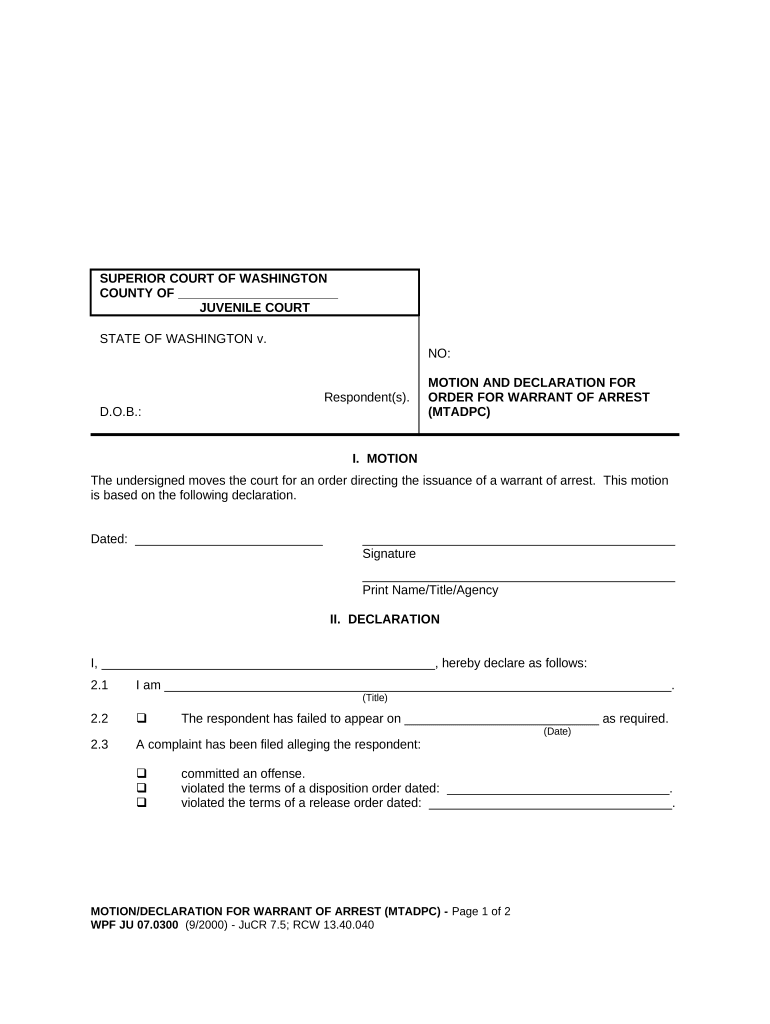
Click ‘Get Form’ to open the order warrant arrest document in the editor.
In the MOTION section, fill in the date and provide your signature along with your printed name, title, and agency. This establishes your request for a warrant.
Proceed to the DECLARATION section. Here, declare your identity by filling in your name and title. Clearly state your relationship to the case.
Indicate whether a complaint has been filed against the respondent by checking the appropriate box and providing relevant dates for any missed appearances or violations.
Detail the probable cause for the arrest in the designated area, ensuring that all facts and circumstances are clearly articulated.
Finally, sign and date at the bottom of the declaration section, including your printed name, title, and bar number if applicable.
Start using our platform today to streamline your document editing process for free!
Guide to Understanding Criminal History Record Check
Arrest Type is used to indicate the way that the arrest occurred such as on view arrest, summoned/cited (not taken into custody), original arrest warrant, bond.Read more
Cookie consent notice
This site uses cookies to enhance site navigation and personalize your experience.
By using this site you agree to our use of cookies as described in our Privacy Notice.
You can modify your selections by visiting our Cookie and Advertising Notice.