Type text, add images, blackout confidential details, add comments, highlights and more.
02. Sign it in a few clicks
Draw your signature, type it, upload its image, or use your mobile device as a signature pad.
03. Share your form with others
Send it via email, link, or fax. You can also download it, export it or print it out.
How to use or fill out affidavit respondent with our platform
Ease of Setup
DocHub User Ratings on G2
Ease of Use
DocHub User Ratings on G2
Click ‘Get Form’ to open the affidavit respondent in the editor.
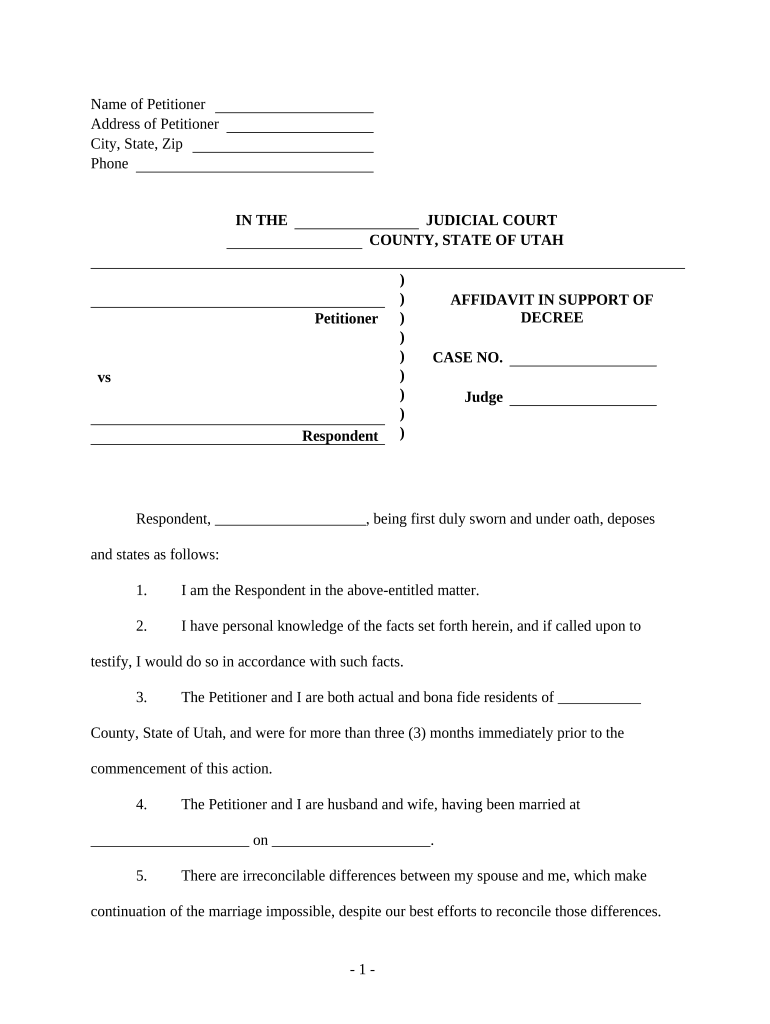
Begin by entering the Name and Address of the Petitioner at the top of the form. Ensure that all details are accurate, as this information is crucial for identification.
In the section labeled 'Respondent', fill in your name clearly. This identifies you as the individual responding to the petition.
Proceed to state your relationship with the Petitioner. Indicate that you are married and provide details about your marriage date and location.
Address any irreconcilable differences between you and your spouse in a clear statement, emphasizing your attempts at reconciliation.
Confirm that you have entered into a Separation and Property Settlement Agreement, ensuring it is fair and equitable for both parties.
Finally, sign and date the document where indicated, ensuring that all required fields are completed before submission.
Start using our platform today to easily complete your affidavit respondent for free!
Affidavit in Response form AlbertaForm DV25 AffidavitAffidavit form Qld PDFAffidavit template qld family CourtDomestic violence affidavit exampleAffidavit AlbertaAffidavit WAAffidavit template WA
Security and compliance
At DocHub, your data security is our priority. We follow HIPAA, SOC2, GDPR, and other standards, so you can work on your documents with confidence.
I am fully competent to make this affidavit. I DocHub that I am financially unable to employ counsel and I hereby request the Court to appoint counsel. I amRead more
Cookie consent notice
This site uses cookies to enhance site navigation and personalize your experience.
By using this site you agree to our use of cookies as described in our Privacy Notice.
You can modify your selections by visiting our Cookie and Advertising Notice.