01. Edit your free printable pool waiver form pdf online
Type text, add images, blackout confidential details, add comments, highlights and more.
02. Sign it in a few clicks
Draw your signature, type it, upload its image, or use your mobile device as a signature pad.
03. Share your form with others
Send swimming pool waiver template via email, link, or fax. You can also download it, export it or print it out.
How to use or fill out waiver swimming form with our platform
Ease of Setup
DocHub User Ratings on G2
Ease of Use
DocHub User Ratings on G2
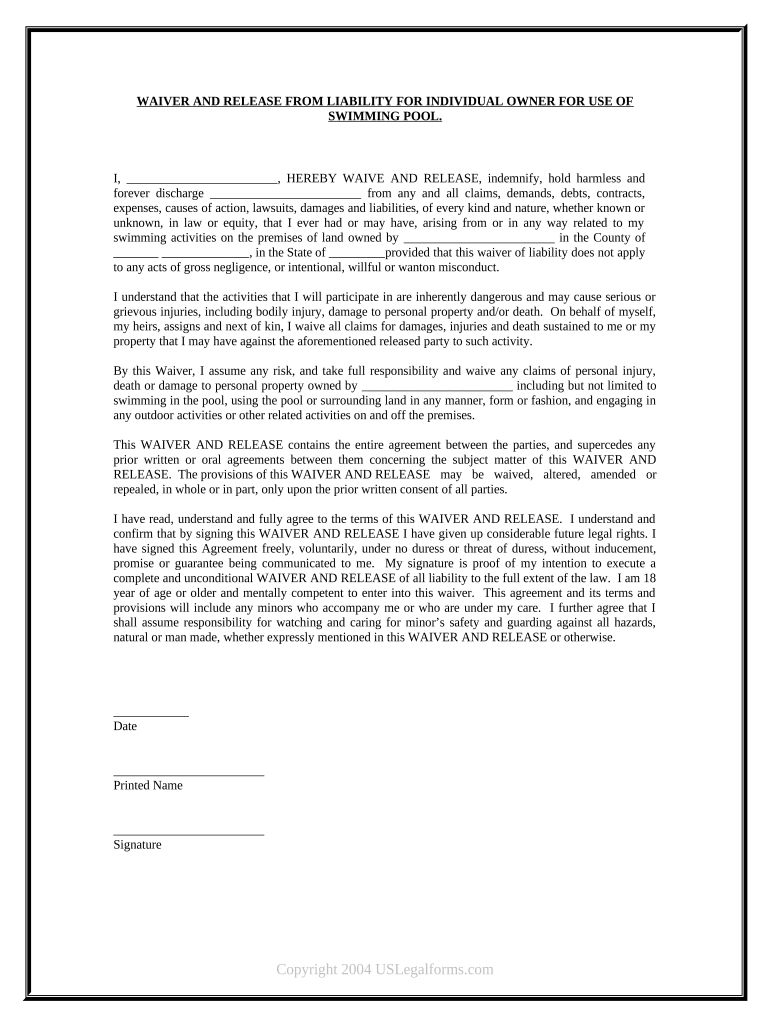
Click ‘Get Form’ to open the waiver swimming form in the editor.
Begin by filling in your name in the designated field at the top of the form. This identifies you as the individual waiving liability.
Next, enter the name of the property owner and location details where you will be swimming. This is crucial for specifying who is being released from liability.
Read through the waiver carefully. Ensure you understand all terms regarding risks associated with swimming activities.
Sign and date the form at the bottom. Your signature confirms that you agree to all terms outlined in the waiver.
If applicable, provide printed names and signatures for any minors accompanying you, acknowledging your responsibility for their safety.
Start using our platform today to complete your waiver swimming form easily and for free!
What is a waiver form? Waiver forms are a type of legal protection used by businesses to reduce their liability and risk. This type of agreement between a business and its customers is used to document that all parties are aware of potential risks in certain situations.
What is the purpose of a release form?
Yes, you can still sue after signing a waiver if the injury resulted from negligence or misconduct that goes beyond the risks outlined in the waiver. This includes situations where a business or individual fails to manage risks responsibly or exposes you to unexpected dangers.
Can I write my own waiver?
You can file an I-601 Waiver application by yourself. However, you are very strongly advised against doing so. You should hire an experienced immigration lawyer to assist and represent you in the preparation and filing of your application for an I-601 Waiver.
What does waiver release form mean?
WHAT ARE WAIVERS AND RELEASES? Waivers and/or releases of liability (releases) are legal agreements designed to transfer responsibility for injuries and property damage from one party to another.
What is a waiver release form?
An Activity Waiver and Release is an agreement in which a participant agrees they understand the risks of an activity and will not sue the activity provider for any injuries or damages. Activity providers protect themselves from liability by asking participants to sign a waiver before participating in an activity.
free printable pool waiver form
Waiver swimming form templatePrintable waiver swimming formWaiver swimming form pdfFree printable Pool Waiver FormFree printable Pool Waiver Form pdfSwimming Pool Waiver TemplateSwimming pool Waiver Release Form landlordWaiver swimming form online
Security and compliance
At DocHub, your data security is our priority. We follow HIPAA, SOC2, GDPR, and other standards, so you can work on your documents with confidence.
Key Takeaways On How To Write A Waiver Choose a waiver template. Determine the type of activity or service. State the purpose of the waiver. Identify the risks. Include a title. Include customer information. Include waiver terms. Include a statement of understanding.
swim at your own risk waiver
USA Swimming Competitor Waiver and Release Form
USA Swimming Competitor Waiver and Release Form. By signing below, the athlete affirms to have read the entry form and agrees to abide by the conditionsRead more
Parent/guardian: Complete this waiver if your child ages 12-17 wants to swim during non-lifeguarded hours. An advanced swim test is requireddetails areRead more
Cookie consent notice
This site uses cookies to enhance site navigation and personalize your experience.
By using this site you agree to our use of cookies as described in our Privacy Notice.
You can modify your selections by visiting our Cookie and Advertising Notice.