Type text, add images, blackout confidential details, add comments, highlights and more.
02. Sign it in a few clicks
Draw your signature, type it, upload its image, or use your mobile device as a signature pad.
03. Share your form with others
Send it via email, link, or fax. You can also download it, export it or print it out.
How to use or fill out musician form with our platform
Ease of Setup
DocHub User Ratings on G2
Ease of Use
DocHub User Ratings on G2
Click ‘Get Form’ to open the musician form in the editor.
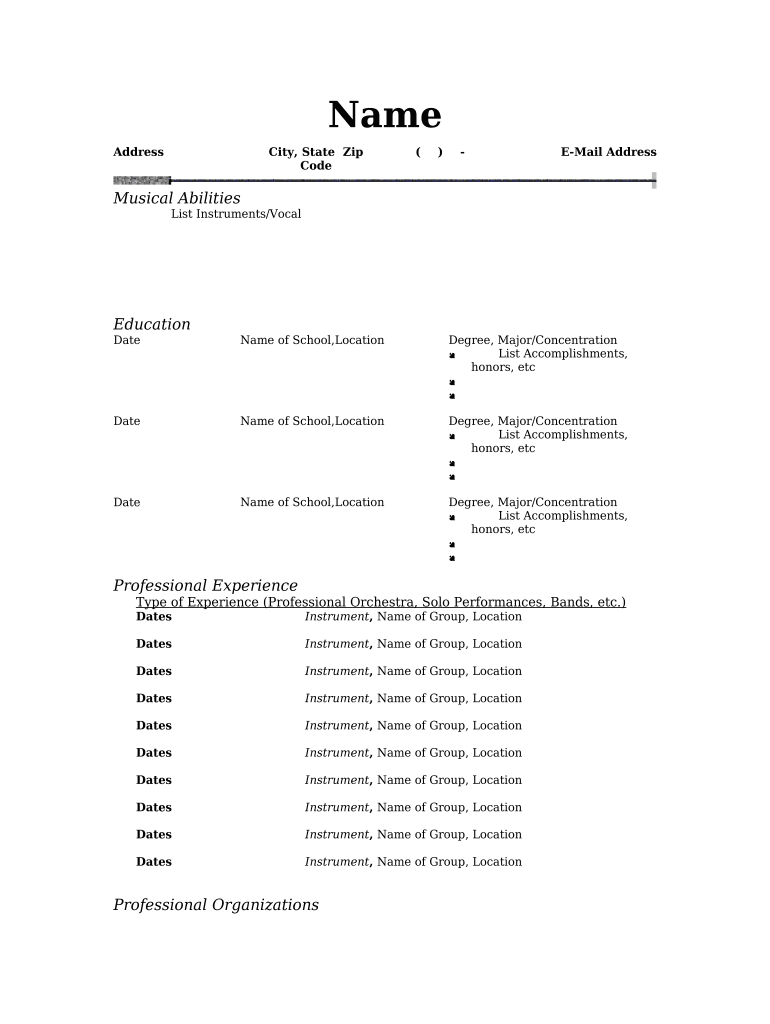
Begin by entering your personal information. Fill in your Name, Address, City, State, and Zip Code. Ensure that your E-Mail Address is accurate for communication purposes.
In the 'Musical Abilities' section, list all instruments you play and any vocal skills. This showcases your versatility as a musician.
For 'Education', provide details of your musical education. Include the Date, Name of School, Location, Degree, and Major/Concentration. Don’t forget to list any relevant accomplishments or honors.
In 'Professional Experience', detail your performance history. Specify the Type of Experience (e.g., Professional Orchestra), Dates, Instrument played, Name of Group, and Location for each entry.
Lastly, include any memberships in Professional Organizations and list any Honors and Awards you have received to enhance your profile.
Start filling out your musician form today for free on our platform!
What are the 4 types of musical formMusician form examplesWhat are the 4 types of musical form with examplesMusician form listMusical forms PDFBinary form in musicBinary form in music examplesCompose in musical form 5 letters
Security and compliance
At DocHub, your data security is our priority. We follow HIPAA, SOC2, GDPR, and other standards, so you can work on your documents with confidence.
By entering into this Agreement, musicians agree to the use of their name, image and performance in marketing materials and social media disseminated by theRead more
In order to fulfill your request and find available musicians, the online form must be submitted with a minimum of two (2) weeks lead time. ✓.Read more
Cookie consent notice
This site uses cookies to enhance site navigation and personalize your experience.
By using this site you agree to our use of cookies as described in our Privacy Notice.
You can modify your selections by visiting our Cookie and Advertising Notice.