Texas account status 2026

Get Form
franchise tax account status Preview on Page 1

Here's how it works

01. Edit your franchise tax account status online
Type text, add images, blackout confidential details, add comments, highlights and more.

02. Sign it in a few clicks
Draw your signature, type it, upload its image, or use your mobile device as a signature pad.

03. Share your form with others
Send texas franchise account status via email, link, or fax. You can also download it, export it or print it out.

How to use or fill out texas account status with our platform

Form edit decoration
9.5
Ease of Setup
DocHub User Ratings on G2
9.0
Ease of Use
DocHub User Ratings on G2
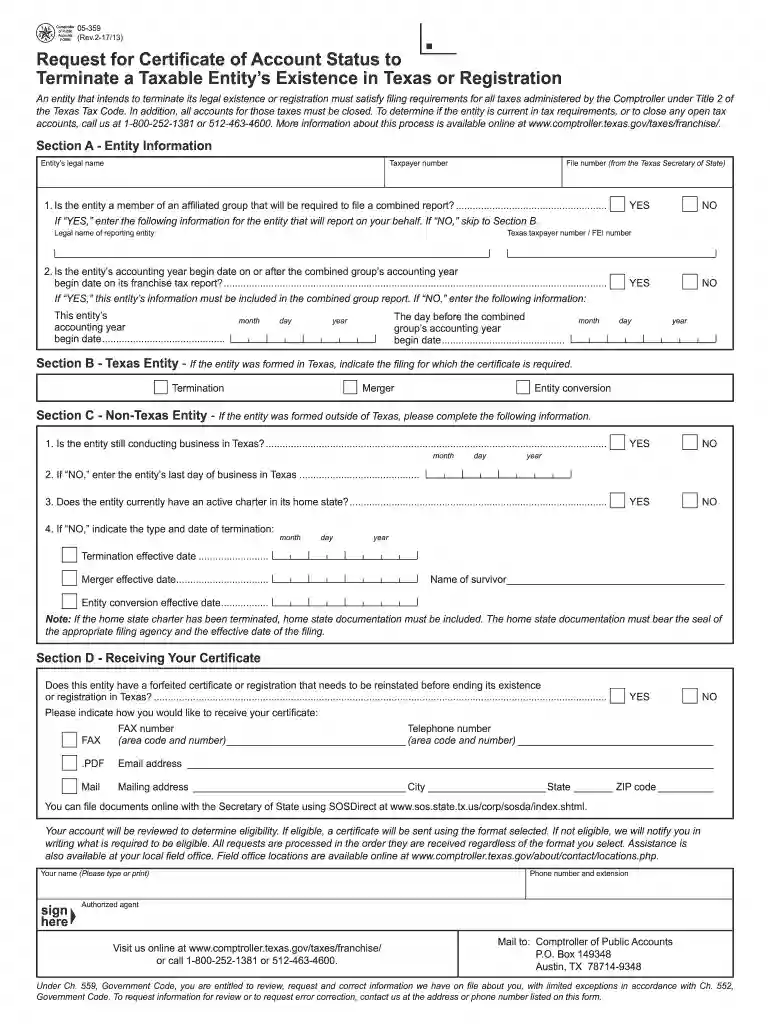
  1. Click ‘Get Form’ to open the Texas Account Status form in the editor.
  2. In Section A, provide the entity’s legal name, taxpayer number, and file number from the Texas Secretary of State. If applicable, answer whether the entity is part of an affiliated group and provide details for the reporting entity.
  3. Proceed to Section B if your entity was formed in Texas. Indicate the filing for which the certificate is required.
  4. For non-Texas entities in Section C, confirm if the entity is still conducting business in Texas. If not, enter the last day of business and other relevant termination details.
  5. In Section D, indicate how you would like to receive your certificate (FAX, PDF, or Mail) and provide necessary contact information.

Start using our platform today to streamline your document editing and form completion process for free!

See more texas account status versions

We've got more versions of the texas account status form. Select the right texas account status version from the list and start editing it straight away!
Versions Form popularity Fillable & printable
2017 4.8 Satisfied (115 Votes)
2012 4.4 Satisfied (438 Votes)
2010 4 Satisfied (25 Votes)
be ready to get more

Complete this form in 5 minutes or less

Get form

Got questions?

We have answers to the most popular questions from our customers. If you can't find an answer to your question, please contact us.
Contact us

A lot of software solutions are available out there for document modifying and signing. DocHub is one of the most in-demand online solutions that comply with all data protection and compliance standards and ensures your eSigned paperwork is legally enforceable. All you need to give it a try is to create an account, upload your franchise account status, fill out the necessary details, and click Sign. Create your electronic signature by typing, drawing it, uploading its picture to your document, or scanning a unique QR code.

You can easily edit fill out your comptroller form 05 305 on any iOS device. Open an internet browser of your choice, visit the DocHub website, authorize or create a new account, upload your file for editing, and make your required adjustments. Our service is mobile-friendly, so utilizing its functions on your phone will be a no-brainer, even on the first try.

Acceptable proof includes a Certificate of Account Status from the Comptrollers office, or a printout of your franchise tax details from the Comptrollers website: .
How to Check Your Texas LLC Status Online Visit the SOSDirect website. Select the option to search by entity name or filing number. Enter your LLCs name exactly as it appears in state records. Review the results to check your entitys status, such as Active, Forfeited, or Inactive.
Information about certificates of account status is available from the comptroller. You may contact the comptroller at (800) 252-1381 for assistance as well. Certificates of account status are often confused with certificates of fact - status issued by the Secretary of State.

People also ask

A Certificate of Account Status for Dissolution/Termination is a certificate issued by the Texas Comptroller of Public Accounts indicating that the entity has paid all taxes under Title 2 of the Tax Code, and that the certificate must be filed with the secretary of state to legally end the entitys existence.
Lets start by checking your LLC status. Go to the Texas Taxable Entity Search linked here: . You will then enter the name of your LLC in the search. Select the details button when your LLC search result appears. Check that the Right to Transact Business in Texas is ACTIVE.
Please note: you must have a Texas driver license or ID to create your account. Still have questions? Check out our TxT FAQs and take a few minutes to watch a step-by-step video guide to getting started with TxT.

texas franchise tax status