Type text, add images, blackout confidential details, add comments, highlights and more.
02. Sign it in a few clicks
Draw your signature, type it, upload its image, or use your mobile device as a signature pad.
03. Share your form with others
Send standstill agreement via email, link, or fax. You can also download it, export it or print it out.
How to use or fill out standstill agreement with our platform
Ease of Setup
DocHub User Ratings on G2
Ease of Use
DocHub User Ratings on G2
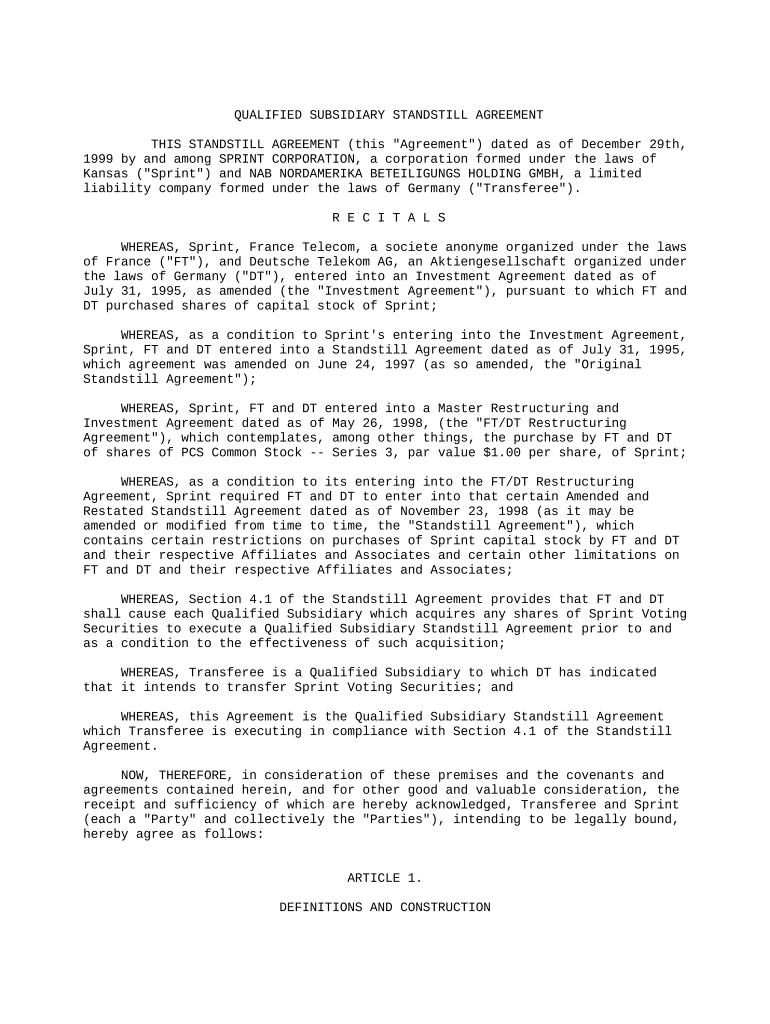
Click ‘Get Form’ to open the standstill agreement in the editor.
Begin by filling in the date at the top of the document. Ensure it reflects the current date or the date relevant to your agreement.
In the introductory section, input the names and details of both parties involved: Sprint Corporation and NAB Nordamerika Beteiligungs Holding GmbH.
Proceed to Article 1, where you will define key terms. Carefully review each definition and modify any that are specific to your context.
Move on to Article 2, which outlines restrictions on acquisitions. Fill in any necessary details regarding ownership percentages as required by your agreement.
Complete Article 3 by reviewing and confirming any standstill covenants that apply to your situation.
Finally, ensure all signatures are collected at the end of the document. Use our platform’s signature feature for a seamless signing process.
Start using our platform today for free to streamline your standstill agreement process!
Standstill agreement of KashmirStandstill agreement limitationStandstill agreement financeStandstill agreement templateStandstill agreement loanStandstill agreement litigationStandstill agreement MAWhat is a standstill agreement in an nda
Security and compliance
At DocHub, your data security is our priority. We follow HIPAA, SOC2, GDPR, and other standards, so you can work on your documents with confidence.
Promises Made to be Broken? Standstill Agreements in
by CM Sautter 2013 Cited by 28 A typical standstill prevents potential buyers from publicly making or announcing a bid for the target during the sale process without the targets priorRead more
Guidelines on Minimum ATC Service During Industrial
Dec 4, 2019 It is recommended that Member Associations seek an agreement with the appropriate authorities on the minimum ATC service ATCOs will provideRead more
Cookie consent notice
This site uses cookies to enhance site navigation and personalize your experience.
By using this site you agree to our use of cookies as described in our Privacy Notice.
You can modify your selections by visiting our Cookie and Advertising Notice.