Type text, add images, blackout confidential details, add comments, highlights and more.
02. Sign it in a few clicks
Draw your signature, type it, upload its image, or use your mobile device as a signature pad.
03. Share your form with others
Send repercussions of a quit claim deed via email, link, or fax. You can also download it, export it or print it out.
How to use or fill out Oregon Quitclaim Deed with DocHub
Ease of Setup
DocHub User Ratings on G2
Ease of Use
DocHub User Ratings on G2
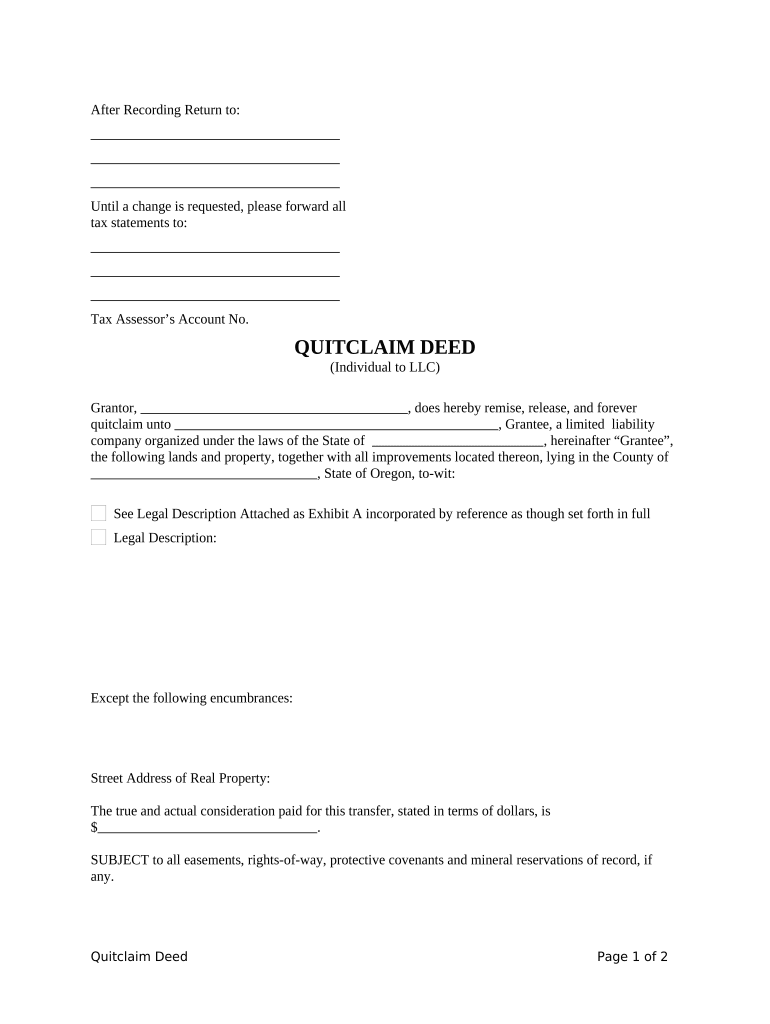
Click ‘Get Form’ to open the Oregon Quitclaim Deed in our editor.
Begin by entering the Grantor's name in the designated field, followed by the Grantee's name, which should be listed as a limited liability company.
Fill in the legal description of the property being transferred. If you have an attachment (Exhibit A), ensure it is included and referenced correctly.
Specify any encumbrances on the property, if applicable, and provide the street address of the real property.
Indicate the true consideration paid for this transfer in dollars.
Decide how taxes for the tax year will be prorated or paid and select the appropriate option.
Finally, have both parties sign and date the document. Ensure that a notary public acknowledges it as required.
Start using our platform today to complete your Oregon Quitclaim Deed online for free!
93.110 Quitclaim deed sufficient to pass estate. A deed of quitclaim and release, of the form in common use, is sufficient to pass all the estate which theRead more
Quitclaim deed by and between C.A. Health and Eliza J Heath, husband and wife and L.A. heath, and Cassie M Heath, husband and wife, and Josephine County
Cookie consent notice
This site uses cookies to enhance site navigation and personalize your experience.
By using this site you agree to our use of cookies as described in our Privacy Notice.
You can modify your selections by visiting our Cookie and Advertising Notice.