Type text, add images, blackout confidential details, add comments, highlights and more.
02. Sign it in a few clicks
Draw your signature, type it, upload its image, or use your mobile device as a signature pad.
03. Share your form with others
Send it via email, link, or fax. You can also download it, export it or print it out.
How to use or fill out against contractor with our platform
Ease of Setup
DocHub User Ratings on G2
Ease of Use
DocHub User Ratings on G2
Click ‘Get Form’ to open the against contractor document in the editor.
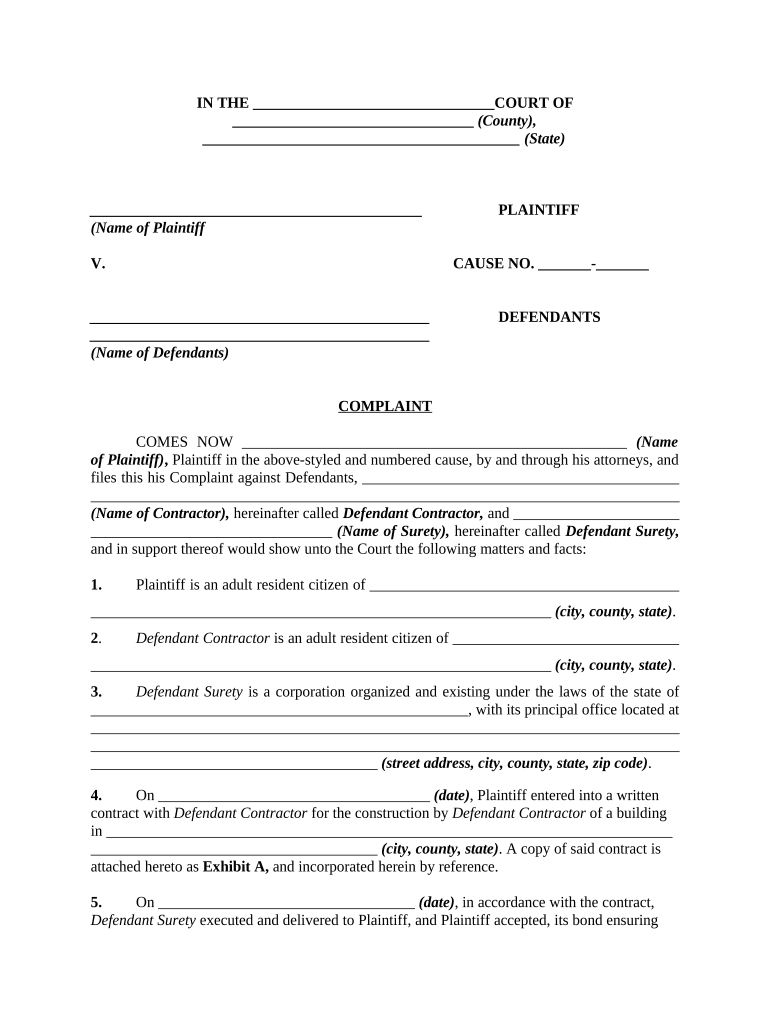
Begin by filling in the court name and county at the top of the form. This sets the jurisdiction for your complaint.
Enter the names of both the plaintiff and defendants in their respective fields, ensuring accuracy to avoid any legal issues.
In section 1, provide your residency details as the plaintiff, including city, county, and state.
For sections 2 and 3, input the residency information for both Defendant Contractor and Defendant Surety.
Detail the contract specifics in section 4, including dates and location of construction. Attach any relevant documents as exhibits.
In section 6, clearly state how Defendant Contractor failed to perform their obligations under the contract.
Complete sections regarding damages and demands made on contractors in sections 9 through 10, ensuring all dates are accurate.
Finally, review all entries for completeness before signing at the bottom of the form. Ensure that your attorney's information is also filled out correctly.
Start using our platform today to streamline your document editing process for free!
Against contractor letterAgainst contractor complaintsAgainst contractor californiaFile a complaint against contractorHow to file claim against contractor bondCSLB Complaint form PDFCSLB complaint lookupCslb complaint email
Security and compliance
At DocHub, your data security is our priority. We follow HIPAA, SOC2, GDPR, and other standards, so you can work on your documents with confidence.
If the manufacturer of the defective product is determined to be solely responsible, no action will be taken against the contractor. In such a case, debarmentRead more
If you are unable to resolve serious problems with a contractor, you can file suit against their bond. See Filing a suit against a contractor (and their bondingRead more
Cookie consent notice
This site uses cookies to enhance site navigation and personalize your experience.
By using this site you agree to our use of cookies as described in our Privacy Notice.
You can modify your selections by visiting our Cookie and Advertising Notice.