Petition custody file 2026

Get Form
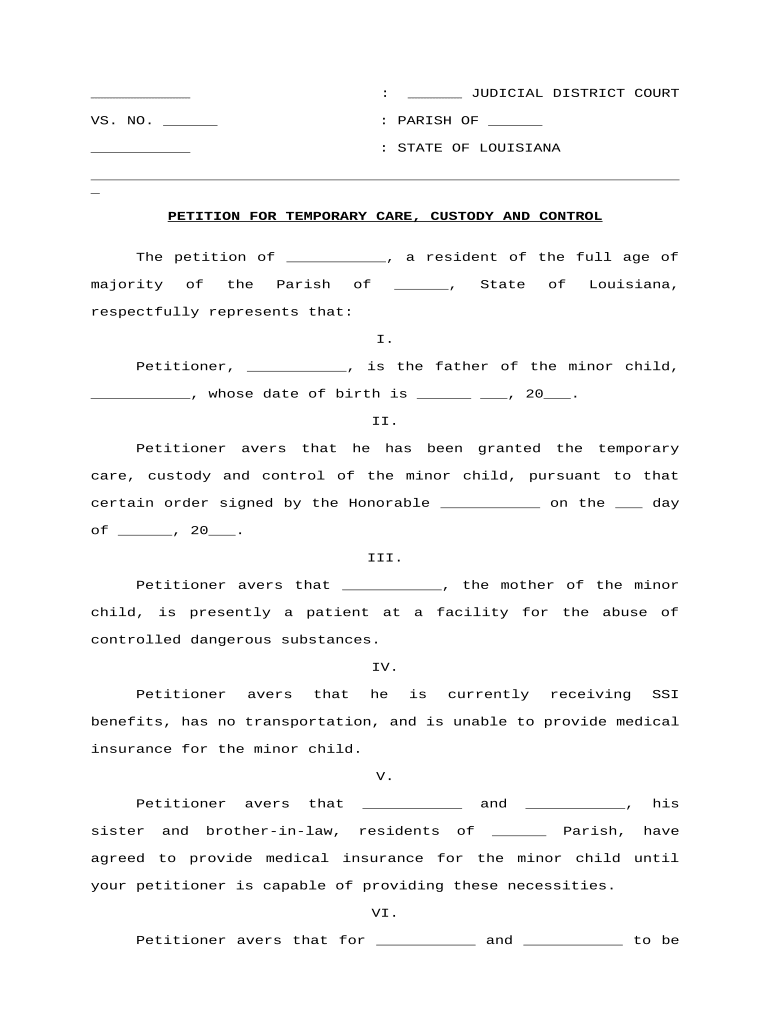
file for custody online virginia Preview on Page 1

Here's how it works

01. Edit your file for custody online virginia online
Type text, add images, blackout confidential details, add comments, highlights and more.
02. Sign it in a few clicks
Draw your signature, type it, upload its image, or use your mobile device as a signature pad.
03. Share your form with others
Send it via email, link, or fax. You can also download it, export it or print it out.

How to use or fill out petition custody file with our platform

Form edit decoration
9.5
Ease of Setup
DocHub User Ratings on G2
9.0
Ease of Use
DocHub User Ratings on G2
  1. Click ‘Get Form’ to open the petition custody file in the editor.
  2. Begin by filling in your name as the petitioner and your address in the designated fields. Ensure that all information is accurate and up-to-date.
  3. Next, provide details about the minor child, including their name and date of birth. This information is crucial for identifying the child involved in the custody case.
  4. In section III, describe the current situation of the child's mother, ensuring to include any relevant details regarding her circumstances.
  5. Proceed to section IV where you will need to state your current financial situation, including any benefits you receive. This helps establish your capability to care for the child.
  6. In section V, list your sister and brother-in-law's names along with their agreement to provide medical insurance for the child. This section supports your request for temporary custody.
  7. Finally, review all entries for accuracy before submitting. Once satisfied, save your document and proceed with any necessary signatures using our platform’s signing feature.

Start editing your petition custody file today for free on our platform!

be ready to get more

Complete this form in 5 minutes or less

Get form

Got questions?

We have answers to the most popular questions from our customers. If you can't find an answer to your question, please contact us.
Contact us

Yes, and it’s really easy! DocHub is a web-based PDF editor with advanced document management features that allow you promptly modify your paperwork, fill out blank fields and drop new ones for others to fill out, and create eSignatures in several ways. Add your petition custody file, give information as required, and choose how you want to eSign your template - by typing your name, drawing your signature, uploading its picture, or utilizing a QR code.

Apart from a comprehensive toolset for editing PDFs on mobile phones, DocHub allows you to sign your petition custody file along the way. Open our editor in your internet browser, make modifications using DocHub’s toolset, and finish your editing by eSigning the finished form.

When a petition is filed, the plaintiff and the defendant are given the opportunity to settle the case privately or to use an alternative dispute resolution (ADR) process rather than go to trial. The court may also provide a summary judgment. If the case goes to trial, the judge will ultimately issue a verdict.
Drafting the Complaint In some circumstances, you file a petition or a motion. The court has several complaint forms that you may use in drafting your complaint. The forms are available online and at the Pro Se Intake Unit. You may also write your own complaint without using a court form.
Essential Declaration Letter Tips Write clearly, and use your own words. Use bulleted lists for your major points. Dont insult or bash your ex. Attach evidence such as pay stubs or bank statements, but redact SSN and account numbers. Affirm that you are making your statement under oath, and under penalty of perjury.

Security and compliance

At DocHub, your data security is our priority. We follow HIPAA, SOC2, GDPR, and other standards, so you can work on your documents with confidence.

Learn more
ccpa2
pci-dss
gdpr-compliance
hipaa
soc-compliance