Legal Last Will and Testament Form for a Single Person with Minor Children - Oregon 2026

Get Form
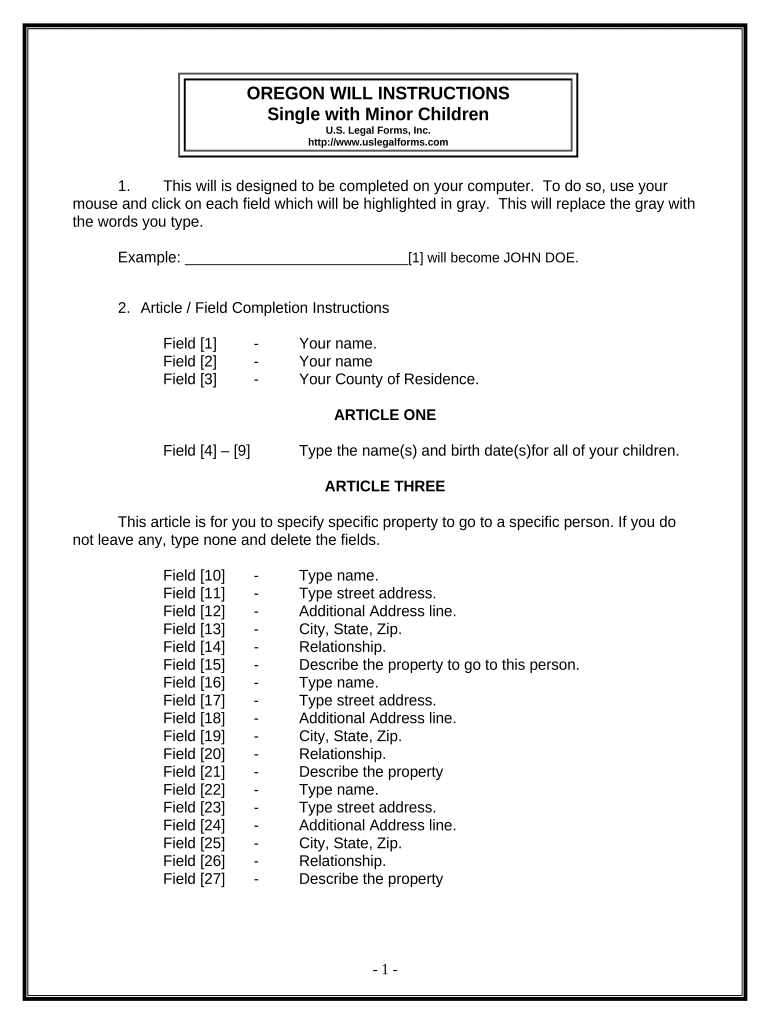
Legal Last Will and Testament Form for a Single Person with Minor Children - Oregon Preview on Page 1

Here's how it works

01. Edit your form online
Type text, add images, blackout confidential details, add comments, highlights and more.
02. Sign it in a few clicks
Draw your signature, type it, upload its image, or use your mobile device as a signature pad.
03. Share your form with others
Send it via email, link, or fax. You can also download it, export it or print it out.

How to use or fill out Legal Last Will and Testament Form for a Single Person with Minor Children - Oregon

Form edit decoration
9.5
Ease of Setup
DocHub User Ratings on G2
9.0
Ease of Use
DocHub User Ratings on G2
  1. Click ‘Get Form’ to open it in the editor.
  2. Begin by entering your name and county of residence in the designated fields. This establishes your identity as the testator.
  3. In Article One, list the names and birth dates of all your children. This is crucial for ensuring their rights to inheritance.
  4. For Article Three, specify any particular property you wish to bequeath to individuals. If there are no specific bequests, simply type 'none'.
  5. In Article Four, indicate that all remaining property will be divided equally among your children. Ensure you understand the term 'per stirpes' as it affects distribution if a child predeceases you.
  6. Complete Articles Five through Nine by appointing a trustee, guardian for minor children, and personal representative. These roles are vital for managing your estate and caring for your children.
  7. Review all entries carefully before printing. Remember that signatures must be witnessed by two adults who are not related to you.

Start using our platform today to easily complete your Legal Last Will and Testament form online for free!

be ready to get more

Complete this form in 5 minutes or less

Get form

Got questions?

We have answers to the most popular questions from our customers. If you can't find an answer to your question, please contact us.
Contact us
If your language is ambiguous or your intentions are not clear it could lead to instructions not being followed properly or the will being ruled invalid. Ensure you seek professional advice when writing a will, and that all of the proper steps are taken, including having the will witnessed.
How Much Does a Will Cost in Oregon? A simple or basic Will in Oregon can cost anywhere from $300 to $1,000.
Steps to Create a Will in Oregon Decide what property to include in your will. Decide who will inherit your property. Choose an executor to handle your estate. Choose a guardian for your children. Choose someone to manage childrens property. Make your will. Sign your will in front of witnesses. Store your will safely.
Although Oregon does not require a will to be docHubd, the state allows you to make your will self-proving, which does require a notary. A self-proving will speeds up probate because the court can accept the will without contacting the witnesses who signed it.
You can create your own will in the state of Oregon. You do not have to use an attorney to draft your will. If you know who you want to handle your estate, what assets you have, and who you wish to receive those assets, you are ready to make a will.

Security and compliance

At DocHub, your data security is our priority. We follow HIPAA, SOC2, GDPR, and other standards, so you can work on your documents with confidence.

Learn more
ccpa2
pci-dss
gdpr-compliance
hipaa
soc-compliance

People also ask

In the Will, you will name who will have your Power of Attorney, appoint the Guardian and Executor for your minor children, and state your wishes for your assets. There may be state-specific tax and inheritance laws youll want to consider when creating a will.
How to Create Oregon Last Will and Testament Online Select a trusted online estate planning platform, service, or template. Draft your Will. Review and finalize your Will. Print out your Will. Sign the Will. Obtain signatures from two competent witnesses. Optional: get your Will docHubd if you want it to be self-proving.

Related links