Type text, add images, blackout confidential details, add comments, highlights and more.
02. Sign it in a few clicks
Draw your signature, type it, upload its image, or use your mobile device as a signature pad.
03. Share your form with others
Send it via email, link, or fax. You can also download it, export it or print it out.
How to use or fill out conditional waiver final with our platform
Ease of Setup
DocHub User Ratings on G2
Ease of Use
DocHub User Ratings on G2
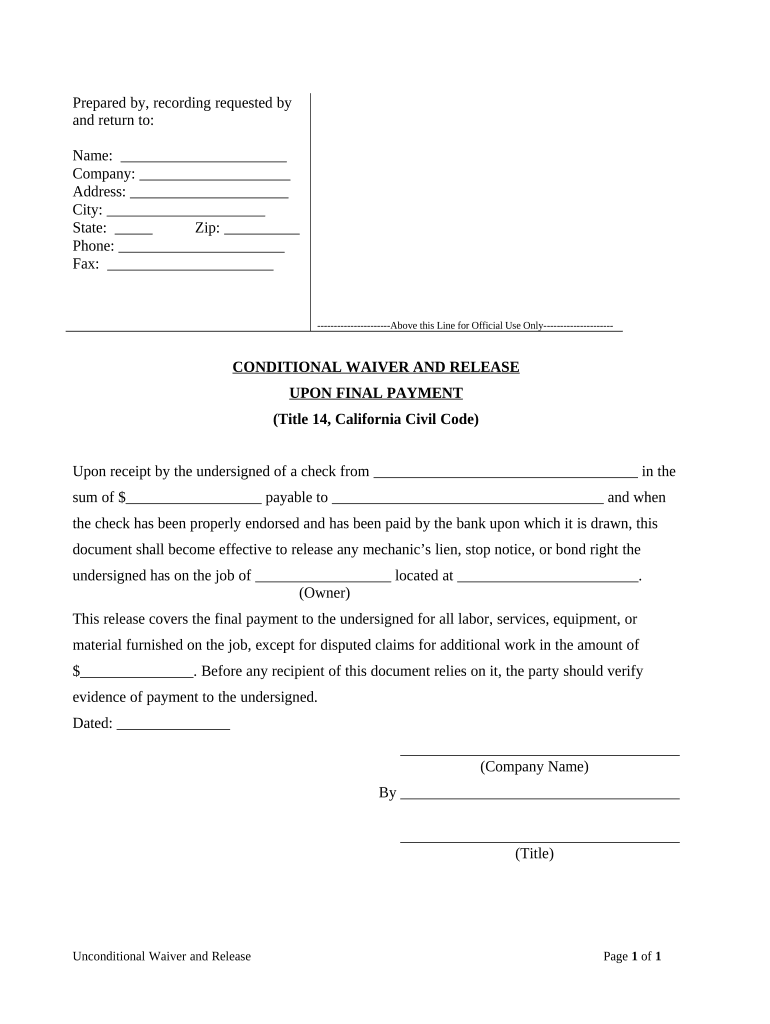
Click ‘Get Form’ to open the conditional waiver final in the editor.
Begin by filling in your personal information at the top of the form. Enter your name, company, address, city, state, zip code, phone number, and fax number in the designated fields.
In the section labeled 'Upon receipt by the undersigned of a check from', specify the name of the payer and the amount of payment. Ensure accuracy as this is crucial for processing.
Next, indicate who the check is payable to and provide details about the job location in the respective fields.
Fill out any disputed claims for additional work if applicable. This ensures clarity on what is covered under this waiver.
Finally, date the document and sign it with your title and company name to validate it before submission.
Start using our platform today to easily complete your conditional waiver final for free!
Fill out conditional waiver final online It's free
Conditional waiver final templateConditional waiver final meaningConditional waiver and release ON final payment pdfConditional waiver final exampleUnconditional final releaseHow to fill out a conditional Waiver and Release on Final paymentFinal conditional lien waiver templateConditional Waiver and Release on final payment California
Security and compliance
At DocHub, your data security is our priority. We follow HIPAA, SOC2, GDPR, and other standards, so you can work on your documents with confidence.
Conditional and Unconditional Waiver and Release Forms
This form is useful when the claimant is not yet paid, but will be paid out of a progress payment that is not the final payment. This conditional waiver andRead more
CONDITIONAL WAIVER AND RELEASE UPON FINAL PAYMENT. PURPOSE OF DOCUMENT: Provides the University with a written statement wherein the contractor orRead more
Ultimately, we achieved the successful production of four terpenoids: ocimene, cineole, nerolidol, and nerol. Additionally, we explored the conditional releaseRead more
Cookie consent notice
This site uses cookies to enhance site navigation and personalize your experience.
By using this site you agree to our use of cookies as described in our Privacy Notice.
You can modify your selections by visiting our Cookie and Advertising Notice.