Sf 2817 form-2026

Get Form
dd form 2817 Preview on Page 1

Here's how it works

01. Edit your dd form 2817 online
Type text, add images, blackout confidential details, add comments, highlights and more.
02. Sign it in a few clicks
Draw your signature, type it, upload its image, or use your mobile device as a signature pad.
03. Share your form with others
Send dd form 2817 evidence via email, link, or fax. You can also download it, export it or print it out.

How to use or fill out sf 2817 form with our platform

Form edit decoration
9.5
Ease of Setup
DocHub User Ratings on G2
9.0
Ease of Use
DocHub User Ratings on G2
  1. Click ‘Get Form’ to open the sf 2817 in the editor.
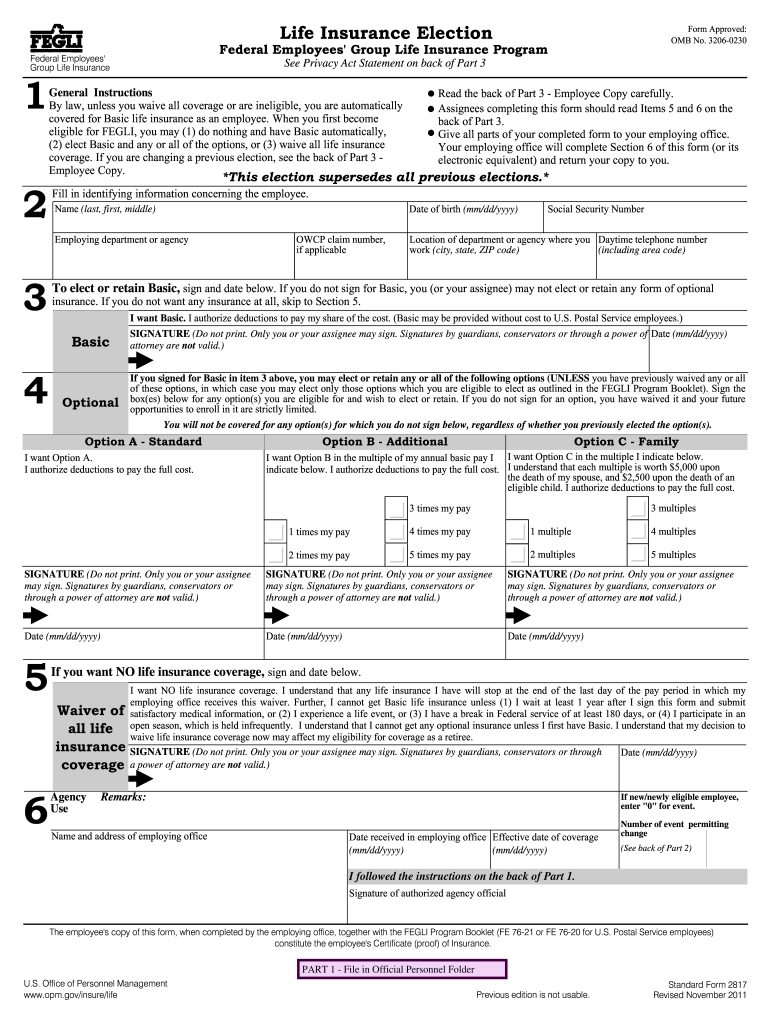
  2. Begin by filling in your identifying information in Section 2, including your name, date of birth, and employing department.
  3. In Section 3, indicate whether you want Basic life insurance by signing and dating the appropriate box. Remember, if you do not sign for Basic, you cannot elect optional insurance.
  4. If you wish to elect optional insurance (Options A, B, or C), proceed to Section 4. Sign the boxes for any options you want and specify the multiples for Options B and C.
  5. If you choose to waive all life insurance coverage, sign Section 5. Ensure that this decision is made carefully as it affects future eligibility.
  6. Review all sections for completeness and accuracy before submitting the form through our platform to your employing office.

Start using our platform today to easily fill out your sf 2817 form online for free!

See more sf 2817 form versions

We've got more versions of the sf 2817 form form. Select the right sf 2817 form version from the list and start editing it straight away!
Versions Form popularity Fillable & printable
2011 4.9 Satisfied (273 Votes)
2000 4.3 Satisfied (210 Votes)
be ready to get more

Complete this form in 5 minutes or less

Get form

Got questions?

We have answers to the most popular questions from our customers. If you can't find an answer to your question, please contact us.
Contact us

Sure, a typed name is accepted as a valid electronic signature when you create it on your document using a compliant solution like DocHub. Simply add your sf 2817 to our editor, click Sign in the top tool pane → Create your signature → Type your name in the appropriate tab, and select how it will appear on your document.

If you are searching for a state-specific sf 2817 fillable sample, you will find it in our DocHub Forms & Templates catalog. Use the search field, enter your form’s name, and search through the results for your state. You may also filter out irrelevant results while exploring our catalog by groups.

Your Full Reduction Option B multiples are free after you reach age 65 or retire (if later), but reductions start. The Full Reduction multiples will reduce by 2% of the pre-retirement amount per month for 50 months, at which time that coverage will end.
If you have left Federal employment, if you are receiving recurring benefits from the Office of Workers' Compensation Programs, or if you have retired, file this form with the Office of Personnel Management, Retirement Operations Center, Federal Employees Retirement System, P.O. Box 45, Boyers, PA 16017-0045.
The SF 2821 should be completed to reflect the retiring employee's insurance status at the time of separation for retirement and attached to the Application for Retirement.

People also ask

Submit the designation form to: Office of Personnel Management, Retirement Operations Center, P.O. Box 45, Boyers, PA 16017-0045.
The SF 2819 represents notice of your loss of group life insurance coverage and the right to convert. In addition, you must contact your servicing HR office and request the SF 2821 (Agency Certification of Insurance Status).
FEGLI Premium Overview AGESame Basic Biweekly Cost (per $1000 of coverage)Same Basic Monthly Cost (per $1000 of coverage)25-year-old active employee$0.1600$0.346764-year-old retiree
In general, participants may indeed designate a beneficiary electronically; this was first permitted under the Electronic Signatures Act of 2000, and IRS and Department of Labor (DOL) guidance has also affirmed that electronic designations are indeed permitted, with the caveat that certain provisions in the guidance ...
FEGLI Option B is essentially term insurance \u2013 with a guaranteed renewable five year term. This plan in particular can insure you for as much as 1, 2, 3, 4, or even 5 times your Annual Salary rounded up to the nearest $1,000.

2817