Harmless form sample 2026

Get Form
harmless form sample Preview on Page 1

Here's how it works

01. Edit your form online
Type text, add images, blackout confidential details, add comments, highlights and more.
02. Sign it in a few clicks
Draw your signature, type it, upload its image, or use your mobile device as a signature pad.
03. Share your form with others
Send it via email, link, or fax. You can also download it, export it or print it out.

How to use or fill out harmless form sample with our platform

Form edit decoration
9.5
Ease of Setup
DocHub User Ratings on G2
9.0
Ease of Use
DocHub User Ratings on G2
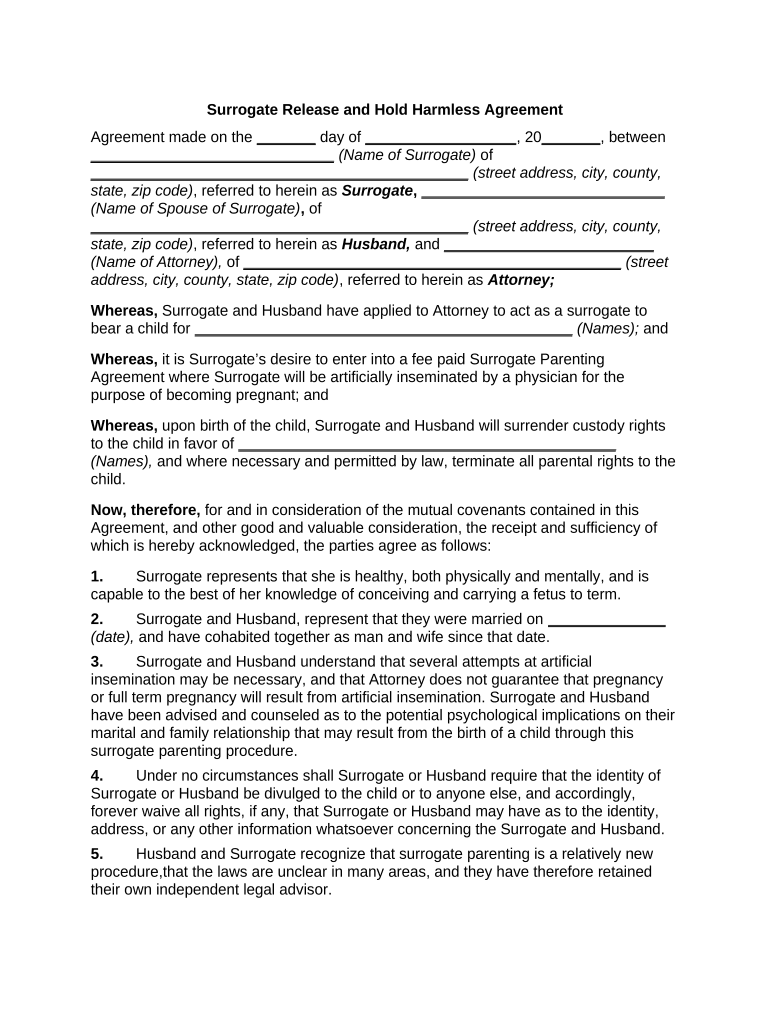
  1. Click ‘Get Form’ to open the harmless form sample in the editor.
  2. Begin by entering the date of the agreement in the first blank space provided. This sets the context for your document.
  3. Fill in the names and addresses of both the Surrogate and her Husband in their respective sections. Ensure accuracy for legal purposes.
  4. In the section regarding the intended parents, input their names clearly. This identifies who will receive custody after birth.
  5. Complete all statements regarding health, marriage date, and understanding of potential complications by filling in each blank as applicable.
  6. Review all entries for correctness before signing. Both Surrogate and Husband must provide their signatures at the end of the document.

Start using our platform today to easily fill out your harmless form sample online for free!

be ready to get more

Complete this form in 5 minutes or less

Get form

Got questions?

We have answers to the most popular questions from our customers. If you can't find an answer to your question, please contact us.
Contact us
For example: If a construction company or independent contractor is doing work at your business property, the company may have you sign a hold harmless clause to avoid being legally liable for any injuries resulting from the construction work.
Free Hold-Harmless (Indemnity) Agreement | LawDepot (US)
The hold harmless agreement binds you individually if you sign it individually. But, you may have liability to the firm you are contracting with as a matter of law anyway, as an individual, unless that is expressly waived by contract with the person who might otherwise sue you.

Security and compliance

At DocHub, your data security is our priority. We follow HIPAA, SOC2, GDPR, and other standards, so you can work on your documents with confidence.

Learn more
ccpa2
pci-dss
gdpr-compliance
hipaa
soc-compliance
be ready to get more

Complete this form in 5 minutes or less

Get form