




Here's how it works



How to use or fill out affidavit of repossession texas with DocHub

- Click ‘Get Form’ to open the affidavit of repossession in our editor.
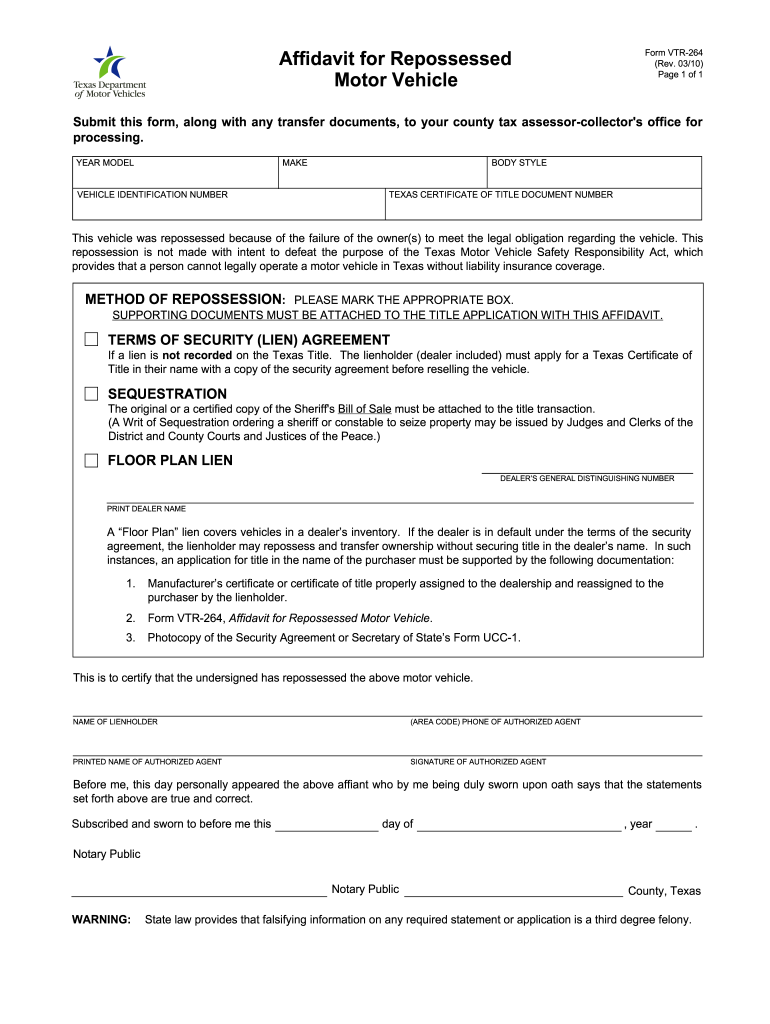
- Begin by entering the vehicle's YEAR, MODEL, MAKE, and VEHICLE IDENTIFICATION NUMBER in the designated fields. This information is crucial for identifying the repossessed vehicle.
- Indicate the METHOD OF REPOSSESSION by marking the appropriate box. Ensure that you have supporting documents ready to attach as required.
- Fill in the TERMS OF SECURITY (LIEN) AGREEMENT if applicable. If there is no lien recorded, ensure that you understand the implications for title application.
- Complete the section for NAME OF LIENHOLDER and provide contact details including phone number and printed name of the authorized agent responsible for this affidavit.
- Sign and date the document where indicated, ensuring it is notarized as required by Texas law before submission.
Start using our platform today to easily complete your affidavit of repossession for free!
It's free
See more affidavit of repossession texas versions
Got questions?
Can I type my eSignature on my dochub com fillable form?
Sure, a typed name is accepted as a valid electronic signature when you add it to your document using a compliant solution like DocHub. Simply upload your dochub com fillable form to our editor, click Sign in the top tool pane → Create your signature → Type your name in the proper tab, and choose how it will appear on your document.
How to manage my repo affidavit from Gmail?
If your go-to electronic mail service is Gmail, you can easily incorporate your DocHub editor in your work. Modify your repo affidavit with DocHub tools and connect it to your drafts in Gmail. See how straightforward it is to exchange files and work together having a swift PDF editing solution at hand.
How to legally repossess a vehicle in Texas?
What are my rights when my car is repossessed?
What is the meaning of affidavit of repossession?
Security and compliance
At DocHub, your data security is our priority. We follow HIPAA, SOC2, GDPR, and other standards, so you can work on your documents with confidence.
Learn more


Related forms


