




Here's how it works

01. Edit your disability tax credit form online
Type text, add images, blackout confidential details, add comments, highlights and more.

02. Sign it in a few clicks
Draw your signature, type it, upload its image, or use your mobile device as a signature pad.

03. Share your form with others
Send dtc form pdf via email, link, or fax. You can also download it, export it or print it out.
How to use or fill out Canadian Disability Tax Credit Form with our platform

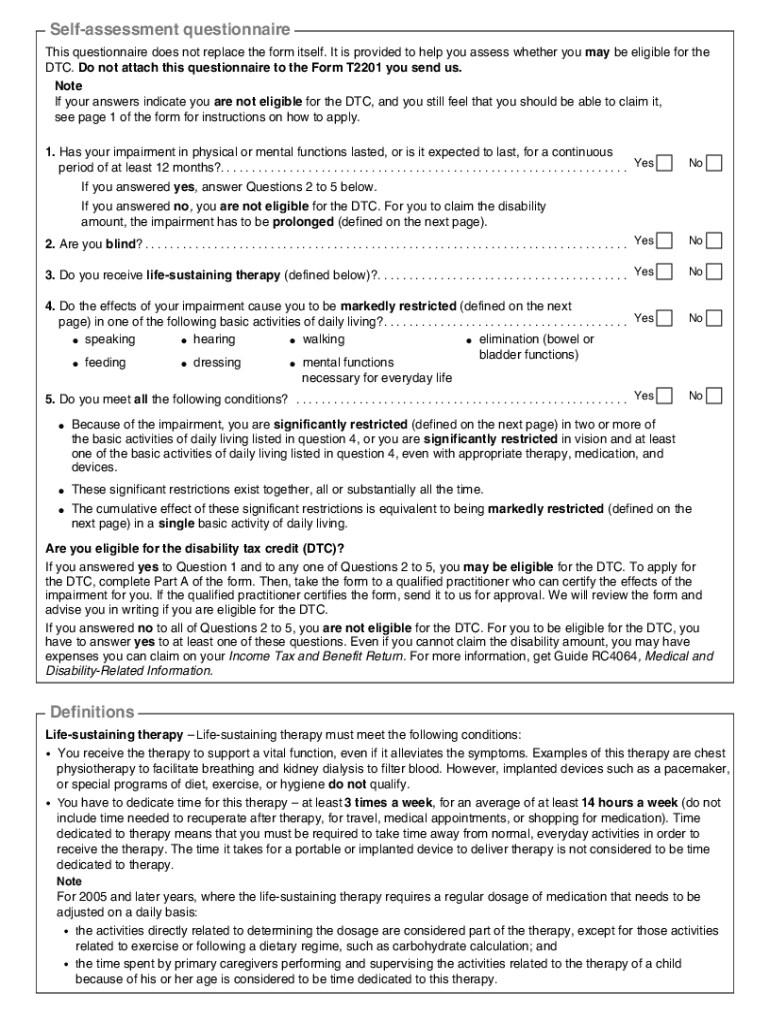
- Click ‘Get Form’ to open the Canadian Disability Tax Credit Certificate (Form T2201) in the editor.
- Begin by completing Part A of the form, which requires personal information about the individual with a disability. Ensure all fields are filled accurately, including name, address, and social insurance number.
- Next, take the completed form to a qualified practitioner who will certify your impairment in Part B. This step is crucial as it validates your eligibility for the tax credit.
- Once certified, return to our platform to upload and finalize your form. Make sure to review all sections for completeness before submission.
- Finally, send the completed form to one of the designated tax centers listed in the introduction of the document. Keep a copy for your records.
Start using our platform today for free to simplify your form completion process!
Fill out canadian disability tax credit form online
It's free
It's free
See more canadian disability tax credit form versions
We've got more versions of the canadian disability tax credit form form. Select the right canadian disability tax credit form version from the list and start editing it straight away!
| Versions | Form popularity | Fillable & printable |
|---|---|---|
| 2023 | 4.6 Satisfied (49 Votes) | |
| 2022 | 4.2 Satisfied (28 Votes) | |
| 2018 | 4.8 Satisfied (152 Votes) | |
| 2017 | 4.3 Satisfied (63 Votes) | |
| 2016 | 4.4 Satisfied (51 Votes) | |
| 2015 | 4.3 Satisfied (50 Votes) | |
| 2012 | 4.4 Satisfied (445 Votes) | |
| 2011 | 4 Satisfied (39 Votes) | |
| 2010 | 4.4 Satisfied (44 Votes) | |
| 2008 | 4.2 Satisfied (74 Votes) |
Security and compliance
At DocHub, your data security is our priority. We follow HIPAA, SOC2, GDPR, and other standards, so you can work on your documents with confidence.
Learn more


Related forms

A FBI report shows cybercriminals targeted banks and credit unions, using spam, phishing
The Daily Open Source Infrastructure Report from September 19, 2012, highlights significant incidents including cybercri ...

Department of Homeland Security Cybersecurity JobsNCWIT
The document outlines the recruitment efforts of the Department of Homeland Security (DHS) for cybersecurity professiona ...

NSP2 Questions on Forms Are state and local governments - HUD - hud
The document provides guidance on various forms and requirements related to the NSP2 program, clarifying which forms are ...

UNITED STATES OF AMERICA DEPARTMENT OF HOUSING AND URBAN DEVELOPMENT OFFICE OF ADMINISTRATIVE LAW JU
UNITED STATES OF AMERICA DEPARTMENT OF HOUSING AND URBAN DEVELOPMENT OFFICE OF ADMINISTRATIVE LAW JU
The document is an Initial Decision on Remand and Order from the U.S. Department of Housing and Urban Development regard ...

Equity Housing Fund - HUD - hud
The document is a Default Decision and Order issued by the U.S. Department of Housing and Urban Development (HUD) agains ...

Exhibit 13-6 Guide for Review of SHP Sponsor Management
The document is a guide for reviewing the management of sponsors involved in the Supportive Housing Program (SHP). It ou ...

Itr acknowledgement
The document is an Indian Income Tax Return Verification Form (ITR-V) for the assessment year 2009-10, submitted by Suma ...
South Carolina Certification Form - Charleston Southern University
The South Carolina Certification Form is an affidavit that must be completed annually by state aid recipients to qualify ...