Agreement purchase 2026

Get Form
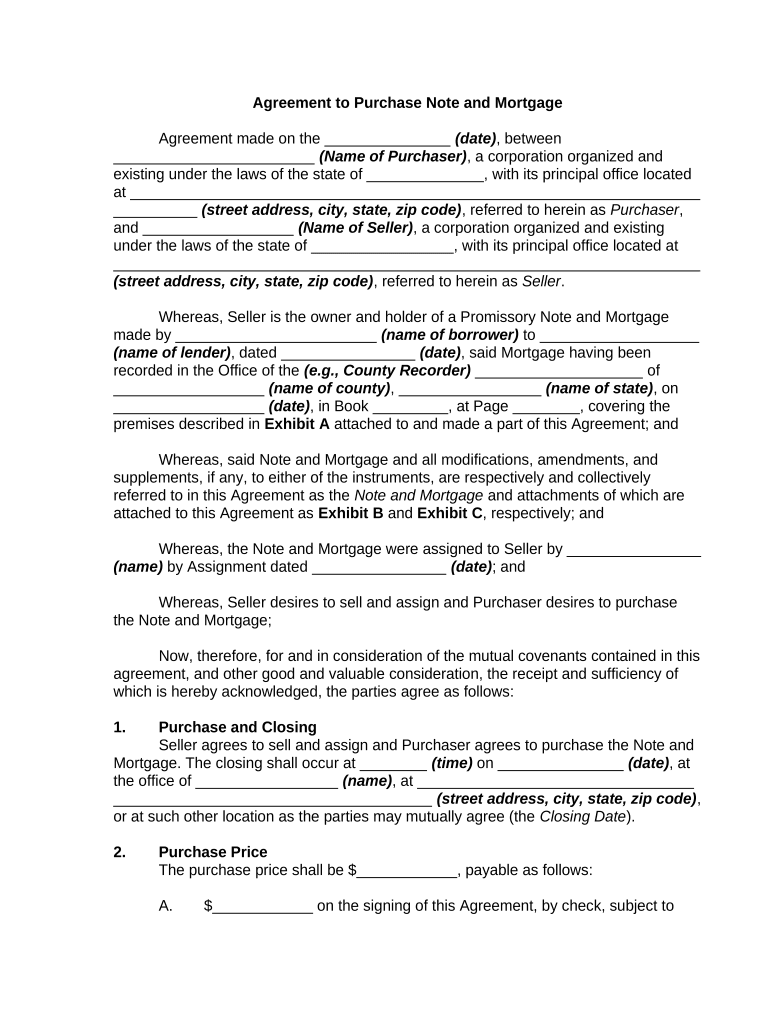
agreement purchase Preview on Page 1

Here's how it works

01. Edit your form online
Type text, add images, blackout confidential details, add comments, highlights and more.
02. Sign it in a few clicks
Draw your signature, type it, upload its image, or use your mobile device as a signature pad.
03. Share your form with others
Send it via email, link, or fax. You can also download it, export it or print it out.

How to use or fill out agreement purchase with our platform

Form edit decoration
9.5
Ease of Setup
DocHub User Ratings on G2
9.0
Ease of Use
DocHub User Ratings on G2
  1. Click ‘Get Form’ to open the Agreement to Purchase in the editor.
  2. Begin by entering the date of the agreement at the top of the form. This is crucial for establishing a timeline for both parties.
  3. Fill in the names and addresses of both the Purchaser and Seller. Ensure that all details are accurate to avoid any legal complications.
  4. In the 'Purchase Price' section, specify the total amount being paid, including any initial deposit and balance due at closing.
  5. Complete sections regarding representations and warranties, ensuring you understand that the Note and Mortgage are sold 'as is'.
  6. Review and fill out any additional sections related to fees, taxes, and escrow arrangements as applicable.
  7. Finally, ensure all parties sign where indicated, including printed names and titles if applicable. Don’t forget to attach any required exhibits.

Start using our platform today for free to streamline your document editing and signing process!

be ready to get more

Complete this form in 5 minutes or less

Get form

Got questions?

We have answers to the most popular questions from our customers. If you can't find an answer to your question, please contact us.
Contact us
Once the contract is signed, its time to start working through the contingencies. For example, the buyer can order an inspection. Additionally, now is the time for the buyer to secure funding for the deal. If all the contingencies are met by closing day, the buyer and seller can complete the transaction.
Some states, like California, have created real estate purchase agreements you can download and change. You can also get a template from PandaDoc, as well as benefiting from real estate contract management software functionality.
Yes, any adults can write legally binding contracts, although minors cannot except in certain circumstances. However, oral contracts are binding, but it is better to get it in writing so you have proof of the contract. In fact, you can even enter into a contract by your actions without saying anything.
While the PSA lays out the transactions details leading up to the closing date, the purchase agreement is what you sign to finalize the transaction.
Put simply, a purchase agreement is a contract. This means that once it is signed, the language is fixed and is legally binding for the buyer and seller.

Security and compliance

At DocHub, your data security is our priority. We follow HIPAA, SOC2, GDPR, and other standards, so you can work on your documents with confidence.

Learn more
ccpa2
pci-dss
gdpr-compliance
hipaa
soc-compliance