Document Locator and Personal Information Package including burial information form - North Dakota 2026

Get Form
Document Locator and Personal Information Package including burial information form - North Dakota Preview on Page 1

Here's how it works

01. Edit your form online
Type text, add images, blackout confidential details, add comments, highlights and more.
02. Sign it in a few clicks
Draw your signature, type it, upload its image, or use your mobile device as a signature pad.
03. Share your form with others
Send it via email, link, or fax. You can also download it, export it or print it out.

How to use or fill out Document Locator and Personal Information Package including burial information form - North Dakota

Form edit decoration
9.5
Ease of Setup
DocHub User Ratings on G2
9.0
Ease of Use
DocHub User Ratings on G2
  1. Click ‘Get Form’ to open it in the editor.
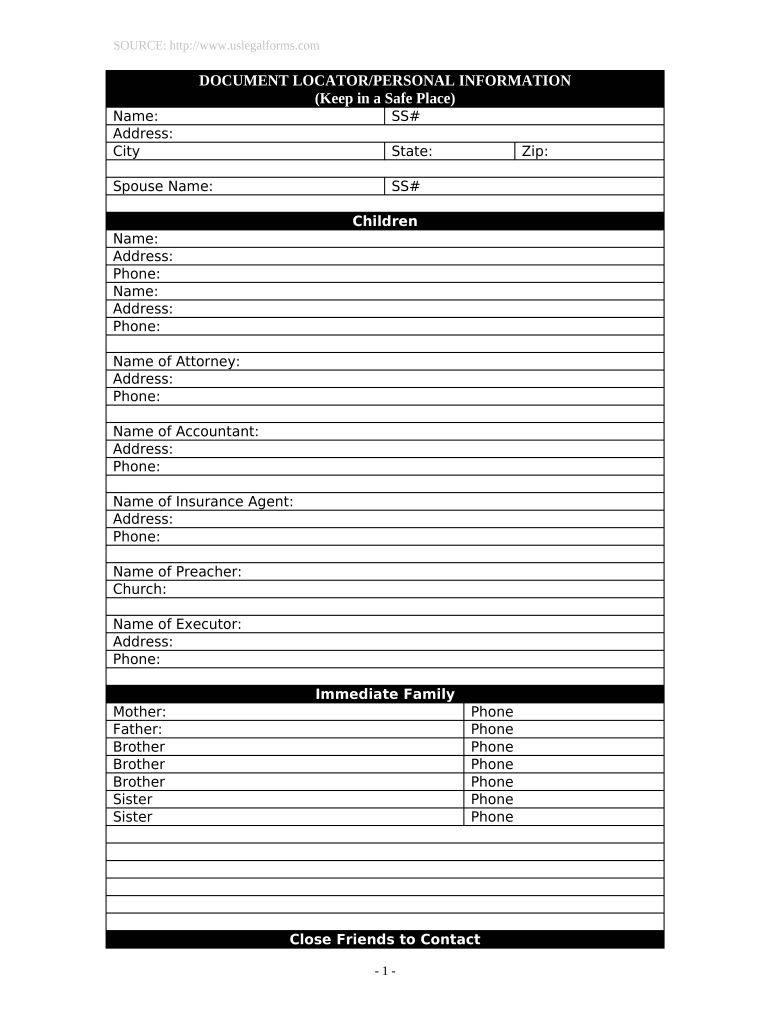
  2. Begin by entering your personal details in the 'Name', 'Address', and 'SS#' fields. Ensure accuracy as this information is crucial for identification.
  3. Fill in your spouse's name and SS#, followed by your state and zip code. This section helps maintain family records.
  4. List your children’s names, addresses, and phone numbers. This ensures that all immediate family members are accounted for.
  5. Provide contact information for important individuals such as your attorney, accountant, insurance agent, preacher, and executor. This facilitates communication during critical times.
  6. In the 'Location of Important Documents' section, specify where key documents like wills, birth certificates, and insurance policies are stored. This aids in quick retrieval when needed.
  7. Complete the burial information section with cemetery details and contact names to ensure arrangements are clear.
  8. Finally, add any notes or messages to loved ones in the designated area to convey personal sentiments.

Start using our platform today to easily complete your Document Locator and Personal Information Package!

be ready to get more

Complete this form in 5 minutes or less

Get form

Got questions?

We have answers to the most popular questions from our customers. If you can't find an answer to your question, please contact us.
Contact us

Most eSignature services require users to have a paid subscription. With DocHub, there are two ways for you to create an electronic signature to your Document Locator and Personal Information Package including burial information form - North Dakota free of charge:

  • You can do it during a 7-day trial period;
  • You can sign up for a free plan.

The second option, however, has restrictions on the number of signatures, sign requests, emails, and forms for adjusting available per month. You can check for full information here.

If you use Chrome, there are two simple methods to edit your Document Locator and Personal Information Package including burial information form - North Dakota online. First, go to the DocHub website, add your document, and edit it utilizing our toolbar. You can also install our Chrome extension and edit any document by dragging and dropping it in your browser tab.

Forms for a burial The existing Deeds will be normally be required. If the Coroner is to hold an inquest there will be no green form and instead the Coroner will issue an Order for Burial (form 101). This is usually collected by the funeral director from the coroners service on your behalf.
They explain the requirements of the revised Funeral Rule and discuss how to prepare documents required by the Rule the General Price List, the Casket Price List, the Outer Burial Container Price List, and the Statement of Funeral Goods and Services Selected.
Some of the first things you should grab when youre heading out to make Roseville, CA funeral arrangements for a loved one are all the important documents youll need to get started. This should obviously include their birth certificate and Social Security card.

Security and compliance

At DocHub, your data security is our priority. We follow HIPAA, SOC2, GDPR, and other standards, so you can work on your documents with confidence.

Learn more
ccpa2
pci-dss
gdpr-compliance
hipaa
soc-compliance
be ready to get more

Complete this form in 5 minutes or less

Get form

People also ask

Where can I get a copy of a birth or death certificate? Birth or death certificates can be requested from the Department of Vital Statistics at the State Capitol. The telephone number is (701) 328-2360.
REQUIREMENTS: Certified copy of Certificate of Death. Original Copy of Transfer or Entrance Permit (if death occurred in another city/municipality) Affidavit of Undertaking (if the remains will be interred in Bagbag Public Cemetery or Novaliches Public Cemetery) Burial Form from Quezon City Health Department.
Among the funeral documents needed are various basic and fundamental papers like the birth and death certificates of your loved one, their social security card and the cremation or burial forms. You may also need the cremation deed, the military discharge documents and the insurance details, if applicable.

Related links