Affidavit service mail 2026

Get Form
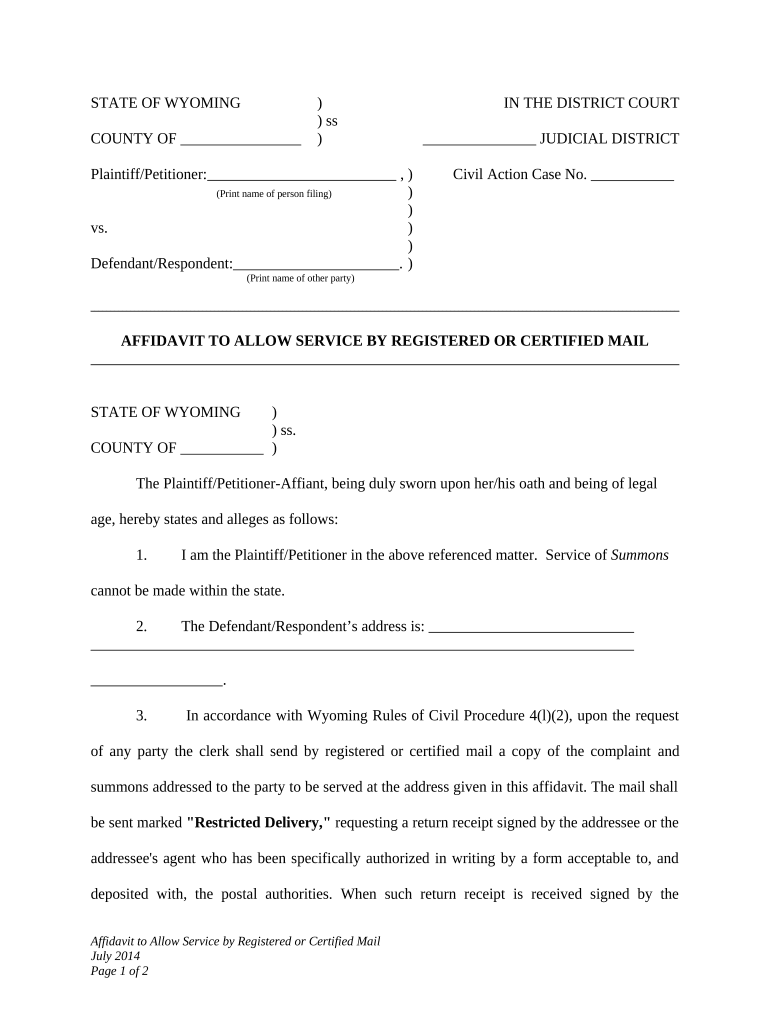
affidavit service mail Preview on Page 1

Here's how it works

01. Edit your form online
Type text, add images, blackout confidential details, add comments, highlights and more.
02. Sign it in a few clicks
Draw your signature, type it, upload its image, or use your mobile device as a signature pad.
03. Share your form with others
Send it via email, link, or fax. You can also download it, export it or print it out.

How to use or fill out affidavit service mail with our platform

Form edit decoration
9.5
Ease of Setup
DocHub User Ratings on G2
9.0
Ease of Use
DocHub User Ratings on G2
  1. Click ‘Get Form’ to open the affidavit service mail in the editor.
  2. Begin by filling in the 'COUNTY OF' section with the appropriate county name where the case is being filed.
  3. In the 'Plaintiff/Petitioner' section, print your name clearly as the person filing the affidavit.
  4. Next, enter the name of the 'Defendant/Respondent' in the designated field.
  5. Fill in the 'Civil Action Case No.' with your case number for proper identification.
  6. Provide the Defendant/Respondent’s address in section 2, ensuring accuracy for successful service.
  7. In section 4, confirm your request for service by certified mail due to inability to serve within the state.
  8. Finally, sign and date at the bottom of the form, and ensure all information is correct before submission.

Start using our platform today to easily complete your affidavit service mail for free!

be ready to get more

Complete this form in 5 minutes or less

Get form

Got questions?

We have answers to the most popular questions from our customers. If you can't find an answer to your question, please contact us.
Contact us
How to Fill Out an Affidavit of Service Provide Process Server Information. Include the name and address of the process server delivering the papers. Add a Description of Service. List the Receiving Partys Information. Choose a Service Method. Obtain Notary Acknowledgment.
An affidavit of service is a sworn statement made by the process server that the court documents were delivered to a party in a lawsuit. The court documents are called process, and the person who delivers the documents is called a process server.
The proof of service must be signed by the process server under penalty of perjury, affirming the accuracy and truthfulness of the statements therein. And the affidavit is signed by the process server in front of a notary who puts them under oath that their statements therein are accurate and truthful.
After the documents are served, the process server signs the affidavit, has their signature properly docHubd, and files the affidavit with the court. A person who signs an affidavit containing false information can be subject to criminal penalties.
After the Affidavit of Service has been created, it may need to be docHubd before being submitted to the courts. (This will depend on your jurisdiction.) When your Affidavit is ready to be submitted to the court, make sure to double-check everything!

Security and compliance

At DocHub, your data security is our priority. We follow HIPAA, SOC2, GDPR, and other standards, so you can work on your documents with confidence.

Learn more
ccpa2
pci-dss
gdpr-compliance
hipaa
soc-compliance