Type text, add images, blackout confidential details, add comments, highlights and more.
02. Sign it in a few clicks
Draw your signature, type it, upload its image, or use your mobile device as a signature pad.
03. Share your form with others
Send failure to protect california via email, link, or fax. You can also download it, export it or print it out.
How to use or fill out Failure to Protect - California with our platform
Ease of Setup
DocHub User Ratings on G2
Ease of Use
DocHub User Ratings on G2
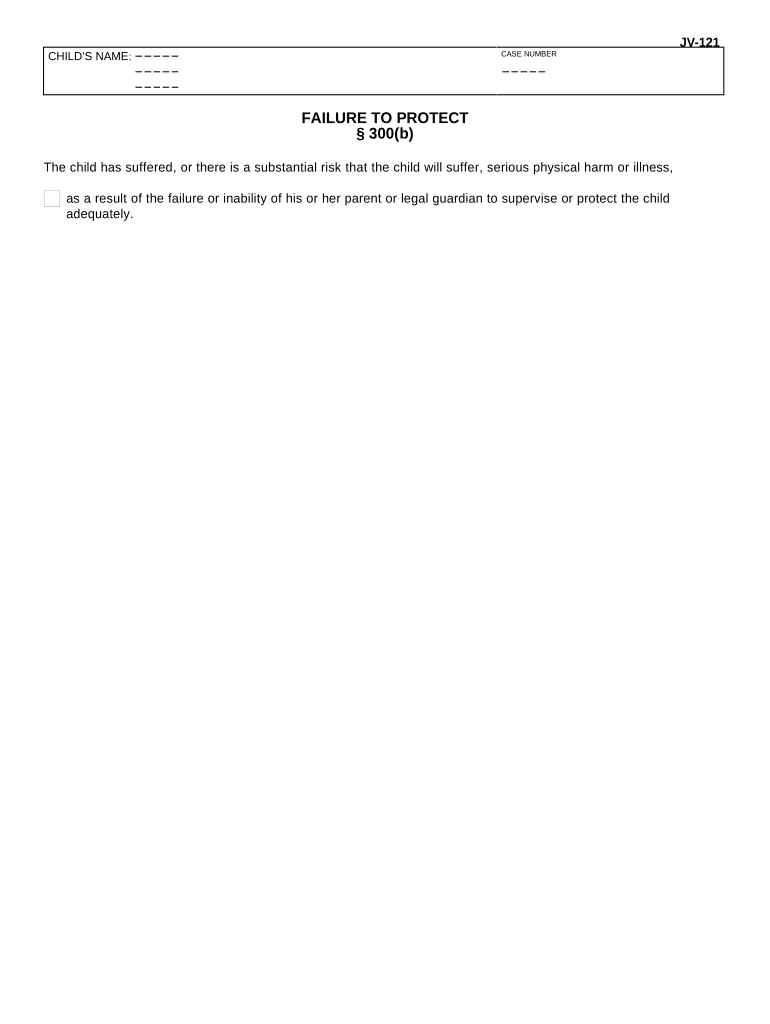
Click ‘Get Form’ to open the Failure to Protect - California document in the editor.
Begin by entering the child's name in the designated field at the top of the form. This is crucial for identifying the case.
Next, input the case number in the provided space. Ensure this number is accurate as it links your document to specific legal proceedings.
In section § 300(b), clearly state any incidents or risks that have led to concerns about the child's safety. Number each supporting fact (b-1, b-2, b-3, etc.) for clarity.
Review all entered information for accuracy and completeness before finalizing your document. Utilize our platform's editing tools to make any necessary adjustments.
Start using our platform today for free and streamline your document completion process!
Fill out Failure to Protect - California online It's free
CPS rules and regulations CaliforniaFailure to protect lawsWhat CPS can and cannot do CaliforniaCPS guidelines for child removal CaliforniaDomestic violence definition CaliforniaChild custody laws CaliforniaDomestic violence divorce CaliforniaDomestic violence court cases California
Security and compliance
At DocHub, your data security is our priority. We follow HIPAA, SOC2, GDPR, and other standards, so you can work on your documents with confidence.
Groups sue Federal Government over alleged failure to protect San Juan River from coal waste. In late January 2011 it was announced that a coalition ofRead more
Californias Failure to Protect Families by Cecilia Bobbitt
by C Bobbitt 2023 This Article argues that Californias statutory definition of neglect and mandatory reporting scheme work together to encourage mandated reporters, socialRead more
JV-121 FAILURE TO PROTECT 300(b) - California Courts
The childs parent or guardian has failed to, or was unable to, protect the child, and the child has been or is being sexually trafficked, as described inRead more
Cookie consent notice
This site uses cookies to enhance site navigation and personalize your experience.
By using this site you agree to our use of cookies as described in our Privacy Notice.
You can modify your selections by visiting our Cookie and Advertising Notice.