Buyer seller form 2026

Get Form
seller signature Preview on Page 1

Here's how it works

01. Edit your seller signature online
Type text, add images, blackout confidential details, add comments, highlights and more.
02. Sign it in a few clicks
Draw your signature, type it, upload its image, or use your mobile device as a signature pad.
03. Share your form with others
Send sellers signature via email, link, or fax. You can also download it, export it or print it out.

How to use or fill out buyer seller form with our platform

Form edit decoration
9.5
Ease of Setup
DocHub User Ratings on G2
9.0
Ease of Use
DocHub User Ratings on G2
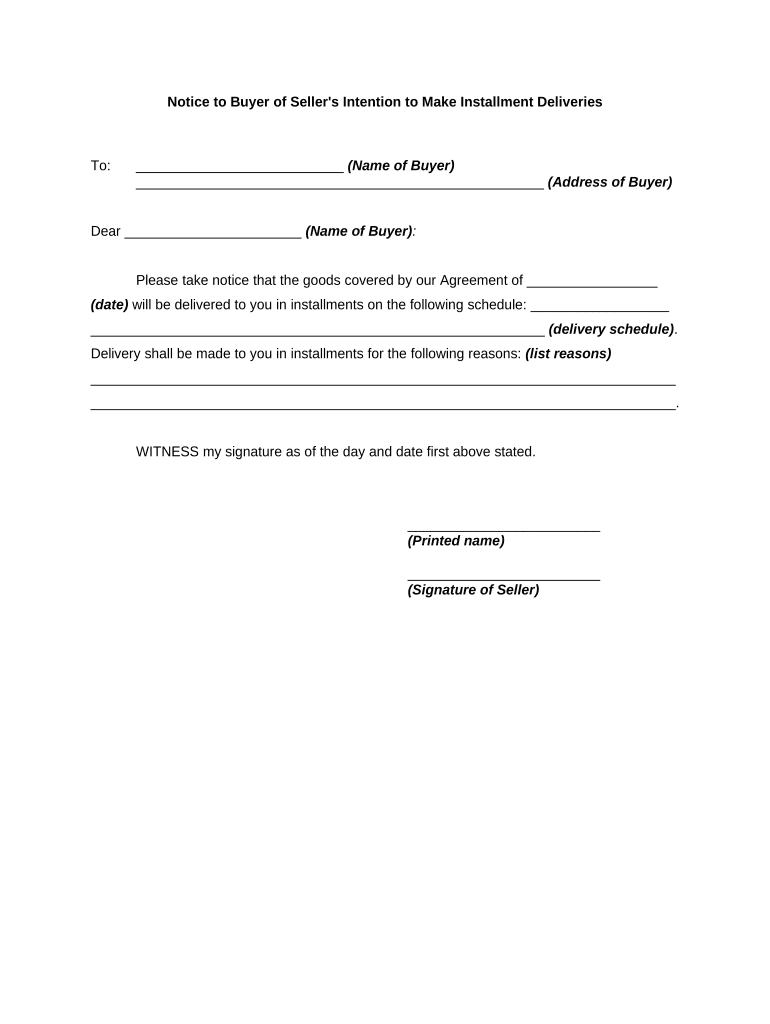
  1. Click ‘Get Form’ to open the buyer seller form in the editor.
  2. Begin by entering the name of the buyer in the designated field. This ensures that all parties are clearly identified.
  3. Next, fill in the address of the buyer. Accurate address details are crucial for proper delivery.
  4. In the section labeled 'Dear', write the name of the buyer again to personalize your communication.
  5. Specify the date of your agreement in the provided space. This establishes a timeline for both parties.
  6. Outline the delivery schedule by detailing when each installment will be delivered. Clarity here helps manage expectations.
  7. List reasons for installment deliveries in the designated area. This provides transparency and justification for your approach.
  8. Finally, sign and print your name at the bottom of the form to validate it as a formal document.

Start using our platform today to streamline your document editing and signing process for free!

be ready to get more

Complete this form in 5 minutes or less

Get form

Got questions?

We have answers to the most popular questions from our customers. If you can't find an answer to your question, please contact us.
Contact us
Sale of Your Home Report the sale or exchange of your main home on Form 8949 if: You cant exclude all of your gain from income, or. You received a Form 1099-S for the sale or exchange.
Form F is the Memorandum of Understanding (MoU) that sets out the agreed terms and conditions of the sale between the seller and buyer. It is signed once both parties have agreed on the price and all other details, acting as a precursor to the formal transfer of ownership.
The electronic form covers all the details of the real estate transaction, including disclosure information on the sellers agent, buyers agent, brokers agent and dual agent. Once the form is complete, both parties can sign off on the information electronically.
If the vehicle is purchased from an individual and the purchase price is below 50% of the current NADA Clean Loan Book value, a docHubd bill of sale must accompany the application for title, or the tax will be assessed on the NADA Clean Loan Book value.
A strong purchase agreement will include: Buyer and seller names and contact information. Description of goods, services, or property being purchased. Payment amount, dates, and method. Liability of each party in the case of loss, damage, or delivery failure.

Security and compliance

At DocHub, your data security is our priority. We follow HIPAA, SOC2, GDPR, and other standards, so you can work on your documents with confidence.

Learn more
ccpa2
pci-dss
gdpr-compliance
hipaa
soc-compliance

People also ask

A sales and purchase agreement (SPA) is a legally binding document critical to transactions between buyers and sellers, detailing the terms and conditions agreed upon. Often utilized in real estate, SPAs also extend to various business sectors.
What is a Purchase and Sale Agreement? A purchase and sale agreement (PSA) is a binding contract that outlines how property will change hands between buyer and seller. It covers the crucial details both parties must follow to complete the sale properly and legally.

buyer seller form