Type text, add images, blackout confidential details, add comments, highlights and more.
02. Sign it in a few clicks
Draw your signature, type it, upload its image, or use your mobile device as a signature pad.
03. Share your form with others
Send it via email, link, or fax. You can also download it, export it or print it out.
How to use or fill out ut small claims with our platform
Ease of Setup
DocHub User Ratings on G2
Ease of Use
DocHub User Ratings on G2
Click ‘Get Form’ to open the ut small claims document in the editor.
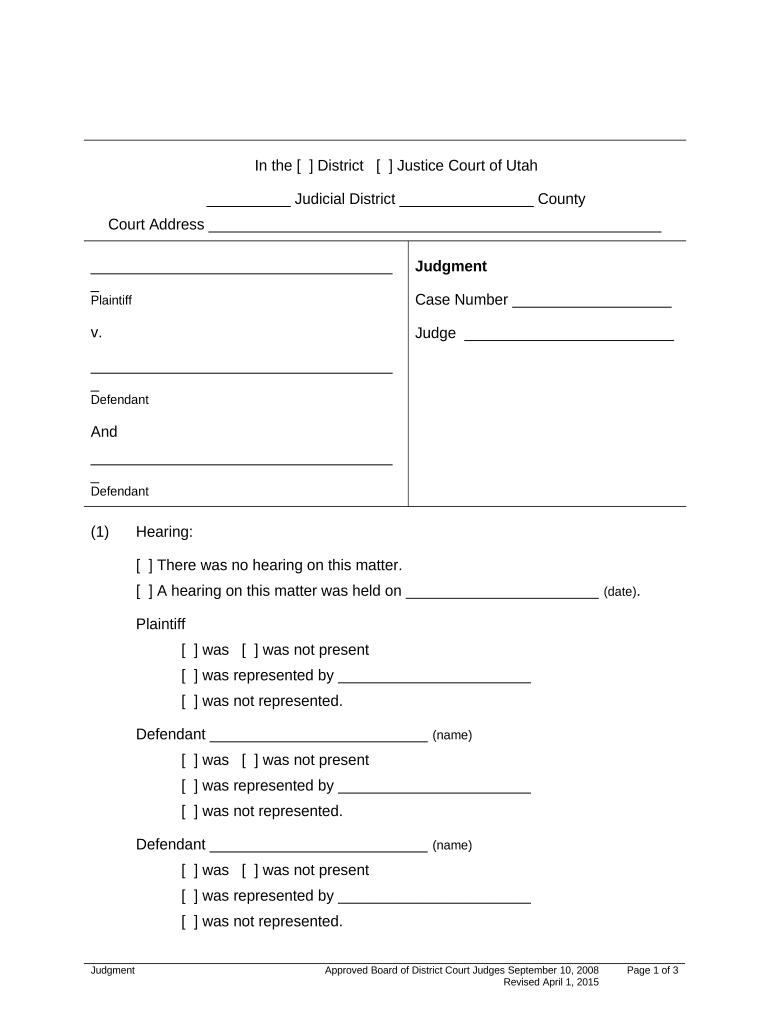
Begin by entering the case number at the top of the form. This is essential for identifying your case within the court system.
Fill in the names of the plaintiff and defendants in their respective sections. Ensure accuracy to avoid any delays.
Indicate whether a hearing was held by checking the appropriate box and providing the date if applicable. Note who was present or represented during this hearing.
In the judgment section, specify whether judgment is entered for the plaintiff or defendant by checking the relevant boxes and filling in amounts for principal, court costs, and total judgment.
Complete any additional details regarding interest rates as required, ensuring compliance with state regulations or contractual agreements.
Finally, sign where indicated for both the judge and court clerk to finalize your document.
Start using our platform today to fill out your ut small claims form easily and for free!
Utah small claims court RulesODR small ClaimsSmall Claims Affidavit and SummonsOgden small Claims CourtSalt Lake City Small Claims courtSmall claims Court provoWest Jordan Small Claims CourtDavis County Small Claims court
Security and compliance
At DocHub, your data security is our priority. We follow HIPAA, SOC2, GDPR, and other standards, so you can work on your documents with confidence.
Free and Low-Cost Legal Resources in Utah: Small Claims
Small Claims Mediation 801-369-0320 This clinic provides in-court mediation services for individuals involved in small claims disputes. It is a subset ofRead more
Cookie consent notice
This site uses cookies to enhance site navigation and personalize your experience.
By using this site you agree to our use of cookies as described in our Privacy Notice.
You can modify your selections by visiting our Cookie and Advertising Notice.