Type text, add images, blackout confidential details, add comments, highlights and more.
02. Sign it in a few clicks
Draw your signature, type it, upload its image, or use your mobile device as a signature pad.
03. Share your form with others
Send it via email, link, or fax. You can also download it, export it or print it out.
How to use or fill out Order on Waiver of Parental Consent for Abortion - Wisconsin with DocHub
Ease of Setup
DocHub User Ratings on G2
Ease of Use
DocHub User Ratings on G2
Click ‘Get Form’ to open it in the editor.
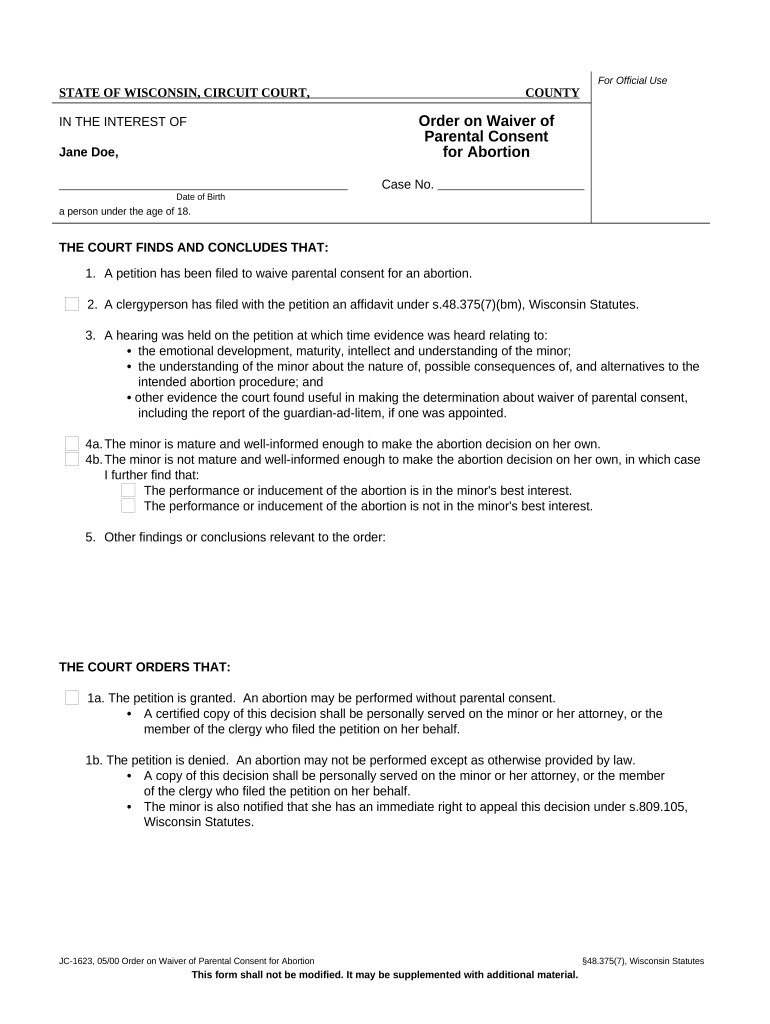
Begin by entering the case number and the date of birth of the minor in the designated fields. This information is crucial for identifying the specific case.
Review the findings section carefully. Ensure that all relevant evidence regarding the minor's maturity and understanding is accurately reflected. You may need to add notes or comments based on your situation.
In the court orders section, select whether the petition is granted or denied by checking the appropriate box. This decision will determine if parental consent is waived.
Finally, sign and print your name in the space provided for the Circuit Court Judge. Make sure to include the date of signing as well.
Start using our platform today to fill out your form easily and for free!
Fill out Order on Waiver of Parental Consent for Abortion - Wisconsin online It's free
wisconsin abortion law textwisconsin abortion law 2022how to get a judicial bypass for an abortionabortion law near wisconsinwisconsin incomplete miscarriagewisconsin supreme court abortionwhen was abortion legal in wiabortion,'' madison, wi
Security and compliance
At DocHub, your data security is our priority. We follow HIPAA, SOC2, GDPR, and other standards, so you can work on your documents with confidence.
Jan 17, 2024 Wisconsin law also permits minors to petition the court to waive the parental consent requirement, a process called judicial bypass. AfterRead more
48.375(1)(a)6.6. Parental knowledge of a minors pregnancy and parental consent to an abortion are usually desirable and in the best interest of the minor.Read more
Cookie consent notice
This site uses cookies to enhance site navigation and personalize your experience.
By using this site you agree to our use of cookies as described in our Privacy Notice.
You can modify your selections by visiting our Cookie and Advertising Notice.