593 e 2018 form-2026

Get Form
593 form 2022 Preview on Page 1

Here's how it works

01. Edit your 593 form 2022 online
Type text, add images, blackout confidential details, add comments, highlights and more.

02. Sign it in a few clicks
Draw your signature, type it, upload its image, or use your mobile device as a signature pad.

03. Share your form with others
Send form 593 via email, link, or fax. You can also download it, export it or print it out.

How to use or fill out 593 e 2018 form with our platform

Form edit decoration
9.5
Ease of Setup
DocHub User Ratings on G2
9.0
Ease of Use
DocHub User Ratings on G2
  1. Click ‘Get Form’ to open the 593 e 2018 form in the editor.
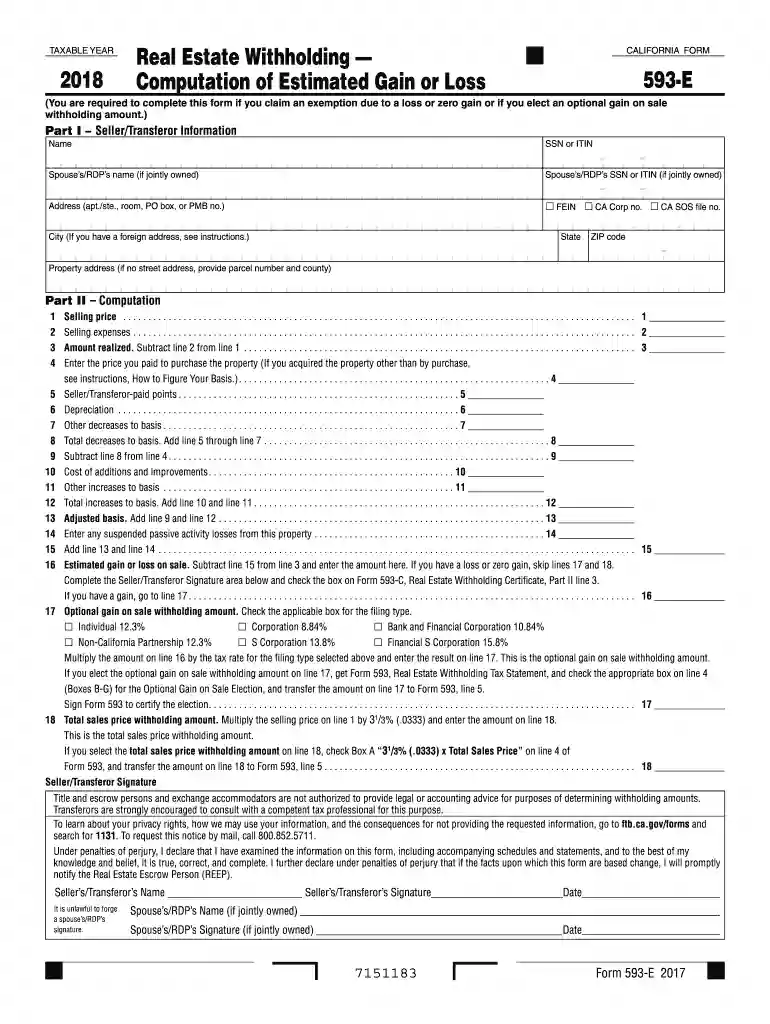
  2. Begin with Part I by entering the Seller/Transferor Information. Fill in your name, SSN or ITIN, and if applicable, your spouse’s/RDP’s details.
  3. Proceed to Part II for Computation. Start by entering the Selling Price on line 1 and Selling Expenses on line 2. Calculate the Amount Realized by subtracting line 2 from line 1.
  4. Continue filling out lines for Adjusted Basis calculations. Enter the purchase price of the property on line 4 and any seller-paid points on line 5.
  5. Complete lines for depreciation and other decreases to basis, ensuring all calculations are accurate before moving forward.
  6. Finally, review all entries for accuracy, sign where indicated, and save your completed form for submission.

Start using our platform today to fill out your forms online for free!

See more 593 e 2018 form versions

We've got more versions of the 593 e 2018 form form. Select the right 593 e 2018 form version from the list and start editing it straight away!
Versions Form popularity Fillable & printable
2019 4.8 Satisfied (141 Votes)
2018 4.3 Satisfied (140 Votes)
2017 4.4 Satisfied (940 Votes)
2016 4.3 Satisfied (104 Votes)
2015 4.2 Satisfied (51 Votes)
2014 4 Satisfied (47 Votes)
2013 4.2 Satisfied (50 Votes)
2012 4.3 Satisfied (55 Votes)
2011 4 Satisfied (36 Votes)
be ready to get more

Complete this form in 5 minutes or less

Get form

Got questions?

We have answers to the most popular questions from our customers. If you can't find an answer to your question, please contact us.
Contact us
Withholding is not required when any of the following is true: The total sale price does not exceed $100,000. The seller is a bank acting as a fiduciary for a trust. The property is being foreclosed upon (see question 28). The seller meets a full exemption on FTB Form 593 -C.
Any remitter (individual, business entity, trust, estate, or REEP) who withheld on the sale/transfer of California real property must file Form 593 to report the amount withheld. If this is an installment sale payment after escrow closed, the buyer/transferee is the responsible person.
The amount is withheld by the Settlement Agent from the Sellers account at the closing of the transaction and sent to the Franchise Tax Board (FTB). The amount is considered a prepayment of income taxes on the potential gain.
Tax Exempt Status A confirmation page will display your confirmation number if you have chosen to confirm your claim for tax exemption. If you are already claiming exemption from federal and California state tax withholding for the current tax year, the Tax Exempt Status page informs you of your tax exemption status.
Form 590 is certified (completed and signed) by the payee. California residents or entities exempt from the withholding requirement should complete Form 590 and submit it to the withholding agent before payment is made.

Security and compliance

At DocHub, your data security is our priority. We follow HIPAA, SOC2, GDPR, and other standards, so you can work on your documents with confidence.

Learn more
ccpa2
pci-dss
gdpr-compliance
hipaa
soc-compliance

People also ask

A seller/transferor that qualifies for a full, partial, or no withholding exemption must file Form 593. Any remitter (individual, business entity, trust, estate, or REEP) who withheld on the sale/transfer of California real property must file Form 593 to report the amount withheld.

Related links