Arizona medical report 2026

Get Form
arizona cdl medical card status Preview on Page 1

Here's how it works

01. Edit your arizona cdl medical card status online
Type text, add images, blackout confidential details, add comments, highlights and more.
02. Sign it in a few clicks
Draw your signature, type it, upload its image, or use your mobile device as a signature pad.
03. Share your form with others
Send it via email, link, or fax. You can also download it, export it or print it out.

How to use or fill out Arizona Medical Report with our platform

Form edit decoration
9.5
Ease of Setup
DocHub User Ratings on G2
9.0
Ease of Use
DocHub User Ratings on G2
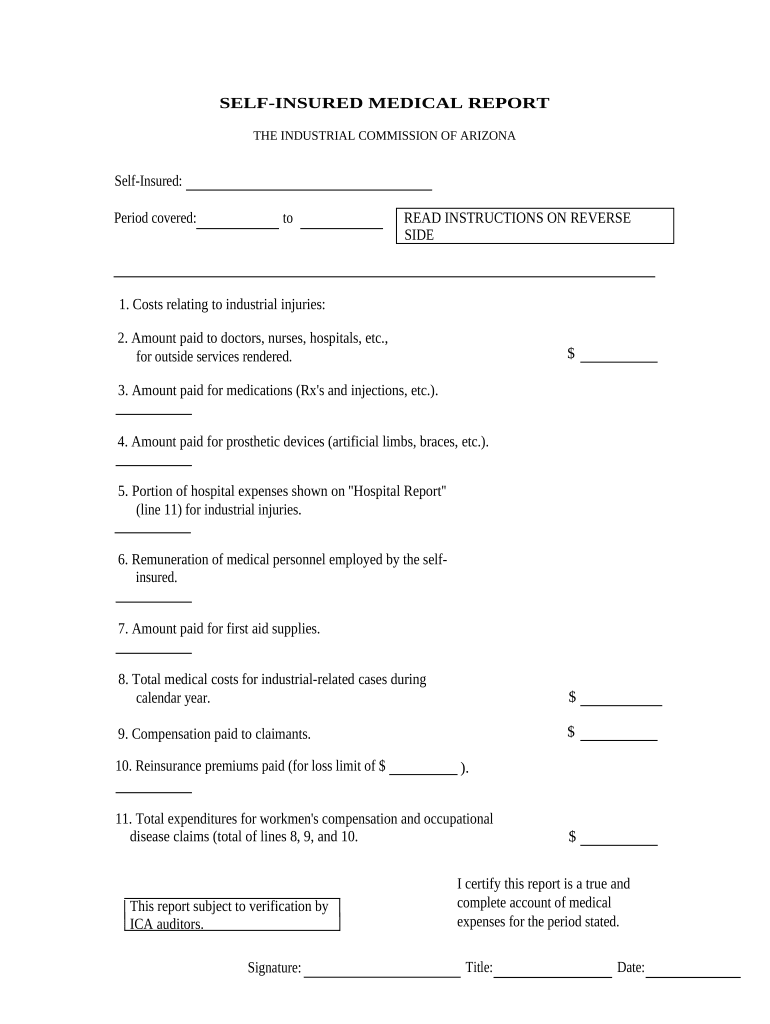
  1. Click ‘Get Form’ to open the Arizona Medical Report in the editor.
  2. Begin by entering the 'Period covered' at the top of the form, specifying the start and end dates.
  3. In section 1, detail costs related to industrial injuries. Fill in amounts for each line item from lines 2 to 7, including payments made to medical professionals and for medications.
  4. Calculate and enter the total medical costs for industrial-related cases in line 8. Ensure all figures are accurate and reflect your records.
  5. Complete line 9 with compensation paid to claimants, followed by reinsurance premiums in line 10.
  6. Finally, sum up lines 8, 9, and 10 for total expenditures on workmen's compensation in line 11.
  7. Sign and date the report at the bottom, certifying that all information is true and complete.

Start using our platform today to streamline your document editing process for free!

be ready to get more

Complete this form in 5 minutes or less

Get form

Got questions?

We have answers to the most popular questions from our customers. If you can't find an answer to your question, please contact us.
Contact us

Yes, you can utilize DocHub for signing any business and private documentation, including your arizona medical report. All electronic signatures you create with our service are legally binding and court-admissible, as DocHub complies with standards required by ESIGN and UETA. Save your accomplished form with a detailed Audit Trail if needed.

You need only an internet connection and a web browser to fill out your arizona medical report by using an iOS phone. Open the DocHub website and authenticate. Then, add your document or select it from the list in your dashboard. Then use our editing instruments to fill out your form and save all your adjustments. You may also send it to a dedicated recipient immediately.

Call your primary care doctor and ask them for your medical records. Medical records are maintained by doctors offices.
Per Arizona State Law, fees are allowed for copies. The cost is $35.00 for clerical handling, $0.60 per page, plus shipping and any applicable tax. For records in storage, there is an additional $46.30 fee for retrieval and re-filing.
Navigate to: 2. Click on REQUEST A REPORT OR RECORDS

Security and compliance

At DocHub, your data security is our priority. We follow HIPAA, SOC2, GDPR, and other standards, so you can work on your documents with confidence.

Learn more
ccpa2
pci-dss
gdpr-compliance
hipaa
soc-compliance

People also ask

Copies of report(s) are available to the public following the final completion of the case. If you request to receive the report(s) via email or fax, there is no fee. If you request to receive the report(s) via mail or pick-up, there will be a $5.00 fee.
Records Releases. If you would like to receive a paper copy of your records, or if you would like us to send your medical records to your employer, doctor or other facility, we will need a completed Release of Information form. Release forms are available for download (English | Spanish) or by calling (602) 506-6018.
Ask your doctor. If your doctor offers a web portal, you may be able to easily view and download your health information whenever you want. There are a few exceptions to getting your information, but you cant be denied access for not paying your medical bill.

Related links