Type text, add images, blackout confidential details, add comments, highlights and more.
02. Sign it in a few clicks
Draw your signature, type it, upload its image, or use your mobile device as a signature pad.
03. Share your form with others
Send isp 3026 via email, link, or fax. You can also download it, export it or print it out.
How to use or fill out isp 3026 with our platform
Ease of Setup
DocHub User Ratings on G2
Ease of Use
DocHub User Ratings on G2
Click ‘Get Form’ to open the isp 3026 in the editor.
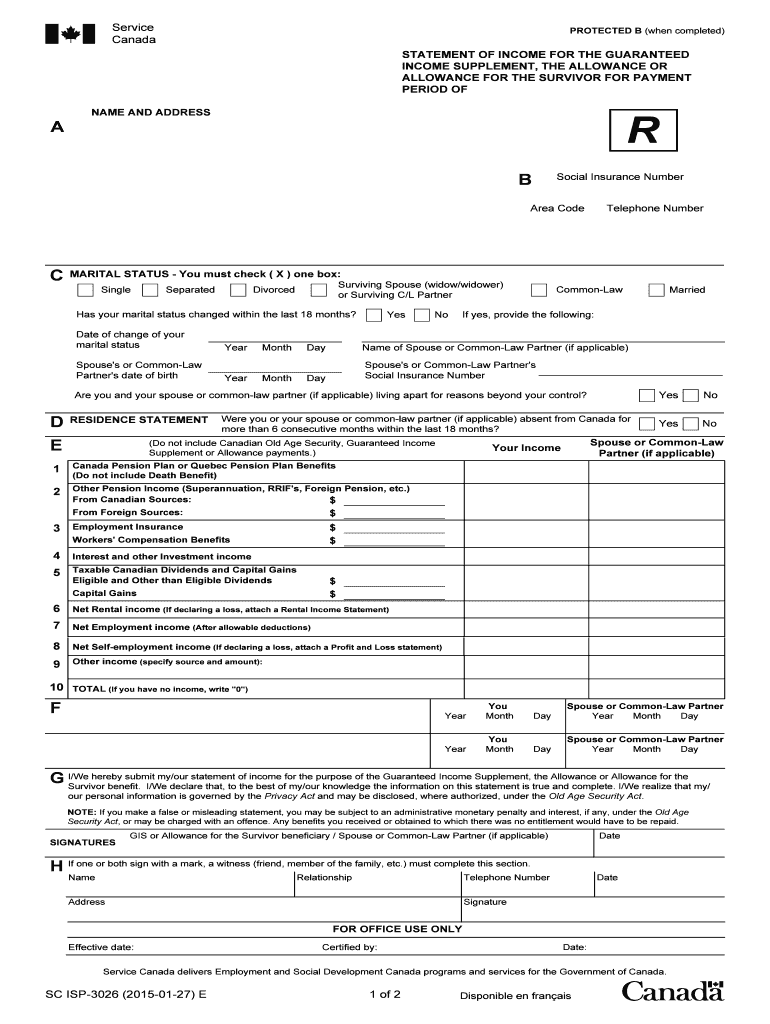
Begin by entering your name and address in section A. Ensure that all details are accurate to avoid processing delays.
In section B, input your Social Insurance Number and telephone number. This information is crucial for identification purposes.
For marital status in section C, check the appropriate box that reflects your current situation. If there has been a change in the last 18 months, provide the necessary details.
Proceed to section E regarding residence statements. Answer whether you or your spouse were absent from Canada for more than six consecutive months.
In section F, report your income sources accurately. Fill out each field corresponding to different income types, ensuring you total them correctly at the end.
Finally, review all entries for accuracy before signing in section G. Your signature confirms that the information provided is true and complete.
Start filling out your isp 3026 form online for free today!
Jul 11, 2023 3026 Romain Trail As a result, unless an exception applies, any person has the right to inspect and copy ISPs public records during regularRead more
Advanced Standing International Student Program (ISP) Dental Medicine: Dual Typically Offered: Fall. SPAN 3026 - Writing for Latinos II (3 Credits).Read more
Cookie consent notice
This site uses cookies to enhance site navigation and personalize your experience.
By using this site you agree to our use of cookies as described in our Privacy Notice.
You can modify your selections by visiting our Cookie and Advertising Notice.