Type text, add images, blackout confidential details, add comments, highlights and more.
02. Sign it in a few clicks
Draw your signature, type it, upload its image, or use your mobile device as a signature pad.
03. Share your form with others
Send it via email, link, or fax. You can also download it, export it or print it out.
How to use or fill out order form civil with our platform
Ease of Setup
DocHub User Ratings on G2
Ease of Use
DocHub User Ratings on G2
Click ‘Get Form’ to open the order form civil in the editor.
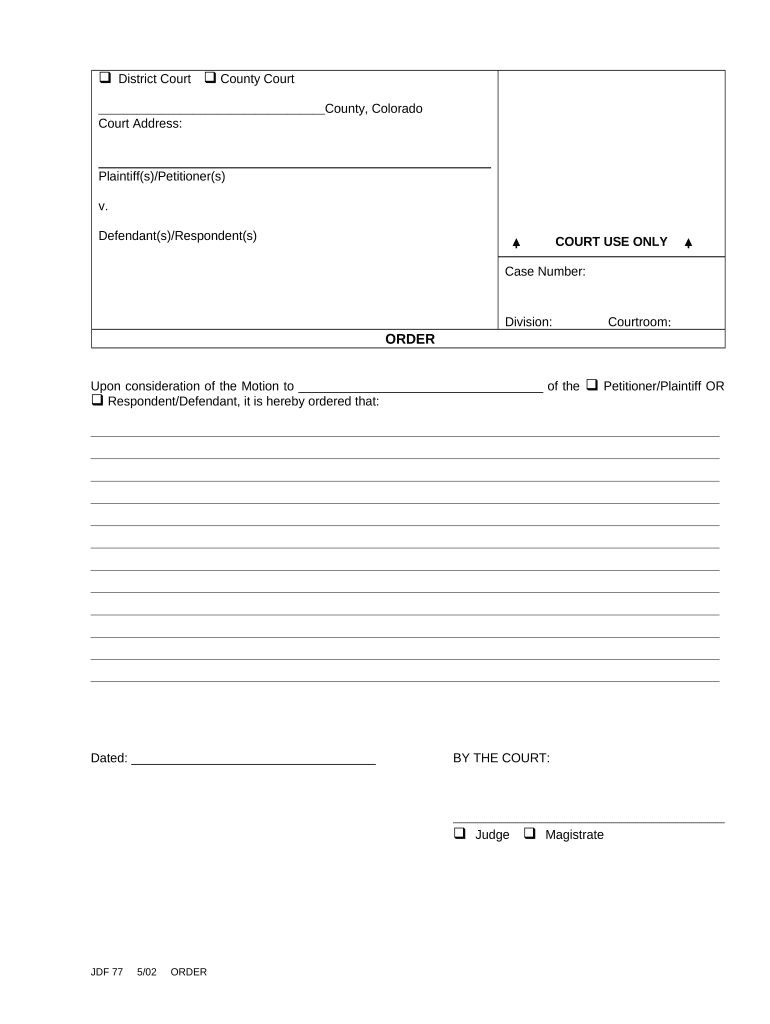
Begin by entering the court address at the top of the form. Ensure that you provide accurate details for proper identification.
In the 'Plaintiff(s)/Petitioner(s)' section, input the names of all parties initiating the case. Follow this with the 'Defendant(s)/Respondent(s)' section where you will list those being accused or responding.
Locate the 'COURT USE ONLY' section and fill in the case number, division, and courtroom as applicable. This information is crucial for court records.
In the 'ORDER' section, clearly state your motion and any specific requests. Use our platform's text tools to format your response neatly.
Finally, sign and date at the bottom of the form where indicated. Choose whether a Judge or Magistrate will be signing off on this order.
Start using our platform today to easily complete your order form civil online for free!
An order can be as simple as setting a date for trial or as complex as restructuring contractual relationships by and between many corporations in a multi-jurisdictional dispute. It may be a final order (one that concludes the court action), or an interim order (one during the action).
How does an order form work?
Typically, a buyer fills out and issues an order form to the seller. The seller accepts this sales order form. This creates a legally binding contract between the two parties governing the exchange. An example of this would be the procurement process for buying new computers in an organization.
How to draft a civil lawsuit?
Comply With the Relevant Federal, State, and Local Rules. Research Before Writing. Allege Subject Matter Jurisdiction, Personal Jurisdiction, and Venue. Jurisdiction. Draft Concise and Plain Statement of the Facts. Factual Allegations. Draft Separate Counts for Each Legal Claim. Plead Facts With Particularity Where Necessary.
What does order mean in a court?
An Order is a separate document that a judge signs which sets forth the judges ruling on a motion. A Judgment is a separate document that a judge signs and sets forth the judges ruling at the end of an adversary proceeding.
How to answer a civil complaint in NJ?
STEP 1: Fill out the appropriate Answer form (Form A or B) STEP 2: Pay the filing fee. STEP 3: Where to file the Answer. STEP 4: Check your completed form. STEP 5: Mail or deliver your package of completed papers to the court and the. STEP 6: You will get a court date for your trial.
Related Searches
Free Civil Lawsuit formsPrintable court forms PDFCivil Court forms and petitionsFAM 020 form PDFCivil Summons formCivil Complaint formsLa Court formsLASC FAM 014 form
Security and compliance
At DocHub, your data security is our priority. We follow HIPAA, SOC2, GDPR, and other standards, so you can work on your documents with confidence.
Lawyers for both sides begin by making opening arguments in which they lay out the cases they intend to present. The plaintiffs side then calls witnesses, who may be cross-examined by the defendant. Then the defendants witnesses are called, and may be cross-examined by the plaintiff.
Related links
Legal Forms
Note: Forms are searchable by keyword and/or topic. If you know the form number, you may enter it into the keyword search. . New and Recently Revised AOCRead more
Mar 27, 2026 Civil Contempt Order (Non-Support) - SCCA437; Amended Contempt Order - SCCA232; Affidavit of Service - SCCA402CP; Motion and Order InformationRead more
Cookie consent notice
This site uses cookies to enhance site navigation and personalize your experience.
By using this site you agree to our use of cookies as described in our Privacy Notice.
You can modify your selections by visiting our Cookie and Advertising Notice.