




Here's how it works



How to use or fill out FYBA Purchase and Sale - Ross Yacht Sales with our platform

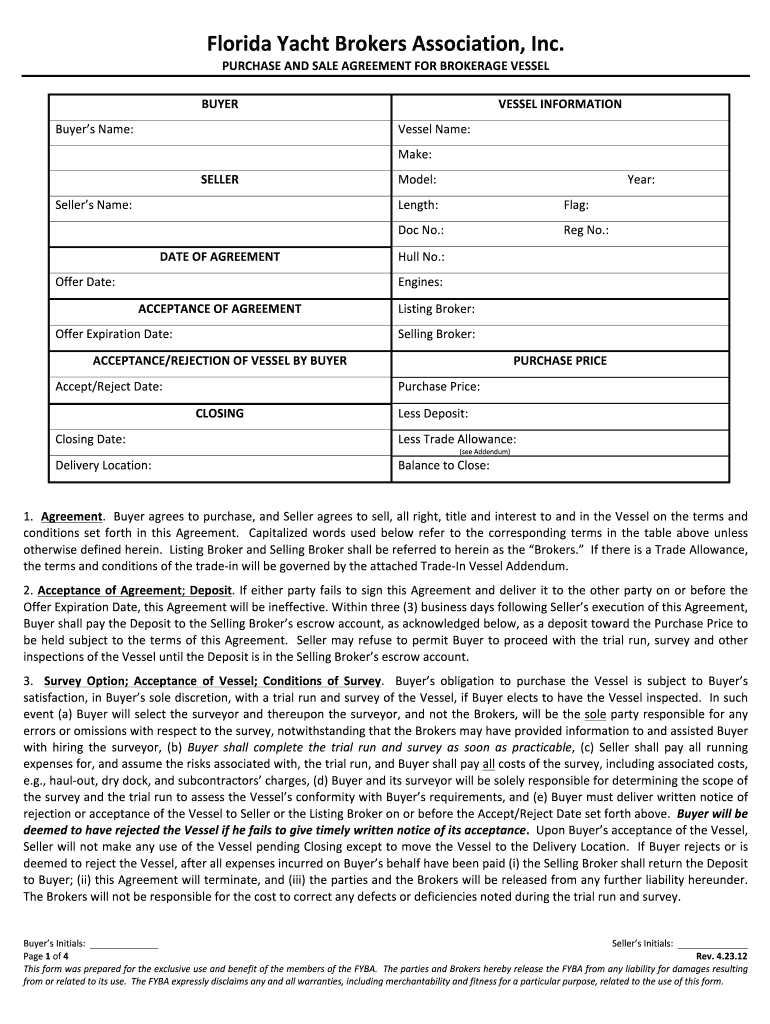
- Click ‘Get Form’ to open the FYBA Purchase and Sale Agreement in the editor.
- Begin by entering the Buyer’s Name in the designated field. Ensure that this is accurate as it will be used throughout the document.
- Next, fill in the Vessel Information section. Input the Vessel Name, Make, Model, Year, Length, Flag, Doc No., and Reg No. These details are crucial for identifying the vessel involved in the transaction.
- Proceed to enter dates such as Offer Date and Offer Expiration Date. This helps establish a timeline for the agreement.
- In the Acceptance/Rejection section, indicate whether you accept or reject the vessel by filling out the Accept/Reject Date.
- Complete the Purchase Price section by entering the agreed amount and any applicable deposits or trade allowances.
- Finally, review all entered information for accuracy before signing. Use our platform's signature feature to sign electronically.
Start using our platform today to streamline your document editing and signing process for free!
It's free
See more FYBA Purchase and Sale - Ross Yacht Sales versions
Got questions?
How can I eSign my fy ba full form in Word?
Microsoft Word doesn’t have signing tools to create legitimate eSignatures and enforceable forms. Luckily, DocHub is an online eSignature-compliant editor that works with various file formats, such as .doc files. Log in to your account and add the Word version of your fy ba full form from your device and cloud, or URL - our editor will automatically turn it into an editable PDF. Make all required modifications in your document and click Sign to create your own legally-binding electronic signature. There are four signing methods from which to choose.
How to complete fyba full form on the internet for free in 2024?
Using a swift editing system like DocHub, you do not require anything but a web browser and connection to the internet to edit your fyba full form on the internet quickly. Add your document or get the relevant form in DocHub’s catalog, open our editor with one click, and complete it electronically. To edit your forms at any time, sign up a free profile with DocHub.
Security and compliance
At DocHub, your data security is our priority. We follow HIPAA, SOC2, GDPR, and other standards, so you can work on your documents with confidence.
Learn more


