




01. Edit your form online
Type text, add images, blackout confidential details, add comments, highlights and more.

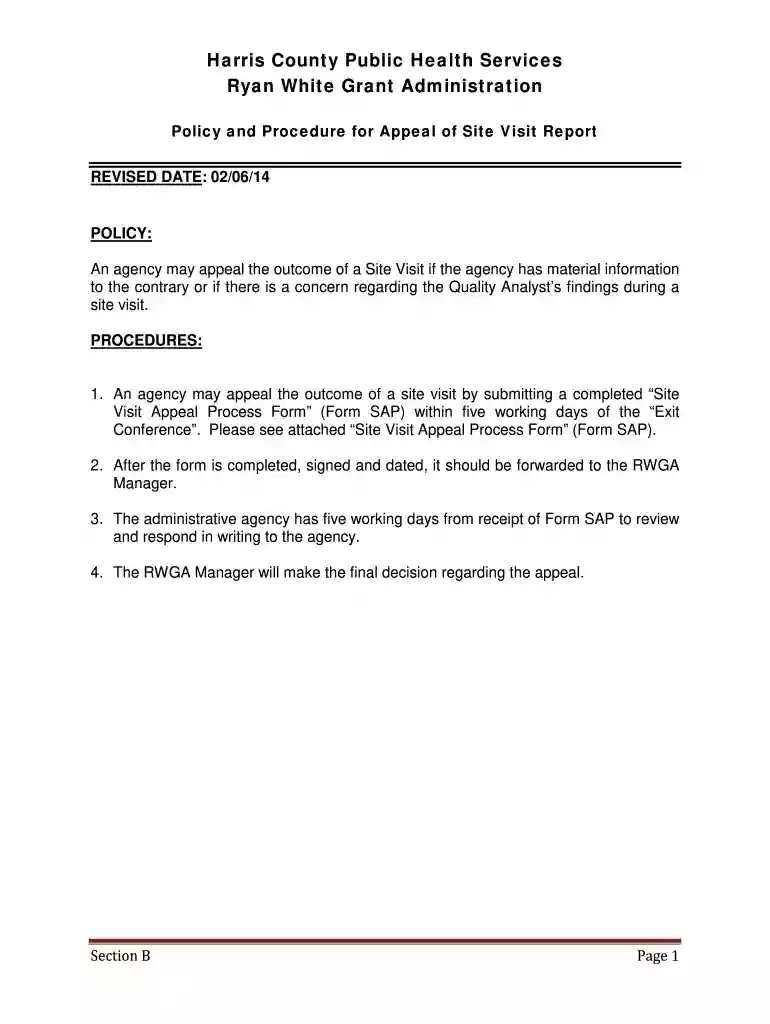
Type text, add images, blackout confidential details, add comments, highlights and more.

Draw your signature, type it, upload its image, or use your mobile device as a signature pad.

Send it via email, link, or fax. You can also download it, export it or print it out.

Start using our platform today to streamline your appeal process for free!
We've got more versions of the Policy and Procedure for Appeal of Site Visit Report - hcphes form. Select the right Policy and Procedure for Appeal of Site Visit Report - hcphes version from the list and start editing it straight away!
Yes, you can use DocHub for signing any business and private paperwork, including your Policy and Procedure for Appeal of Site Visit Report - hcphes. All electronic signatures you create with our tool are legally binding and court-admissible, as DocHub complies with standards required by ESIGN and UETA. Save your accomplished paperwork with a detailed Audit Trail if necessary.
When you edit your Policy and Procedure for Appeal of Site Visit Report - hcphes with DocHub, you will not need to look for other applications or services to sign it. An electronic signature is a component of DocHub’s substantial editing toolset, which allows you to implement changes in your form without switching between platforms. Simply complete your form, double-check the correctness of the data and place your electronic signature at the end to make it submission-ready within minutes.
At DocHub, your data security is our priority. We follow HIPAA, SOC2, GDPR, and other standards, so you can work on your documents with confidence.
PROCEDURE FOR DATA COLLECTION, ANALYSIS, REPORTING Site visits/Tours. Opening up a project venue objectives, allocating resources and guiding policy and
Apr 14, 2010 The Qualified Facilities. Programs rules must be clear about which sources on a site can participate in the netting process. This goes toRead more


