




Here's how it works



How to use or fill out SSA 725 form with our platform

- Click ‘Get Form’ to open the SSA 725 form in the editor.
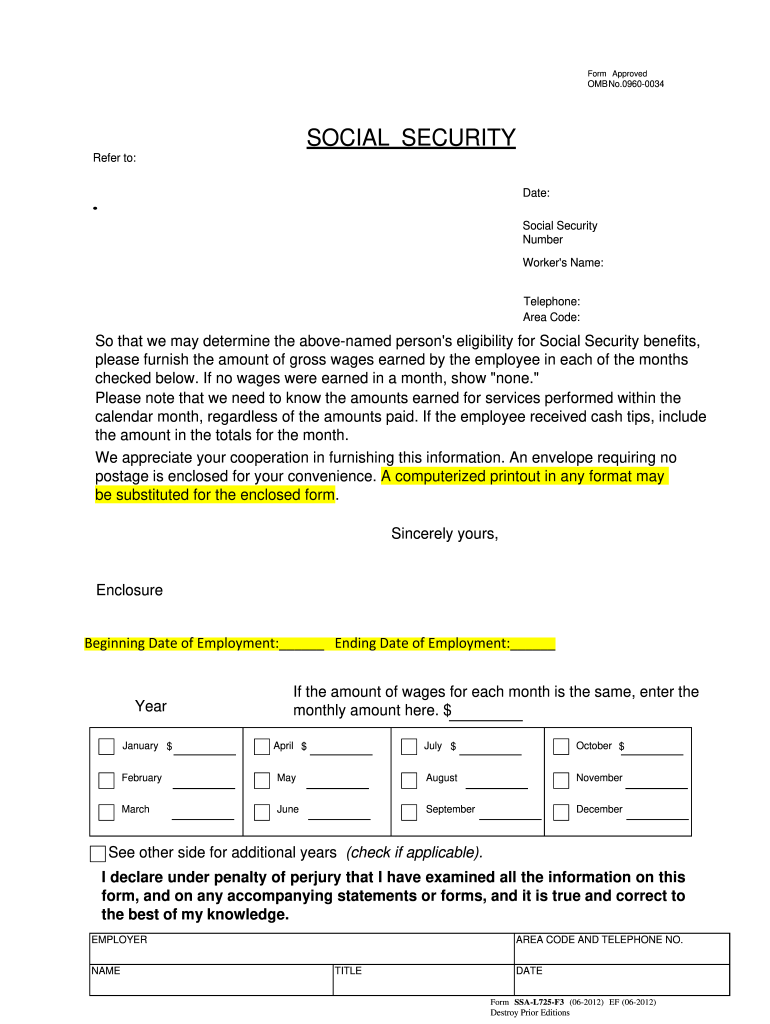
- Begin by entering the worker's name and Social Security number at the top of the form. Ensure accuracy as this information is crucial for processing.
- In the section labeled 'Beginning Date of Employment' and 'Ending Date of Employment', input the respective dates to provide context for the wage information.
- For each month listed, enter the gross wages earned. If no wages were earned, write 'none'. If wages are consistent across months, you can enter a single amount in the designated field.
- Complete the employer's details including name, title, and contact number at the bottom of the form. This ensures that any follow-up can be conducted smoothly.
- Finally, review all entries for accuracy before signing and dating the declaration statement at the end of the form.
Start using our platform today to fill out your SSA 725 form easily and for free!
It's free
See more ssa 725 form versions
Got questions?
Can I use DocHub to create legal eSignatures on my ssa 725 form?
Yes, you can utilize DocHub for signing any business and private documentation, including your ssa 725 form. All electronic signatures you create with our tool are legally binding and court-admissible, as DocHub complies with standards required by ESIGN and UETA. Save your completed document with a detailed Audit Trail if necessary.
How do you get ssa 725 form?
You can find the latest and most relevant version of the ssa 725 form in our DocHub forms collection. Browse it by categories or utilize the search field to get the exact template that fits your situation. You can open this form for editing after you find it.
Can I file SSA online?
Can I file SSA 44 online?
Can I lookup my Social Security benefits online?
Security and compliance
At DocHub, your data security is our priority. We follow HIPAA, SOC2, GDPR, and other standards, so you can work on your documents with confidence.
Learn more




