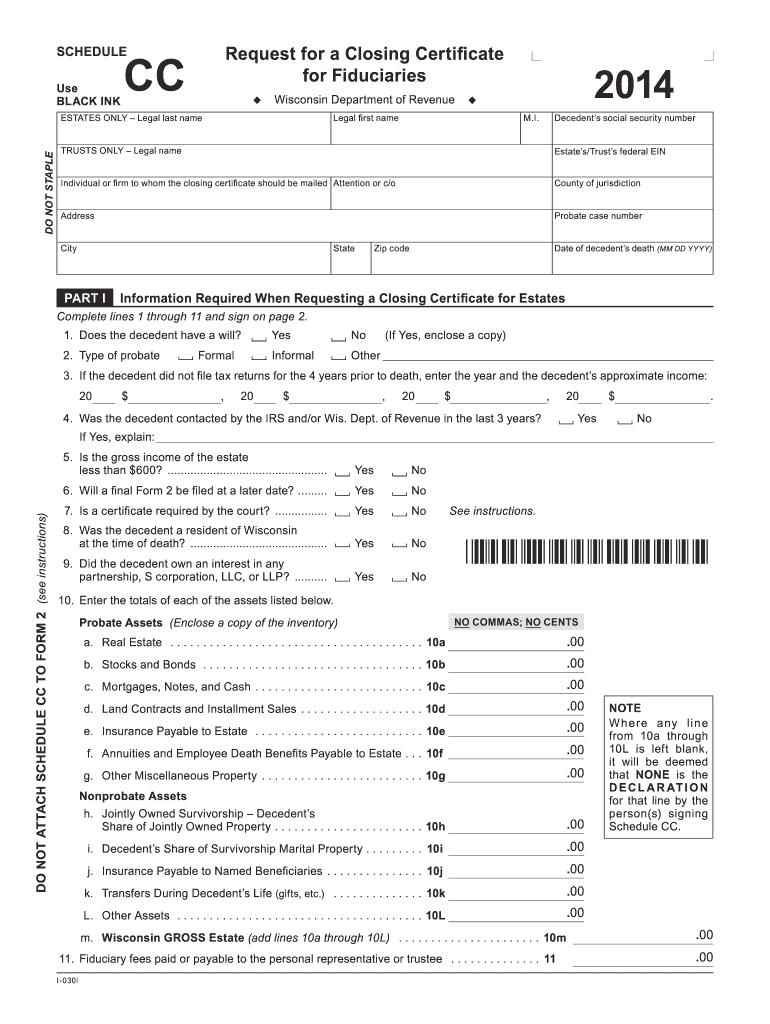
2014 wisconsin certificate form Preview on Page 1

2014 wisconsin certificate form-2026

Here's how it works

  • 01. Edit your form online

    Type text, add images, blackout confidential details, add comments, highlights and more.

  • 02. Sign it in a few clicks

    Draw your signature, type it, upload its image, or use your mobile device as a signature pad.

  • 03. Share your form with others

    Send it via email, link, or fax. You can also download it, export it or print it out.

How to use or fill out 2014 Wisconsin Certificate Form with DocHub

Form edit decoration
9.5
Ease of Setup
DocHub User Ratings on G2
9.0
Ease of Use
DocHub User Ratings on G2
  1. Click ‘Get Form’ to open the 2014 Wisconsin Certificate Form in our editor.
  2. Begin by filling in the decedent's legal name and social security number in the designated fields. Ensure accuracy as this information is crucial for processing.
  3. Proceed to Part I, where you will answer questions regarding the decedent's will, probate type, and income details. Select 'Yes' or 'No' as applicable and provide any necessary explanations.
  4. In Section 10, list all assets accurately without using commas or cents. This includes real estate, stocks, bonds, and other properties. Make sure to enclose any required documentation.
  5. Complete Part II if applicable for trusts. Provide grantor and grantee names along with their social security numbers. Answer questions about trust funding and court petitions.
  6. Finally, review all entries for completeness and accuracy before signing at the bottom of the form. Use our platform’s tools to ensure your document is ready for submission.

Start editing your 2014 Wisconsin Certificate Form online for free today!

See more 2014 wisconsin certificate form versions

We've got more versions of the 2014 wisconsin certificate form form. Select the right 2014 wisconsin certificate form version from the list and start editing it straight away!

VersionsForm popularityFillable & printable
20244.4 Satisfied (22 Votes)
20234.3 Satisfied (47 Votes)
20224.7 Satisfied (38 Votes)
20214.8 Satisfied (40 Votes)
20204.4 Satisfied (242 Votes)
20194.4 Satisfied (62 Votes)
20184.4 Satisfied (164 Votes)
20164.4 Satisfied (89 Votes)
20154.3 Satisfied (164 Votes)
20144 Satisfied (23 Votes)
20133.7 Satisfied (30 Votes)
20124.1 Satisfied (43 Votes)

be ready to get more

Complete this form in 5 minutes or less

Got questions?

We have answers to the most popular questions from our customers. If you can't find an answer to your question, please contact us.

You can claim as many exemptions as youd like. Claiming the most accurate number of exemptions will most likely result in the smallest amount of refund or taxes due. Generally, if you are not claimed as a dependent on another taxpayers tax return, you claim one personal tax exemption.
Use Form 804 to claim a refund on behalf of a deceased taxpayer. If you are claiming a refund on behalf of a deceased tax- payer, you may be required to file Form 804. If you are unable to cash the refund check that was sent to you, you should return it with a completed Form 804.
The Wisconsin Form W706 must be filed by the person who is or would be responsible for filing the Federal Estate Tax Return (i.e., personal representative, special administrator, trustee, distributee or other person who signs or would sign the Federal Form 706).
Between January and April, many libraries will have a supply of Wisconsin individual income tax forms on hand. Use the Library page to locate a library near you. Call or visit any of the Department of Revenue offices located throughout the state. Request forms by calling (608) 266-1961.
You may claim exemption from withholding of Wisconsin income tax if you had no liability for income tax last year, and you expect to incur no liability for income tax this year. To claim complete exemption from withholding use Wisconsin Form WT-4, Employees Wisconsin Withholding Exemption Certificate.

Security and compliance

At DocHub, your data security is our priority. We follow HIPAA, SOC2, GDPR, and other standards, so you can work on your documents with confidence.

People also ask

If you are exempt, your employer will not withhold Wisconsin income tax from your wages. You must revoke this exemption (1) within 10 days from the time you expect to incur income tax liability for the year or (2) on or before December 1 if you expect to incur Wisconsin income tax liabilities for the next year.
Exemption from withholding An employee can also use Form W-4 to tell you not to withhold any federal income tax. To qualify for this exempt status, the employee must have had no tax liability for the previous year and must expect to have no tax liability for the current year.
You can claim exemption from withholding only if both the following situations apply: For the prior year, you had a right to a refund of all federal income tax withheld because you had no tax liability. For the current year, you expect a refund of all federal income tax withheld because you expect to have no liability.

Related links

May 2014 MF-209 Certificate of Fuel Tax Exemption

Forms are also available at revenue.wi.gov/forms/excise/ index-f.html. DATE COVERED BY CERTIFICATE. Effective Date - enter date exemption first applies.Read more

Learn more
Guidance on Natural Attenuation For Petroleum Releases

on a close out form supplied by the Department in accordance with NR 726.09 (Wisconsin DNR. Form 4400-202, Case Closure GIS Registry Form) and must beRead more

Learn more
Employees Wisconsin Withholding Exemption Certificate/

Every Employee is required to file a completed Form WT‑4 with each of his or her employers unless the Employee claims the same number of withholding exemptionsRead more

Learn more
If you believe that this page should be taken down, please follow our DMCA take down process here