Type text, add images, blackout confidential details, add comments, highlights and more.
02. Sign it in a few clicks
Draw your signature, type it, upload its image, or use your mobile device as a signature pad.
03. Share your form with others
Send fillable form d via email, link, or fax. You can also download it, export it or print it out.
How to use or fill out SEC Form D with our platform
Ease of Setup
DocHub User Ratings on G2
Ease of Use
DocHub User Ratings on G2
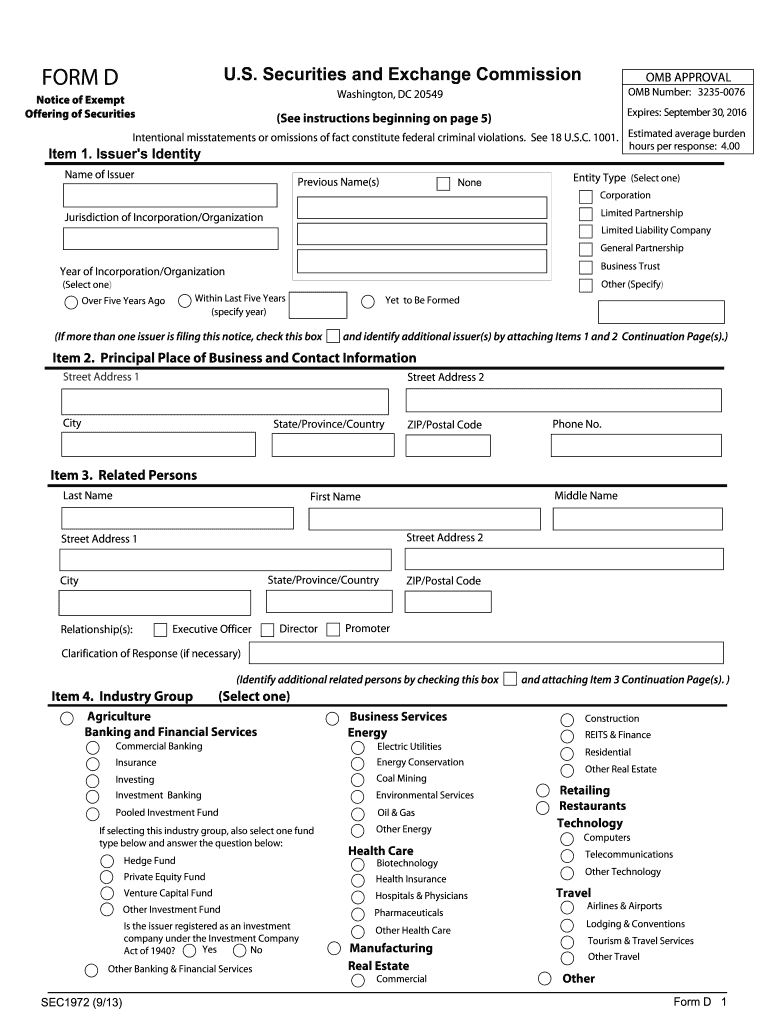
Click 'Get Form' to open SEC Form D in the editor.
Begin with Item 1, 'Issuer's Identity.' Enter the full name of the issuer, any previous names, and select the entity type. Specify the jurisdiction and year of incorporation.
Move to Item 2, 'Principal Place of Business and Contact Information.' Fill in the complete street address and contact number for the issuer.
In Item 3, 'Related Persons,' list all individuals related to the issuer, including their roles. Use continuation pages if necessary.
Proceed to Item 4, 'Industry Group,' and select the appropriate industry category that best describes your business activities.
Complete Items 5 through 16 by providing details on issuer size, federal exemptions claimed, types of securities offered, minimum investment amounts, and intended use of proceeds.
Finally, review all entries for accuracy before signing and submitting your form electronically through our platform.
Start using our platform today for free to streamline your SEC Form D submission!
17 CFR 239.500 - Form D, notice of sales of securities under
(2) An issuer may file an amendment to a previously filed notice of sales on Form D at any time. (3) An issuer must file an amendment to a previously filedRead more
RECENT FORM S-K FILINGS. The listed below have filed Form 8-K reports for. cOlJlflal1ies the month indicated and responding to the item of the Form specifiedRead more
Cookie consent notice
This site uses cookies to enhance site navigation and personalize your experience.
By using this site you agree to our use of cookies as described in our Privacy Notice.
You can modify your selections by visiting our Cookie and Advertising Notice.