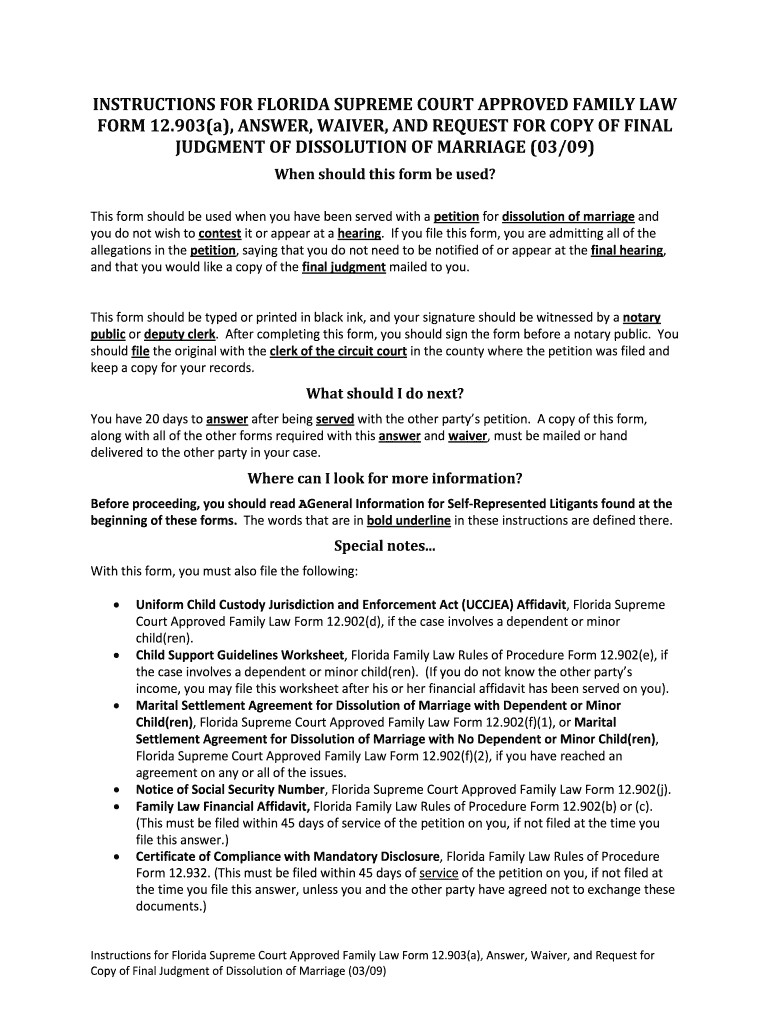
2009 Florida form 12903a-2026

Get Form
2009 Florida form 12903a Preview on Page 1

Here's how it works

01. Edit your form online
Type text, add images, blackout confidential details, add comments, highlights and more.
02. Sign it in a few clicks
Draw your signature, type it, upload its image, or use your mobile device as a signature pad.
03. Share your form with others
Send it via email, link, or fax. You can also download it, export it or print it out.

How to use or fill out 2009 Florida form 12903a with our platform

Form edit decoration
9.5
Ease of Setup
DocHub User Ratings on G2
9.0
Ease of Use
DocHub User Ratings on G2
  1. Click ‘Get Form’ to open the 2009 Florida form 12903a in the editor.
  2. Begin by entering your full legal name in the designated field at the top of the form. Ensure that all information is accurate and typed clearly.
  3. In Section 1, confirm your agreement with the allegations in the petition by checking the appropriate box. This indicates you do not contest the dissolution of marriage.
  4. Complete Section 3 by providing your mailing address where you would like to receive a copy of the Final Judgment. Make sure this is correct to avoid any delays.
  5. If applicable, attach any required additional forms such as the UCCJEA Affidavit or Notice of Social Security Number as specified in the instructions.
  6. After filling out all necessary fields, sign and date the form before a notary public or deputy clerk to validate it.
  7. Finally, file the original document with the clerk of court and keep a copy for your records. Remember to send copies to other parties involved as required.

Start using our platform today for free to simplify your document editing and signing process!

See more 2009 Florida form 12903a versions

We've got more versions of the 2009 Florida form 12903a form. Select the right 2009 Florida form 12903a version from the list and start editing it straight away!
Versions Form popularity Fillable & printable
2018 4.7 Satisfied (23 Votes)
2015 4.8 Satisfied (249 Votes)
2015 4.3 Satisfied (51 Votes)
2012 4.3 Satisfied (35 Votes)
2010 4 Satisfied (33 Votes)
2009 4 Satisfied (56 Votes)
be ready to get more

Complete this form in 5 minutes or less

Get form

Got questions?

We have answers to the most popular questions from our customers. If you can't find an answer to your question, please contact us.
Contact us
If the other party fails to either answer or object to the questions within 30 days, he or she may be subject to court sanctions.
Notarizing a debt settlement agreement ensures that all parties are protected and that the document holds legal weight if challenged in court. With Your Local Notary Public, the process is efficient, professional, and entirely tailored to your needs.
You may think an important legal document like a settlement agreement must be witnessed, however it does not. Once you and your employer have signed the document it is binding on both of you.
Florida Family Law Rules of Procedure demand docHubd signatures on all MSAs and financial affidavits. Notarization proves each spouse signed voluntarily, under oath, and with confirmed identity. Courts will reject an unsigned or un-docHubd agreement, so notarization is not optional; it is mandatory.
The law doesnt require an attorney to help draft your Florida marital settlement agreement, but its highly recommended. Your agreement must include specific items like property division details, support arrangements, and confirmation that both parties shared all financial information.

Security and compliance

At DocHub, your data security is our priority. We follow HIPAA, SOC2, GDPR, and other standards, so you can work on your documents with confidence.

Learn more
ccpa2
pci-dss
gdpr-compliance
hipaa
soc-compliance
be ready to get more

Complete this form in 5 minutes or less

Get form