Motion edi 850 spec 2026

Get Form
edi 850 specification pdf Preview on Page 1

Here's how it works

01. Edit your edi 850 specification pdf online
Type text, add images, blackout confidential details, add comments, highlights and more.

02. Sign it in a few clicks
Draw your signature, type it, upload its image, or use your mobile device as a signature pad.

03. Share your form with others
Send edi 860 specification pdf via email, link, or fax. You can also download it, export it or print it out.

How to use or fill out motion edi 850 spec with our platform

Form edit decoration
9.5
Ease of Setup
DocHub User Ratings on G2
9.0
Ease of Use
DocHub User Ratings on G2
  1. Click 'Get Form' to open the motion edi 850 spec in the editor.
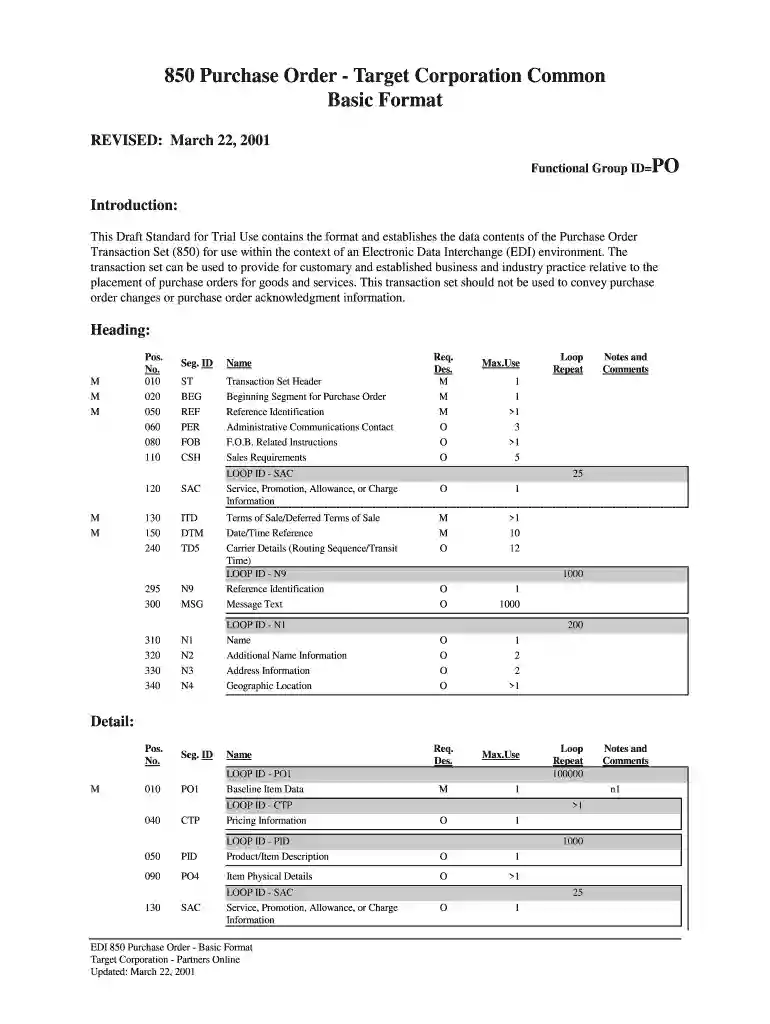
  2. Begin with the 'ST' segment, which indicates the start of your transaction set. Enter a unique control number in ST02.
  3. Proceed to the 'BEG' segment. Fill in BEG01 with the transaction purpose code (e.g., '00' for original), and provide your purchase order number in BEG03.
  4. In the 'REF' segment, specify any reference identification such as internal vendor numbers or department numbers as needed.
  5. Continue through each required segment, ensuring you fill out mandatory fields like 'PO1' for baseline item data, specifying quantities and unit prices accurately.
  6. Review optional segments like 'SAC' for service charges or allowances if applicable, and ensure all relevant details are included.
  7. Finally, complete the form by filling out the 'SE' segment to indicate the end of your transaction set and verify that all segments are accounted for.

Start using our platform today to streamline your motion edi 850 spec completion!

See more motion edi 850 spec versions

We've got more versions of the motion edi 850 spec form. Select the right motion edi 850 spec version from the list and start editing it straight away!
Versions Form popularity Fillable & printable
2001 4.8 Satisfied (182 Votes)
be ready to get more

Complete this form in 5 minutes or less

Get form

Got questions?

We have answers to the most popular questions from our customers. If you can't find an answer to your question, please contact us.
Contact us
An EDI 810 is usually sent out in response to the Purchase Order (EDI 850) or after the order is fulfilled and an Advance Shipping Notice (EDI 856) is sent out. This is an electronic version of the Cash Receipt that is typically issued by a buyer after the receipt of an 810 document (Invoice).
Invoice - 810 (for inbound and outbound messages) Sales Order 850 (for inbound messages) Purchase Order 850 (for outbound messages) Purchase Order Acknowledgement 855 (for inbound messages)
The EDI 855 generally includes reporting of any ordering inaccuracies that have taken place. In the best-case scenario, an EDI 850 can be accepted as-is, and the EDI 855 is a simple affirmation that the order will move forward.
In short, EDI standards (aka EDI file formats) are the specific guidelines that govern the content and format of B2B documents such as orders, invoices and order responses. These documents are then sent via EDI protocols to the service provider / business partner.
An EDI 940 is different from an EDI 850 Purchase Order, as it goes from the supplier (not the retailer) to the warehouse. Typically, however, the supplier will receive an EDI 850 and then create an EDI 940.

Security and compliance

At DocHub, your data security is our priority. We follow HIPAA, SOC2, GDPR, and other standards, so you can work on your documents with confidence.

Learn more
ccpa2
pci-dss
gdpr-compliance
hipaa
soc-compliance
be ready to get more

Complete this form in 5 minutes or less

Get form