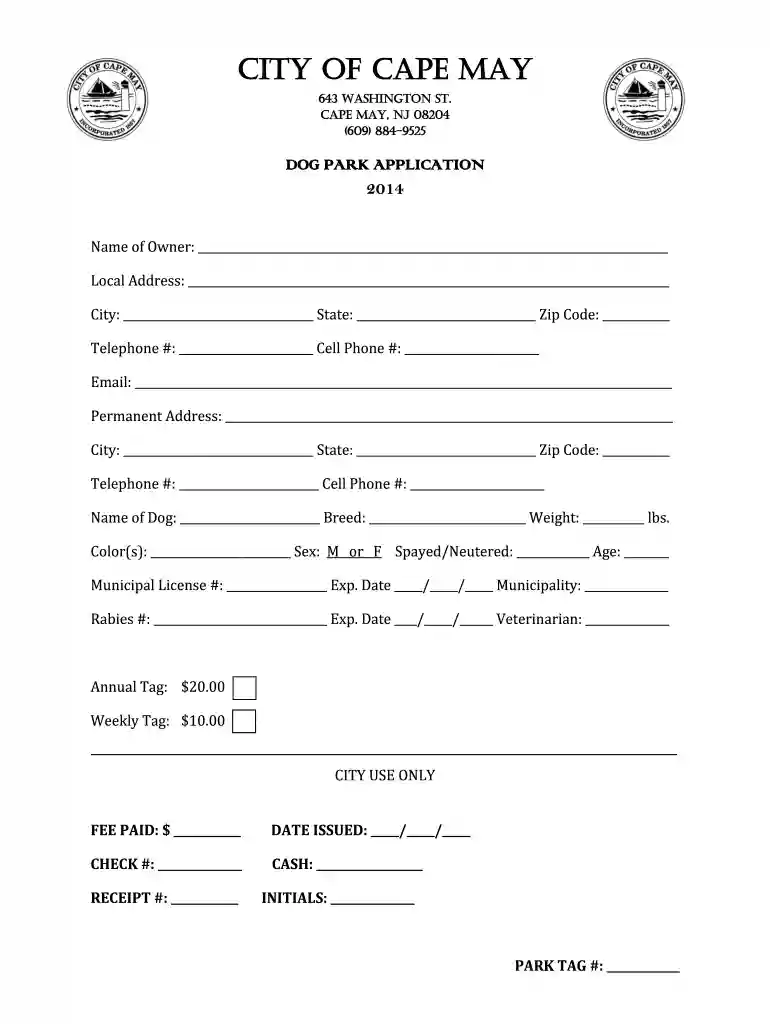
City of Cape May Dog Park Application 2026

Get Form
City of Cape May Dog Park Application Preview on Page 1

Here's how it works

01. Edit your form online
Type text, add images, blackout confidential details, add comments, highlights and more.

02. Sign it in a few clicks
Draw your signature, type it, upload its image, or use your mobile device as a signature pad.

03. Share your form with others
Send it via email, link, or fax. You can also download it, export it or print it out.

How to use or fill out City of Cape May Dog Park Application with our platform

Form edit decoration
9.5
Ease of Setup
DocHub User Ratings on G2
9.0
Ease of Use
DocHub User Ratings on G2
  1. Click ‘Get Form’ to open the City of Cape May Dog Park Application in the editor.
  2. Begin by entering your name as the dog owner in the designated field. Ensure that all personal information is accurate, including your local and permanent addresses.
  3. Fill in your contact details, including telephone numbers and email address. This information is crucial for communication regarding your application.
  4. Provide details about your dog, including its name, breed, weight, color(s), sex, spayed/neutered status, and age. Make sure to have your municipal license and rabies vaccination numbers ready.
  5. Review the fee structure for park tags—$20 for an annual tag or $10 for a weekly tag—and ensure you select the appropriate option based on your needs.
  6. Read through the Acceptance of Risk & Release of Liability Waiver carefully. Sign and date it at the bottom to acknowledge understanding and acceptance of the terms.
  7. Once completed, save your application. You can then submit it directly through our platform or print it out for submission at the City’s Licensing Office.

Start filling out your application today using our platform for free!

See more City of Cape May Dog Park Application versions

We've got more versions of the City of Cape May Dog Park Application form. Select the right City of Cape May Dog Park Application version from the list and start editing it straight away!
Versions Form popularity Fillable & printable
2020 4.1 Satisfied (43 Votes)
2018 4.6 Satisfied (45 Votes)
2014 4.5 Satisfied (62 Votes)
be ready to get more

Complete this form in 5 minutes or less

Get form

Got questions?

We have answers to the most popular questions from our customers. If you can't find an answer to your question, please contact us.
Contact us

Microsoft Word doesn’t have signing tools to create valid eSignatures and enforceable paperwork. Luckily, DocHub is an online eSignature-compliant editor that works with various file formats, including .doc files. Log in to your account and upload the Word edition of your City of Cape May Dog Park Application from your device and cloud, or URL - our editor will automatically convert it into an editable PDF. Make all required alterations in your form and click Sign to create your own legally-binding eSignature. There are four signing methods from which to choose.

You can easily edit and complete your City of Cape May Dog Park Application on any iOS gadget. Open an internet browser of your liking, go to the DocHub site, authorize or create a new account, upload your file for editing, and make your required alterations. Our service is mobile-friendly, so using its functions on your phone will be a no-brainer, even on the first try.

Security and compliance

At DocHub, your data security is our priority. We follow HIPAA, SOC2, GDPR, and other standards, so you can work on your documents with confidence.

Learn more
ccpa2
pci-dss
gdpr-compliance
hipaa
soc-compliance
be ready to get more

Complete this form in 5 minutes or less

Get form