Affidavit of death form california 2026

Get Form
how to fill out affidavit of death of trustee california Preview on Page 1

Here's how it works

01. Edit your how to fill out affidavit of death of trustee california online
Type text, add images, blackout confidential details, add comments, highlights and more.

02. Sign it in a few clicks
Draw your signature, type it, upload its image, or use your mobile device as a signature pad.

03. Share your form with others
Send affidavit of death of trustee instructions via email, link, or fax. You can also download it, export it or print it out.

How to use or fill out affidavit of death form california with DocHub

Form edit decoration
9.5
Ease of Setup
DocHub User Ratings on G2
9.0
Ease of Use
DocHub User Ratings on G2
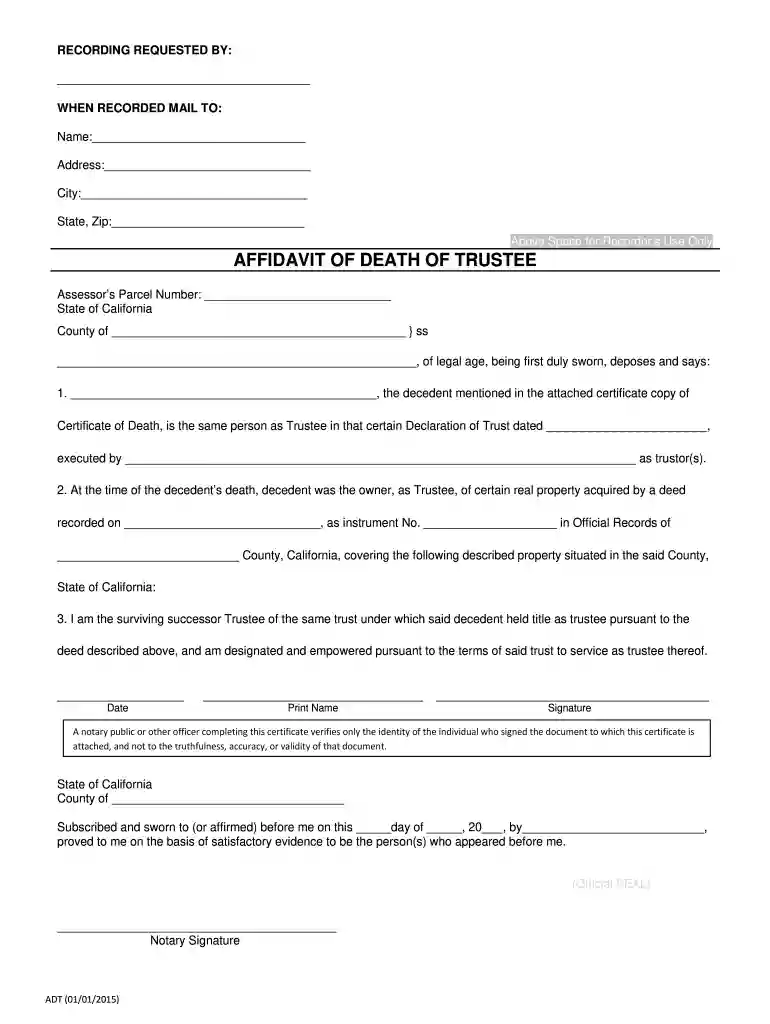
  1. Click ‘Get Form’ to open the affidavit of death form in our editor.
  2. Begin by filling in the 'Recording Requested By' section with your name and contact information. This ensures that the document is properly attributed.
  3. In the 'Affidavit of Death of Trustee' section, provide the decedent's name as mentioned in the attached Certificate of Death. Ensure accuracy for legal purposes.
  4. Next, enter the Assessor’s Parcel Number and details about the property owned by the decedent at the time of death, including deed recording information.
  5. As the surviving successor Trustee, confirm your authority by signing and dating the document at the bottom. Include your printed name for clarity.
  6. Finally, arrange for a notary public to witness your signature and complete their section to validate the affidavit.

Start using our platform today to fill out your affidavit of death form easily and for free!

See more affidavit of death form california versions

We've got more versions of the affidavit of death form california form. Select the right affidavit of death form california version from the list and start editing it straight away!
Versions Form popularity Fillable & printable
2024 4.3 Satisfied (21 Votes)
2024 4.6 Satisfied (51 Votes)
2024 4.5 Satisfied (23 Votes)
2024 4.8 Satisfied (29 Votes)
2023 4.7 Satisfied (42 Votes)
2023 4.4 Satisfied (48 Votes)
2023 4 Satisfied (63 Votes)
2023 4.5 Satisfied (26 Votes)
2023 4.6 Satisfied (34 Votes)
2023 4.2 Satisfied (30 Votes)
2023 3.9 Satisfied (31 Votes)
2023 4.3 Satisfied (42 Votes)
2023 4.7 Satisfied (39 Votes)
2023 4.4 Satisfied (22 Votes)
2023 4.2 Satisfied (51 Votes)
be ready to get more

Complete this form in 5 minutes or less

Get form

Got questions?

We have answers to the most popular questions from our customers. If you can't find an answer to your question, please contact us.
Contact us
How Do I Record an Affidavit? Take a certified copy of the death certificate of the deceased joint tenant and your affidavit to the recorders office in the county where the real property is located. The recorders office also requires a Preliminary Change of Ownership Report (PCOR) when filing the affidavit.
The transfer of inherited property is the most common situation that requires the use of an Affidavit of Death. An Affidavit of Death may also be known by a variety of other names: Affidavit of Death and Heirship.
Instead, an Affidavit of Death and a certified copy of the death certificate can be used. After the Affidavit of Death is signed and docHubd, the affidavit and the certified copy of the death certificate are both recorded at the County Recorders office in the county where the real property is located.
Drafting an Affidavit Appearances are important. Introduce yourself. Write in the first person about facts you know. Keep it as simple as possible. Stick to what is relevant. Dont guess. Be specific about conversations. Be specific about timing and frequency, to the extent this is relevant.
How to Prepare a Transfer-on-Death Deed Using Deed Forms or WillMaker to Make Your Own TOD Deed. Name the Beneficiary of Your Real Estate. Describe the Property Using the Exact Legal Description. Sign the TOD Deed. Have the TOD Deed docHubd (and Possibly Witnessed) Record the Transfer-on-Death Deed.

Security and compliance

At DocHub, your data security is our priority. We follow HIPAA, SOC2, GDPR, and other standards, so you can work on your documents with confidence.

Learn more
ccpa2
pci-dss
gdpr-compliance
hipaa
soc-compliance

People also ask

The Affidavit of Loss should be docHubd as the affidavit only becomes a legal document if it is executed under oath. Having it docHubd means you are attesting to the whole truth of the contents of your affidavit. That is the purpose of the jurat, which starts with the words SUBSCRIBED AND SWORN TO..
If you need to make a statutory declaration or affidavit, you will need to get someone to witness your signature. The person must be an authorised person/approved witness and they must see you signing the document to confirm that it was you who signed it.

affidavit of death of trustee