General release form 2026

Get Form
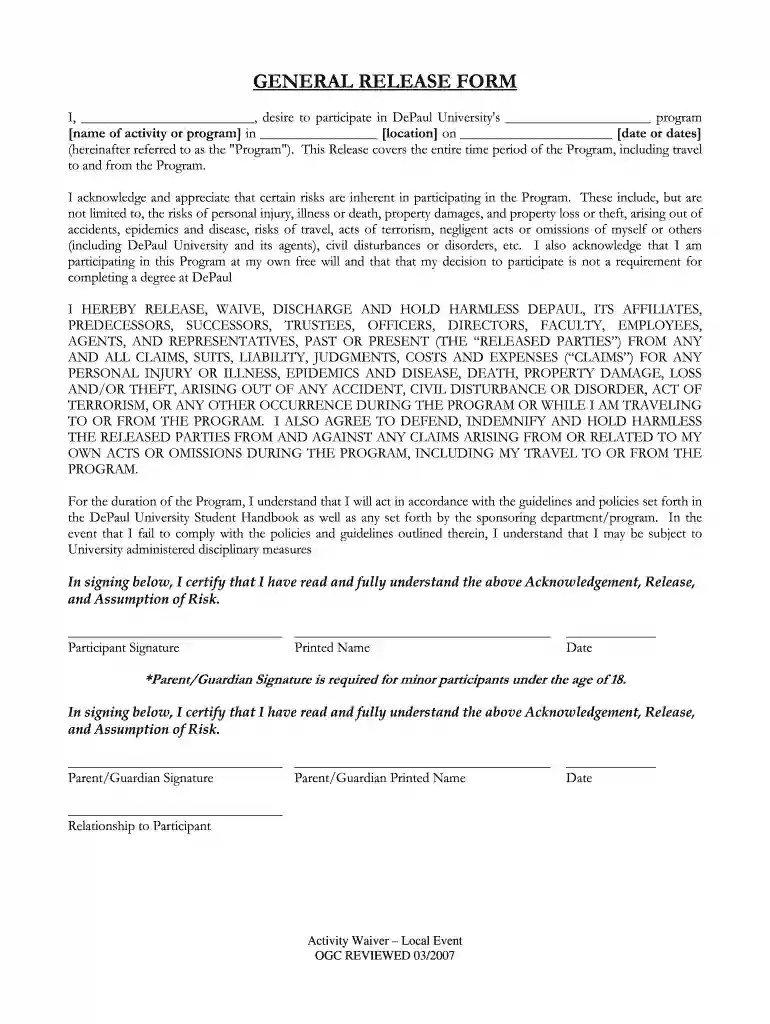
general release form Preview on Page 1

Here's how it works

01. Edit your general release form online
Type text, add images, blackout confidential details, add comments, highlights and more.

02. Sign it in a few clicks
Draw your signature, type it, upload its image, or use your mobile device as a signature pad.

03. Share your form with others
Send general release via email, link, or fax. You can also download it, export it or print it out.

How to use or fill out general release form with our platform

Form edit decoration
9.5
Ease of Setup
DocHub User Ratings on G2
9.0
Ease of Use
DocHub User Ratings on G2
  1. Click ‘Get Form’ to open the general release form in the editor.
  2. Begin by filling in your name in the designated space at the top of the form. This identifies you as the participant.
  3. Next, specify the name of the program you wish to participate in, along with its location and date. Ensure accuracy as this information is crucial for your participation.
  4. Read through the acknowledgment section carefully. It outlines potential risks associated with the program. Confirm your understanding by checking any required boxes if applicable.
  5. In the signature section, sign and print your name to validate your consent. If you are under 18, a parent or guardian must also sign and provide their relationship to you.
  6. Finally, review all entries for completeness and accuracy before submitting or saving your completed form.

Start using our platform today to easily fill out and manage your general release form for free!

be ready to get more

Complete this form in 5 minutes or less

Get form

Got questions?

We have answers to the most popular questions from our customers. If you can't find an answer to your question, please contact us.
Contact us
Easily create, share, and sign digital waivers and release forms, directly from your mobile device or computer. Accelerate the completion of digital waivers and release forms with form sharing and electronic signature capture.
While creating your own release forms is possible, its important to consider a few things before you decide to do so. Consent forms involve intricate legal considerations that have to be specifically tailored to the situation at hand and adhere to certain laws and regulations.
Some of the crucial information in a release includes: Name of the parties involved, i.e., releasor and releasee. Detailed information about the project. Explicit information of the permissions granted. Any special considerations, including payment obligations or credit, if any. A space for all parties to sign.
A release form, or general release form, is a legal document that serves as consent in writing to release the legal liability of a releasee by a releasor. The document is a formal acknowledgment that, once signed, is a legal release of all a releasee obligations within an agreement.
A general release clause is a contractual provision where one party waives any current or future claims or rights they may have against the other party, often in exchange for a sum of money or other consideration.

People also ask

Often when an employee is terminated, their employer will provide them with a termination letter with a release attached. A release is a contract that is often used to limit an employers liability by preventing the employee from bringing legal claims against their employer.

Related links