
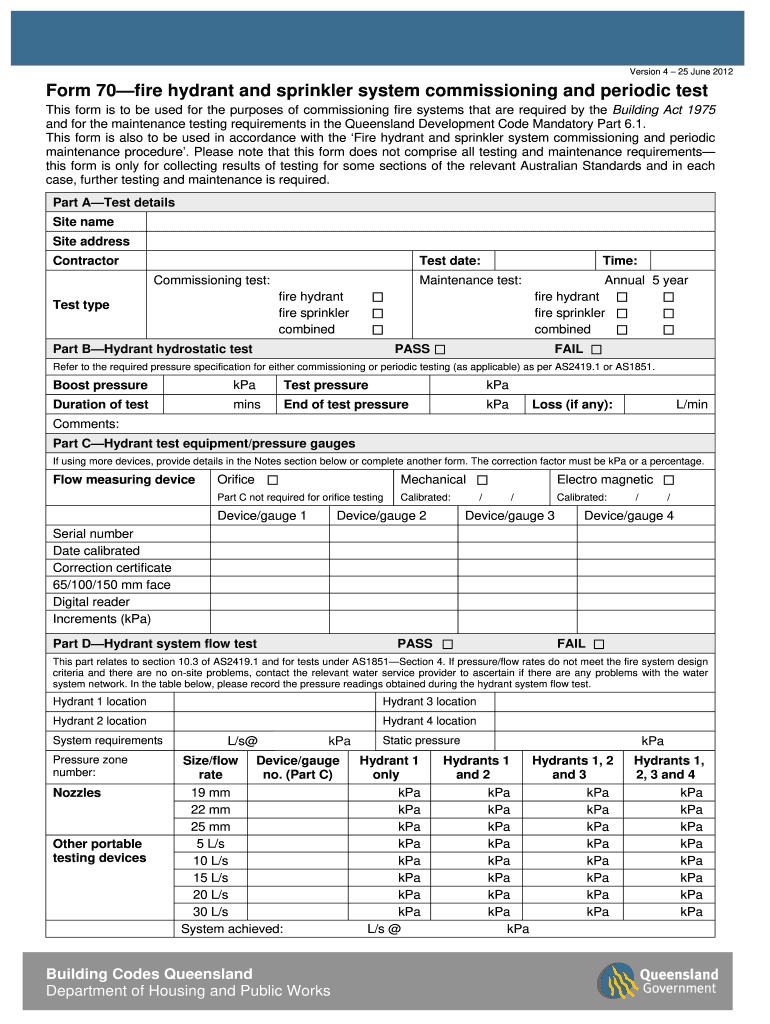







Definition and Meaning of the Fire Hydrant Checklist in Excel
The fire hydrant checklist in Excel serves as a detailed document used for recording essential information related to fire hydrant inspections, maintenance, and compliance. This tool simplifies data collection and can include various fields that operators or maintenance personnel need to fill out when assessing the condition of fire hydrants within their jurisdiction or facility.
Key components often found within the checklist include:
- Hydrant Identification: This typically consists of the hydrant’s location identifier, operational status, and specific markings that correspond with local fire codes.
- Inspection Date: The specific date when the inspection took place, crucial for tracking and compliance purposes.
- Inspection Results: This section may involve whether the hydrant is operable, any noted deficiencies, and the outcome of pressure tests.
- Maintenance Actions: Documentation of any repairs or routine maintenance performed, including dates and details about specific actions taken.
The checklist may also guide users on National Fire Protection Association (NFPA) standards, ensuring that all checks align with legal and operational requirements.
How to Use the Fire Hydrant Checklist in Excel
Using the fire hydrant checklist in Excel involves several straightforward steps that enhance data accuracy and ease of use:
-
Download or Create the Checklist: Obtain a pre-designed fire hydrant checklist template in Excel format or create one from scratch by defining the essential fields.
-
Input Hydrant Data: Fill in pertinent details such as the hydrant number, type, location, and last maintenance date.
-
Conduct the Inspection: As the inspection occurs, document findings within the checklist. Note any maintenance performed, repairs needed, and significant observations.
-
Save and Share: After completing the inspection, save the Excel file and share it with relevant stakeholders such as fire safety officers or compliance officers.
-
Review and Update Regularly: Regular updates are vital to ensure all hydants remain compliant with current NFPA regulations. The checklist should be revised whenever inspections are conducted or maintenance is performed.
Effective use of the checklist not only maintains safety standards but also ensures compliance with state and federal regulations.
Important Terms Related to the Fire Hydrant Checklist in Excel
Understanding specific terminology related to fire hydrant checklists is crucial for effective use and compliance:
-
Flow Test: A procedure used to measure the available water flow from a hydrant, typically expressed in gallons per minute (GPM), which is a vital indication of a hydrant's operational status.
-
Hydrostatic Test: A test intended to confirm the structural integrity of the hydrant's materials, ensuring it can withstand necessary water pressure.
-
NFPA Standards: Guidelines set forth by the National Fire Protection Association that outline the requirements for fire protection and safety measures.
-
Maintenance Action Report: A record of any repairs or routine checks performed during inspections, ensuring that proper upkeep procedures are followed.
-
Compliance Check: An evaluation to determine whether the fire hydrant meets the legal requirements as stated by local fire codes and standards.
Understanding these terms will enhance your ability to fill out and interpret the fire hydrant checklist effectively.
Key Elements of the Fire Hydrant Checklist in Excel
The effectiveness of the fire hydrant checklist in Excel hinges on its comprehensive structure. Key elements typically found within the checklist include:
-
Location Information: Address or coordinates of each hydrant to facilitate easy identification during inspections.
-
Inspection Checklist Items: Specific criteria to evaluate, such as operational status, physical condition, accessibility, and any visible signage.
-
Compliance Documentation: A section for recording evidence of compliance with local fire and safety standards.
-
Remarks Section: A field for additional comments, noting areas of concern or suggestions for future maintenance.
-
Signatures: Space for the inspector's signature, reaffirming accountability and the authenticity of the documentation.
Each of these elements plays a vital role in maintaining a systematic approach to fire hydrant inspections and ensuring public safety.
Steps to Complete the Fire Hydrant Checklist in Excel
Completing a fire hydrant checklist in Excel consists of specific, methodical steps to ensure thoroughness:
-
Create or Open the Checklist: Access the Excel file that contains your fire hydrant checklist. Begin by ensuring all relevant fields are included.
-
Gather Required Information: Collect all necessary data about the hydrants to be inspected, including prior inspection reports and maintenance records.
-
Conduct the Inspection: Examine each hydrant according to the checklist. Fill out the form as you observe each hydrant's condition, noting any deficiencies.
-
Record Findings: Document all inspection results directly on the checklist, including compliance checks and maintenance actions needed.
-
Review Entries: Before finalizing, double-check your entries for accuracy and completeness. Ensure that all necessary fields are filled out.
-
Save the File: Once completed, save the Excel file with an appropriate name indicating the date of inspection and location for easy retrieval.
Following these steps will ensure the checklist captures all required information, promoting effective maintenance and safety compliance.




