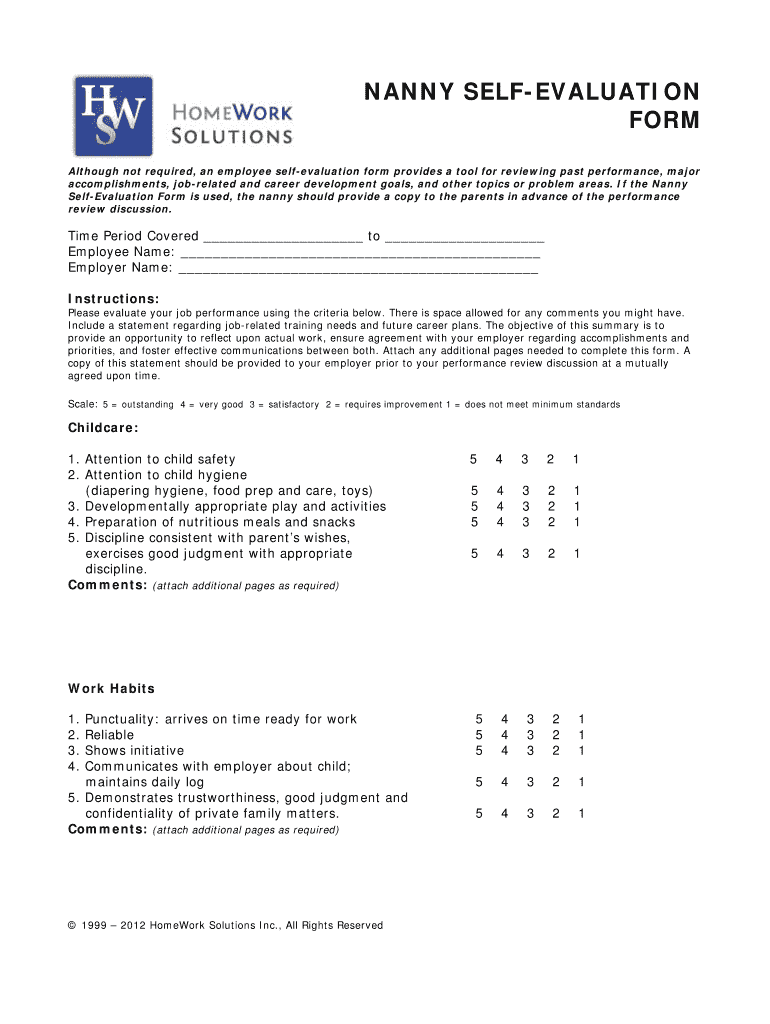
Nanny self evaluation form 2026

Get Form
nanny evaluation form Preview on Page 1

Here's how it works

01. Edit your nanny evaluation form online
Type text, add images, blackout confidential details, add comments, highlights and more.
02. Sign it in a few clicks
Draw your signature, type it, upload its image, or use your mobile device as a signature pad.
03. Share your form with others
Send nanny performance review template via email, link, or fax. You can also download it, export it or print it out.

How to use or fill out nanny self evaluation form with our platform

Form edit decoration
9.5
Ease of Setup
DocHub User Ratings on G2
9.0
Ease of Use
DocHub User Ratings on G2
  1. Click ‘Get Form’ to open the Nanny Self-Evaluation Form in the editor.
  2. Begin by filling in the time period covered and your name along with your employer's name at the top of the form.
  3. Evaluate your job performance in the Childcare section. Rate each criterion from 1 to 5, providing comments where necessary. Use additional pages if needed.
  4. Proceed to the Work Habits section. Again, rate each item and add comments as required, ensuring you reflect on your punctuality, reliability, and communication skills.
  5. If applicable, complete the Housekeeping Responsibilities section by rating your performance and adding any relevant comments.
  6. In the Job Related Training Needs section, outline any training you feel would benefit your career development.
  7. Finally, sign and date the form before sharing it with your employer for review.

Start using our platform today to easily fill out your Nanny Self-Evaluation Form online for free!

be ready to get more

Complete this form in 5 minutes or less

Get form

Got questions?

We have answers to the most popular questions from our customers. If you can't find an answer to your question, please contact us.
Contact us

If you frequently deal with documents kept in your Google Drive, DocHub is a superb solution for you to easily and quickly fill out, modify, and approve them. This editor integrates properly with Google apps, so you can export your nanny review template from your Google Drive to the editor without the need of downloading and re-uploading it. Right-click on your file, select Open With → DocHub PDF Sign and Edit. In our editor, add and assign Signature Fields for all people involved, then click on the Menu button above → Send → decide on how you want to share your paperwork.

In case your go-to electronic mail service is Gmail, you can easily incorporate your DocHub editor into your work. Modify your nanny self evaluation form with DocHub tools and connect it to your drafts in Gmail. See how straightforward it is to exchange files and work together having a swift PDF editing solution at hand.

Dependability and integrity self-evaluation examples I take pride in being honest and accountable, even in challenging situations, and colleagues know they can rely on me to make principled decisions. 2. I am dependable when it comes to meeting deadlines and delivering quality work.
8 Steps to Write a Self-assessment Take ample time to complete the evaluation. Use your own voice and words. Think about how you truly feel. Consider the feedback you have received. Know your worth. Reflect on your mistakes. Identify achievable goals and future projects you want to work on.
Nanny Text-Only Resume Examples and Templates. I am a motivated, dependable nanny with extensive babysitting and care experience. I bring creativity and strong problem-solving skills to provide engaging and educational activities for children. Cared for four children while parents were at work or traveling.

Security and compliance

At DocHub, your data security is our priority. We follow HIPAA, SOC2, GDPR, and other standards, so you can work on your documents with confidence.

Learn more
ccpa2
pci-dss
gdpr-compliance
hipaa
soc-compliance
be ready to get more

Complete this form in 5 minutes or less

Get form

People also ask

Highlight Your Accomplishments A self-evaluation is a rare opportunity to openly talk about your achievements and why youre proud of them. If you went above and beyond to help your team meet a deadline, say so. Doing so helps you and your manager recognize your work ethic and what parts of your job you excel at.

Related links