Type text, add images, blackout confidential details, add comments, highlights and more.

02. Sign it in a few clicks
Draw your signature, type it, upload its image, or use your mobile device as a signature pad.

03. Share your form with others
Send requisition form template via email, link, or fax. You can also download it, export it or print it out.

How to use or fill out travel requisition form with our platform
Ease of Setup
DocHub User Ratings on G2
Ease of Use
DocHub User Ratings on G2
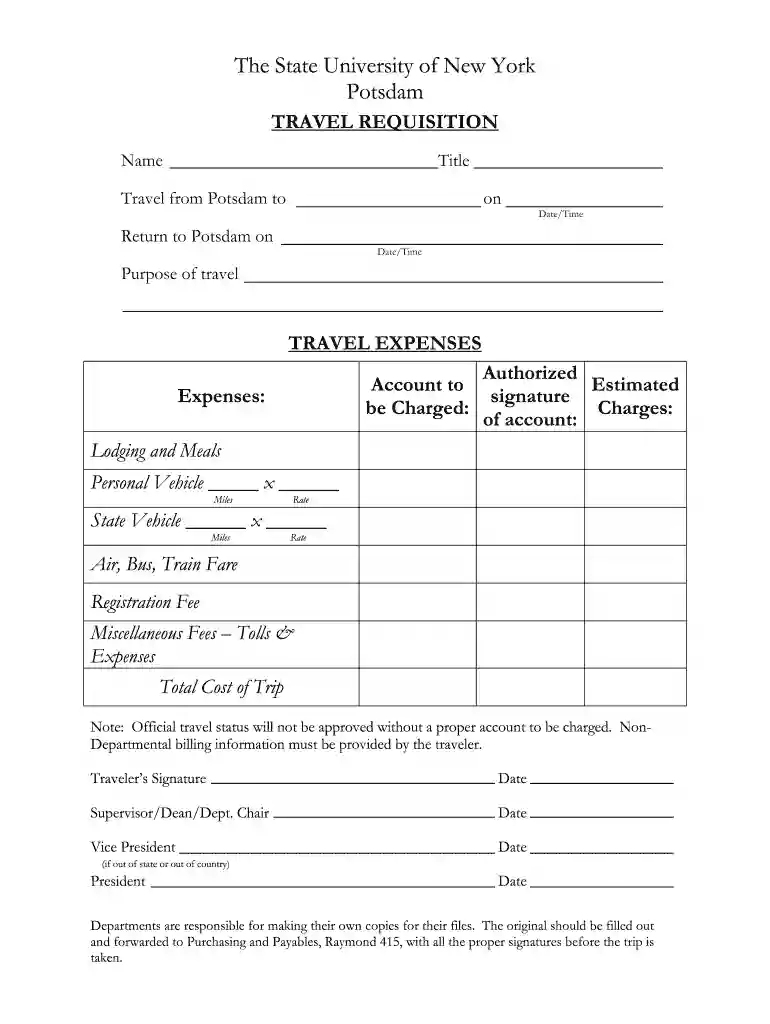
Click ‘Get Form’ to open the travel requisition form in the editor.
Begin by entering your name and title at the top of the form. This identifies you as the traveler.
Fill in the travel details, including your departure location (Potsdam), destination, and dates/times for both departure and return.
Specify the purpose of your travel in the designated field to provide context for your trip.
In the 'TRAVEL EXPENSES' section, indicate the account to be charged for expenses. Ensure this is accurate to avoid delays.
List all estimated expenses, including lodging, meals, vehicle usage (personal or state), transportation fares, registration fees, and any miscellaneous costs.
Calculate and enter the total cost of your trip at the bottom of this section.
Sign and date where indicated as a confirmation of accuracy before submitting it to your supervisor or department chair for approval.
Start using our platform today to streamline your travel requisition process for free!
Travel request forms are designed to give managers an overview of the intended business trip from both a cost and a strategic point of view. The form fields that typically appear on a travel request form include travel information such as: Employee name and contact information. The business purpose of the trip.
What is a travel requisition?
A travel requisition lists the expenses incurred for the purpose of travel. A travel requisition is submitted for review and can be used to authorize expenses.
What is the purpose of a travel request form?
The primary function of a travel request form is to streamline the process of requesting and approving travel within an organisation. By using this form, both employees and managers can clearly communicate the details and necessity of the trip.
How to fill out a travel request form?
The form will need information such as company details, client or customer details, project description, company background, objective, the scope of work, start date, completion date, consulting rates, payment terms, and signatures.
business travel request form template excel
Travel requisition form template wordTravel request form template ExcelTravel request form template wordTravel requisition form pdfTravel requisition form template freeBusiness travel request form template ExcelTravel request form for employeesTravel requisition form for employee
Security and compliance
At DocHub, your data security is our priority. We follow HIPAA, SOC2, GDPR, and other standards, so you can work on your documents with confidence.
What form do you fill out for international travel?
What is a travel request approval workflow? All employees travelling for work need to fill out a travel request form. This form is then approved and signed-off by supervisors and other members of the finance team. By completing a travel request form, all of the employees expenses are covered by the company.
How to fill a travel request form?
A typical travel request form includes: Employee information: Name, department, and contact information. Travel details: Destination, purpose of the visit, departure and return dates. Transportation and accommodation: Preferences or arrangements for flights, hotels, car hire, etc.
requisition form
SMG 2340.1 (01/26/2017)
Jan 26, 2017 Complete the HHS-348 Form. 4. After travel, sign the HHS-348 Form as part of the travel authorization and voucher process. 5. Prepare and
Cookie consent notice
This site uses cookies to enhance site navigation and personalize your experience.
By using this site you agree to our use of cookies as described in our Privacy Notice.
You can modify your selections by visiting our Cookie and Advertising Notice.