Andhra bank kyc form 2026

Get Form
andhra bank kyc update online Preview on Page 1

Here's how it works

01. Edit your andhra bank kyc update online online
Type text, add images, blackout confidential details, add comments, highlights and more.

02. Sign it in a few clicks
Draw your signature, type it, upload its image, or use your mobile device as a signature pad.

03. Share your form with others
Send banking application via email, link, or fax. You can also download it, export it or print it out.

How to use or fill out Andhra Bank KYC Form with DocHub

Form edit decoration
9.5
Ease of Setup
DocHub User Ratings on G2
9.0
Ease of Use
DocHub User Ratings on G2
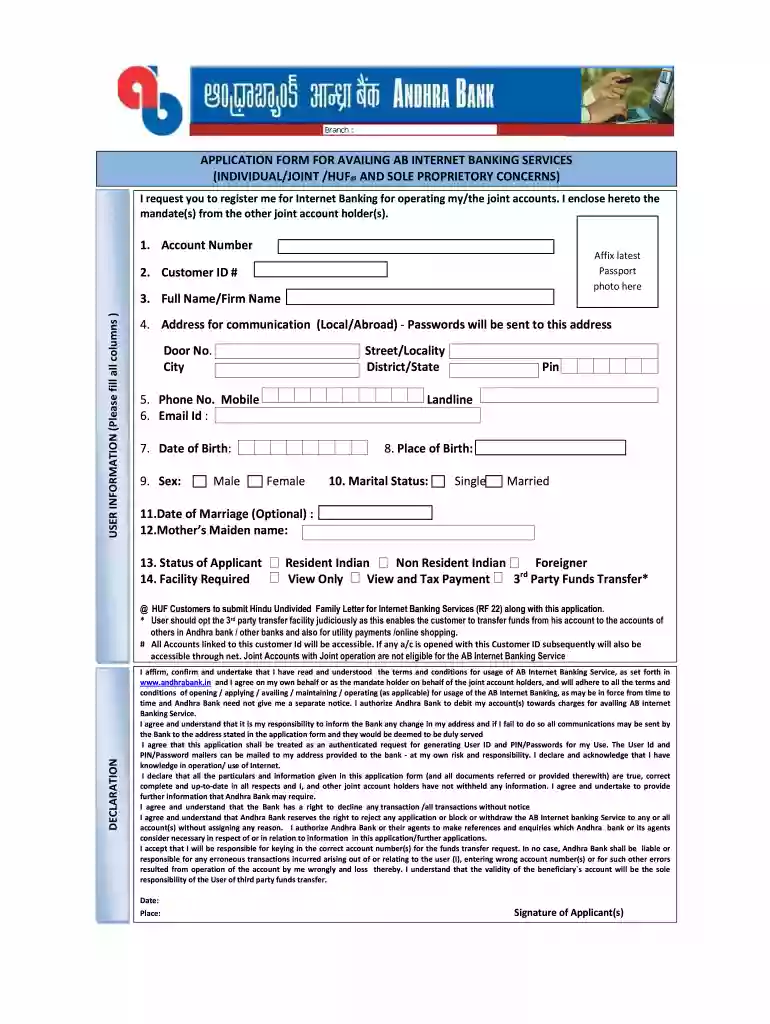
  1. Click ‘Get Form’ to open the Andhra Bank KYC form in our platform.
  2. Begin by entering your Account Number and Customer ID # in the designated fields. Ensure these details are accurate for seamless processing.
  3. Affix your latest passport photo in the specified area. This is essential for identity verification.
  4. Fill out the User Information section, including your Full Name/Firm Name, Address for communication, Phone Numbers, Email ID, Date of Birth, Place of Birth, and Sex. Each field must be completed accurately.
  5. Indicate your Marital Status and provide your Mother’s Maiden Name. These details help in personal identification.
  6. Select the Facility Required from options like Resident Indian or Non-Resident Indian and specify if you need View Only or Transaction capabilities.
  7. Review all entered information for accuracy before submitting the form. Use our platform's editing features to make any necessary adjustments.

Start using our platform today to fill out your Andhra Bank KYC form easily and for free!

be ready to get more

Complete this form in 5 minutes or less

Get form

Got questions?

We have answers to the most popular questions from our customers. If you can't find an answer to your question, please contact us.
Contact us
Yes, eKYC allows customers to complete their KYC process from home using digital platforms. This can be done through Aadhaar authentication or video KYC, enhancing convenience and accessibility. How much does eKYC cost? The cost of eKYC varies based on the service provider and the technology used.
Login to your banks netbanking or mobile banking app, navigate to KYC update section, upload documents and submit. In video KYC, live call is conducted with an authorised executive of the financial institution.
UIDAI provides a mechanism to verify identity of an Aadhaar number holder through an online electronic KYCservice. The e-KYC service provides an authenticated instant verification of identity and docHubly lowers the cost of paper based verification and KYC.
Steps to check your KYC Status: Visit any Mutual Funds or Registrar Transfer Agents (RTA) Website where you have an investment. Check for KYC Status link, if available. Else, visit .cvlkra.com and click on KYC Inquiry. Enter your 10-digit PAN and Captcha and click on Submit.
Here are the steps to follow: Visit the official KYC online portal of the KRA (KYC registration agency). Log in with your registered mobile number and enter the OTP received. Make a self-attested copy of your e-Aadhaar and upload it. Accept the terms and conditions.

Security and compliance

At DocHub, your data security is our priority. We follow HIPAA, SOC2, GDPR, and other standards, so you can work on your documents with confidence.

Learn more
ccpa2
pci-dss
gdpr-compliance
hipaa
soc-compliance
be ready to get more

Complete this form in 5 minutes or less

Get form

People also ask

You can complete your online KYC using your Customer ID, PAN Number, and Account Number.
Enter Phone Number. Enter your primary phone number and accept the terms. ​ I have read and understood the privacy policy. NEXT. Enter OTP. Numbers registered. Document Proof.

andhra bank kyc update