Form rd 3560 20-2026

Get Form
form rd 3560 20 Preview on Page 1

Here's how it works

01. Edit your form online
Type text, add images, blackout confidential details, add comments, highlights and more.
02. Sign it in a few clicks
Draw your signature, type it, upload its image, or use your mobile device as a signature pad.
03. Share your form with others
Send it via email, link, or fax. You can also download it, export it or print it out.

How to use or fill out form RD 3560-20 with our platform

Form edit decoration
9.5
Ease of Setup
DocHub User Ratings on G2
9.0
Ease of Use
DocHub User Ratings on G2
  1. Click ‘Get Form’ to open the RD 3560-20 in the editor.
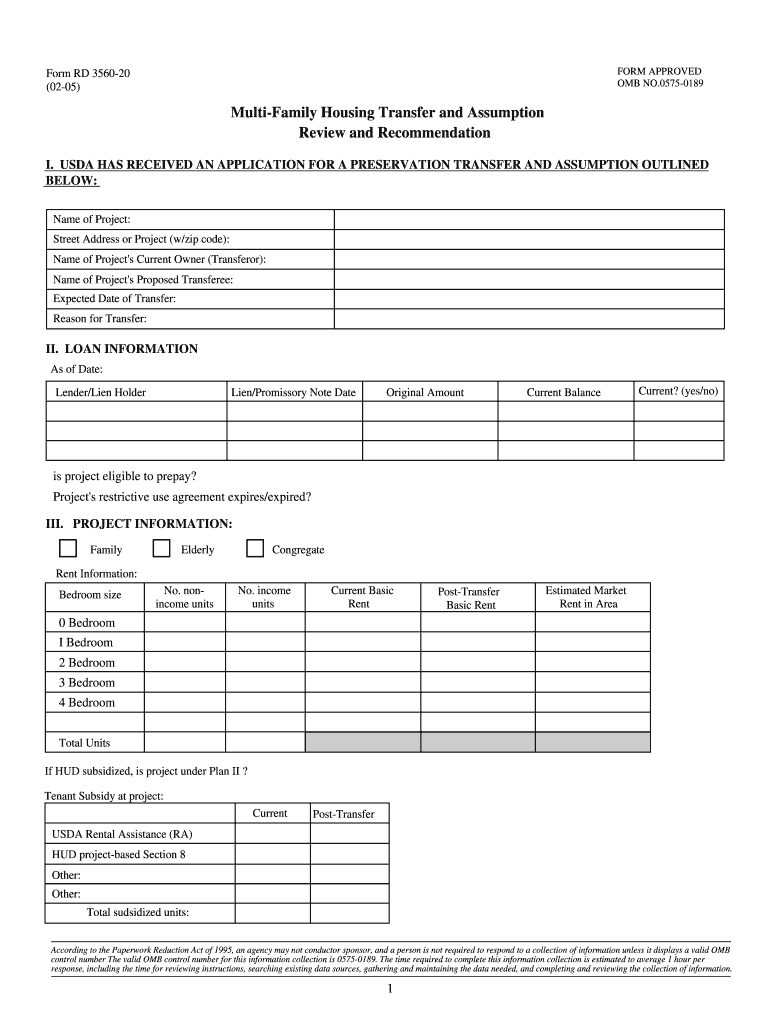
  2. Begin by filling in Section I with the project details, including the name, address, current owner, proposed transferee, expected date of transfer, and reason for transfer.
  3. In Section II, provide loan information such as the lender's name, lien date, original amount, current balance, and eligibility for prepayment.
  4. Move to Section III to enter project information. Specify if it is family or elderly housing and fill in rent details for each bedroom size.
  5. Complete Section IV by detailing reserve account information including current balances and requirements.
  6. In Section V, assess project condition and compliance. Note any unresolved issues and their estimated costs.
  7. Finalize by reviewing Sections VI and VII for appraisal details and any special conditions before certifying your entries.

Start using our platform today to streamline your form completion process for free!

be ready to get more

Complete this form in 5 minutes or less

Get form

Got questions?

We have answers to the most popular questions from our customers. If you can't find an answer to your question, please contact us.
Contact us
Note rent is the rental charge established to cover expenses in the housing projects approved budget and the required loan payment set at the interest rate shown in Form RD 3560-52, Promissory Note.
This form is completed for each tenant in all Rural Rental Housing, Rural Cooperative Housing, and Labor Housing borrowers or their authorized representative to document the tenant income and calculate the appropriate rental charge.
The updated Form RD 3560-8 is for tenant certifications with an effective date of July 1, 2025, or after. The previous Form RD 3560-8 has been renamed Form RD 3560-8A. The updated form will be used for tenant certifications effective before July 1, 2025. HOTMA has undergone many changes since it was signed into law.
� Form RD 1980-19 (Rev. � 6-00). New Guaranteed BI Loan with Interest Rate Buydown. NOTE: Only enter 2 if the borrower does not qualify for the Interest Assistance Program at the time of loan closing, and the borrower will not be eligible for interest assistance during the remaining life of the loan.
If the corporation is revoking its S corporation status for both federal and California purposes, the corporation should file form FTB 3560 with the FTB at the same time it files the federal statement of revocation with the IRS.

Security and compliance

At DocHub, your data security is our priority. We follow HIPAA, SOC2, GDPR, and other standards, so you can work on your documents with confidence.

Learn more
ccpa2
pci-dss
gdpr-compliance
hipaa
soc-compliance
be ready to get more

Complete this form in 5 minutes or less

Get form

People also ask

Form 60 is a declaration form used in India for individuals who do not have a Permanent Account Number (PAN) but need to carry out certain financial transactions. It serves as an alternative to providing a PAN when conducting specific transactions or opening certain accounts.
How to fill out the Final Payment Acknowledgment Form USDA RD 451-20? Review the final payment details provided by USDA. Fill in the required fields, including date and loan information. Sign the form where indicated to acknowledge receipt. Send the completed form to the County Supervisor. Keep a copy for your records.
Form 60 is a document to be filed by a person (not a company or firm) to carry out transactions specified in Rule 114B when they do not have a PAN either because: they have not applied for PAN or. they have applied for PAN, but allotment is pending.

Related links