




01. Edit your daily meal count form online
Type text, add images, blackout confidential details, add comments, highlights and more.

Type text, add images, blackout confidential details, add comments, highlights and more.

Draw your signature, type it, upload its image, or use your mobile device as a signature pad.

Send meal count sheet via email, link, or fax. You can also download it, export it or print it out.
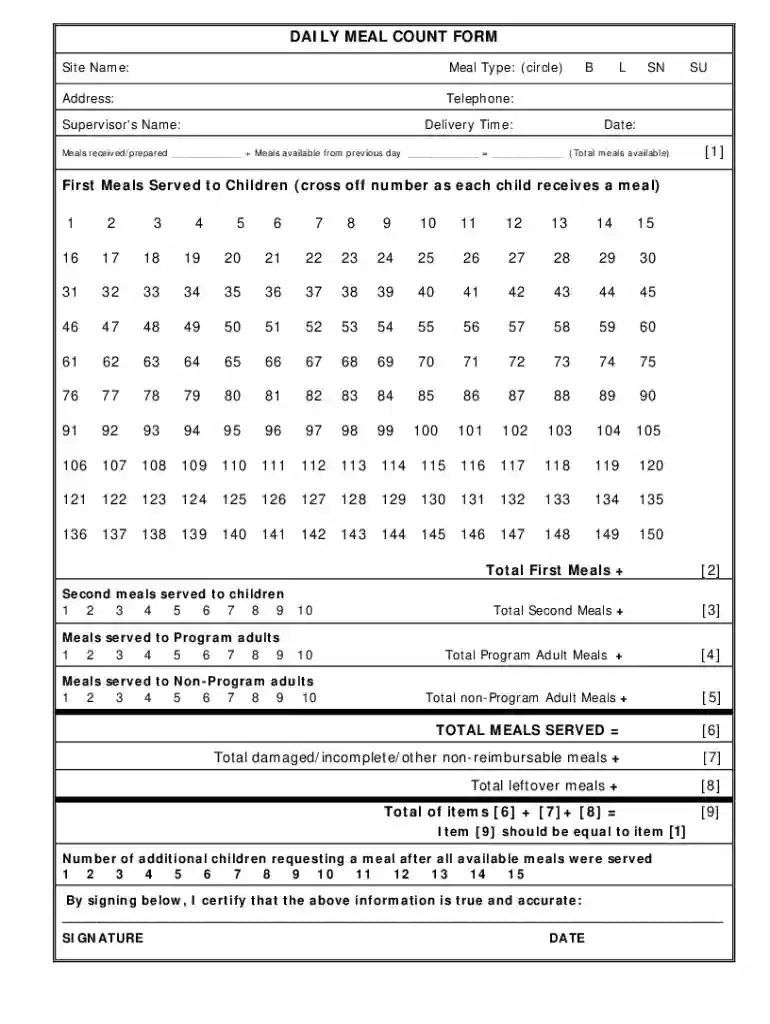
The daily meal count sheet is a structured document utilized to record the number of meals provided at various sites, particularly in programs like the Child and Adult Care Food Program (CACFP) and the Summer Food Service Program (SFSP). This sheet is crucial for tracking meal distribution, ensuring compliance with federal and state regulations, and maintaining accurate records for reporting purposes.
The daily meal count sheet is designed with various sections, each serving a specific purpose crucial for accurate record-keeping:
Meal Count Data: This area includes fields for entering the number of meals served. Typically, it is divided into categories such as:
Types of Meals: The sheet may differentiate between meals served to program participants (children, adults) and non-program individuals, ensuring accurate reporting for reimbursements.
Signature and Certification: There is usually a section for signatures that validates the accuracy of the reported meal counts, often requiring the authorized representative to sign and date the sheet.
Completing the daily meal count sheet involves several steps that ensure all necessary data is accurately recorded:
Preparation at the Start of Each Day: Have the meal count sheet ready before meals are served. This proactive approach ensures that counts are collected in real time.
Accurate Count During Service: As meals are served, staff should tally each meal served in the appropriate sections. For example, if 20 breakfasts are served to children and five to adults, these figures need to be recorded accurately.
Post-Meal Review: After all meals are served, review the entries for any discrepancies. Ensuring that the counts align with the actual number of meals prepared can prevent future reporting issues.
Certifying the Data: An authorized individual must review the completed form, sign it, and date it. This certification indicates the data is complete and accurate.
While the daily meal count sheet is a vital tool, there can be challenges associated with its use:
Underreporting or Overreporting: Meal counts can be affected by oversights, such as forgetting to count all meals or miscalculating totals during busy service times. Staff training can help reduce these errors.
Record Retention: Maintaining these records for the required duration is essential for audits and compliance. Organizations should establish a systematic approach to file and retrieve these sheets.
Adapting to Changes: Changes in meal types, participant numbers, or program requirements may require updates to the meal count sheet. Regular reviews and adaptations ensure that the document remains relevant.
Accurate meal count reporting influences several key areas, including:
Federal and State Compliance: Programs receiving federal reimbursement must adhere to strict reporting guidelines. Inaccurate counts may lead to funding discrepancies.
Budgeting and Planning: Understanding meal needs allows organizations to plan menus, procure the right amount of food, and manage budgets effectively.
Data Analytics: Analyzing meal count data can highlight trends in participation, informing future program developments and adjustments to menu offerings.
To streamline the use of the daily meal count sheet and improve overall accuracy, consider the following best practices:
Regular Staff Training: Conduct training sessions to ensure all staff understand the importance of accurate counting and familiarization with the sheet format.
Standardization: Use a standardized format for all meal count sheets to maintain consistency. This helps simplify the data entry process and reduces confusion.
Monitoring and Feedback: Designate a staff member to regularly review the sheets for accuracy and provide feedback, ensuring continuous improvement in the reporting process.
Through diligent application of these practices, organizations can effectively manage their daily meal count sheets, which in turn enhances their operational efficiency and compliance with applicable food service programs.
With DocHub, it’s pretty simple. The editor offers users an add-on called DocHub for Gmail, which you can find in the Google Workspace Marketplace without being charged. Install it and give it access to your Google account. Open your email with your cacfp meal count form attached and click on the add-on button in the right-side panel. Sign in to your DocHub account, and upload the file to our editor, where you can fill it out and sign.
If you are searching for a state-specific meal count form sample, you can find it in our DocHub Forms & Templates catalog. Use the search field, enter your form’s name, and search through the results for your state. You can also filter out irrelevant results while searching our catalog by categories.
At DocHub, your data security is our priority. We follow HIPAA, SOC2, GDPR, and other standards, so you can work on your documents with confidence.
On this printable daily calorie count half page sheet youll add up all of the calories in the calories column to find your total for the day. The calorieRead more
At-Risk Afterschool Meals Daily Attendance and Meal Count Roster Enter the dates for this form. At the end of the week, combine daily totals and enter into


