Tax organizer template excel 2026

Get Form
tax organizer template excel Preview on Page 1

Here's how it works

01. Edit your tax organizer template excel online
Type text, add images, blackout confidential details, add comments, highlights and more.

02. Sign it in a few clicks
Draw your signature, type it, upload its image, or use your mobile device as a signature pad.

03. Share your form with others
Send free tax organizer template excel via email, link, or fax. You can also download it, export it or print it out.

How to use or fill out tax organizer template excel with our platform

Form edit decoration
9.5
Ease of Setup
DocHub User Ratings on G2
9.0
Ease of Use
DocHub User Ratings on G2
  1. Click ‘Get Form’ to open the tax organizer template in the editor.
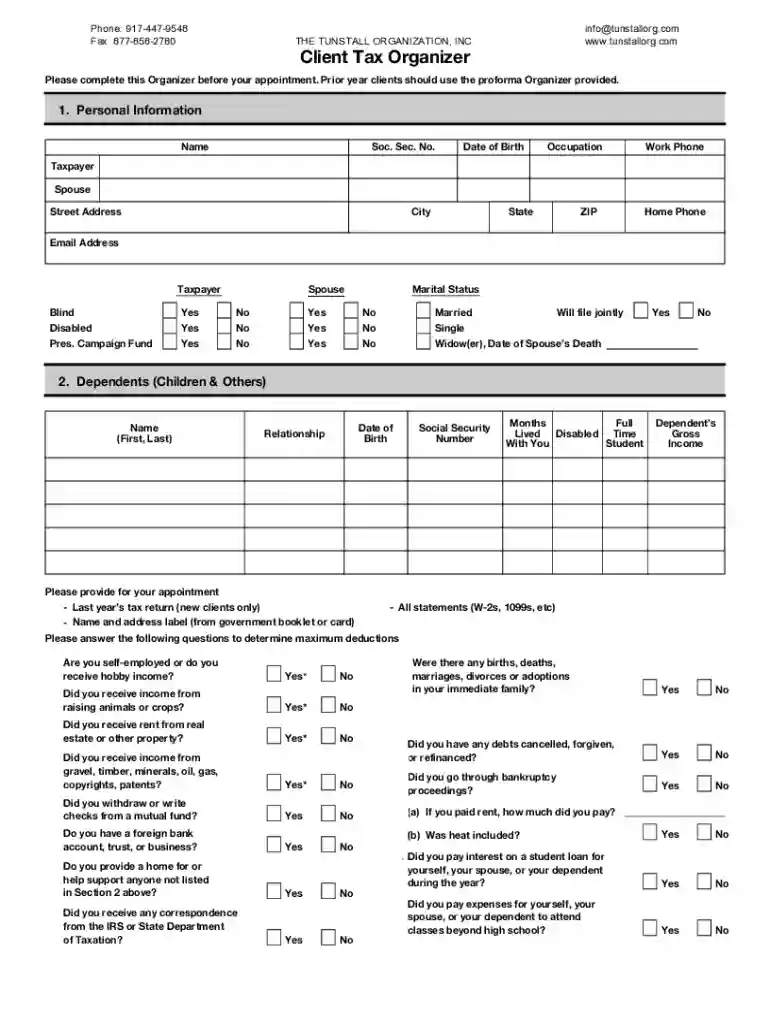
  2. Begin by filling out the 'Personal Information' section. Enter your name, Social Security number, date of birth, occupation, and contact details for both taxpayer and spouse.
  3. Proceed to the 'Dependents' section. List each dependent's name, date of birth, relationship, and Social Security number. Ensure you indicate if they lived with you full-time.
  4. Answer the questions regarding income sources and deductions. This includes self-employment income, rental income, and any significant life events that may affect your taxes.
  5. Review all sections for completeness. Make sure to attach any necessary documentation such as last year's tax return or W-2 forms before finalizing your submission.

Start using our platform today for free to streamline your tax preparation process!

be ready to get more

Complete this form in 5 minutes or less

Get form

Got questions?

We have answers to the most popular questions from our customers. If you can't find an answer to your question, please contact us.
Contact us
Application of Sales tax formula in Excel As an example, if you entered a sales amount of $100 in cell A2 and the tax rate is set at 7% in cell B2, the formula =A2*B2 will generate the sales tax once you press Enter.
For the unfamiliar, a tax organizer is a written compilation of financial questions for taxpayers, often used by CPAs to prepare tax returns.
ITR Computation can be prepared using Excel by following the below process: The basic details of the assessee like Name, PAN, address, Aadhaar Number, date of birth, residential status, should be entered. The financial year, assessment year, and the type of return should be added.
Create a row in Excel for each income tax rate. Enter the applicable portion of your income that falls into that bracket and multiply it by the percentage. Enter the result in the last column then total the figures that appear in that column. This is your total tax.
Avoid These Common Tax Mistakes Not Claiming All of Your Credits and Deductions. Not Being Aware of Tax Considerations for the Military. Not Keeping Up with Your Paperwork. Not Double Checking Your Forms for Errors. Not Adhering to Filing Deadlines or Not Filing at All. Not Fixing Past Mistakes. Not Planning for Next Year.

Security and compliance

At DocHub, your data security is our priority. We follow HIPAA, SOC2, GDPR, and other standards, so you can work on your documents with confidence.

Learn more
ccpa2
pci-dss
gdpr-compliance
hipaa
soc-compliance
be ready to get more

Complete this form in 5 minutes or less

Get form

People also ask

Under the Act, an organizer is simply the person who signs the articles of organization to create the LLC. The person may, but is not required to be, a member or manager of the LLC.
Hourly rate: Tax advisors may charge an hourly rate ranging from $100 to $400, depending on their qualifications and experience. This pricing model is often used for tax planning or advisory services, as the time spent can vary docHubly depending on the clients situation.

free excel tax worksheet