Irs form 2325 2002-2026

Get Form
form 2325 Preview on Page 1

Here's how it works

01. Edit your form 2325 online
Type text, add images, blackout confidential details, add comments, highlights and more.

02. Sign it in a few clicks
Draw your signature, type it, upload its image, or use your mobile device as a signature pad.

03. Share your form with others
Send it via email, link, or fax. You can also download it, export it or print it out.

How to use or fill out IRS Form 2325 2002 with our platform

Form edit decoration
9.5
Ease of Setup
DocHub User Ratings on G2
9.0
Ease of Use
DocHub User Ratings on G2
  1. Click ‘Get Form’ to open it in the editor.
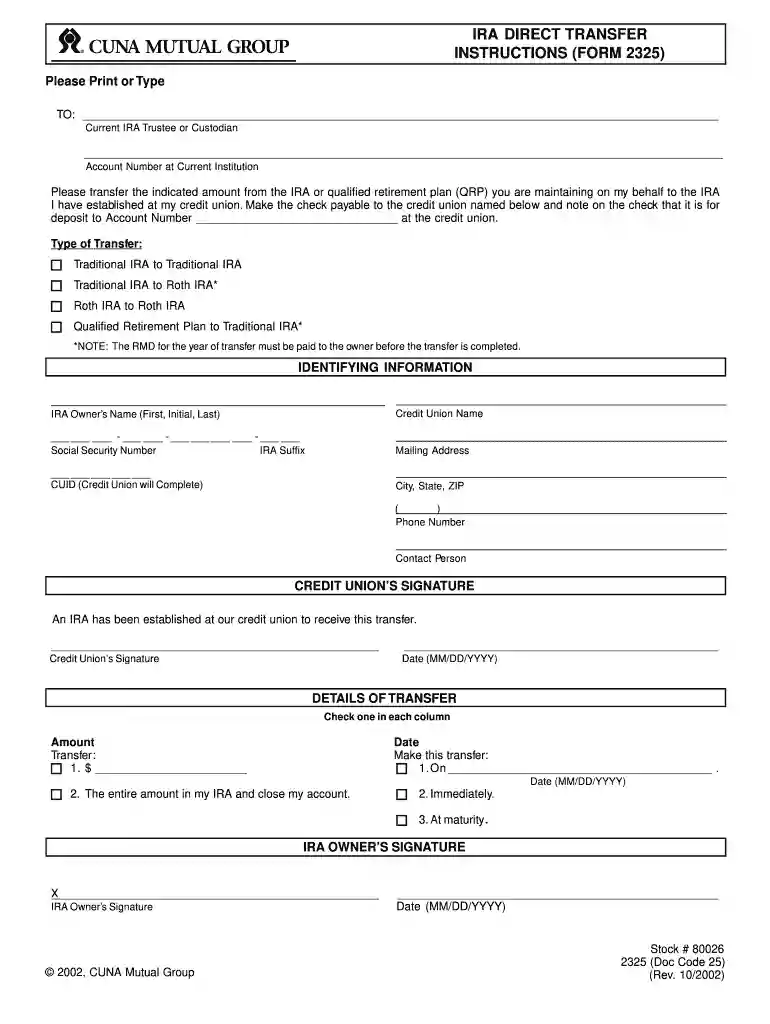
  2. Begin by filling in the 'Current IRA Trustee or Custodian' section with the name and account number of your current institution.
  3. Select the type of transfer you are requesting: Traditional IRA to Traditional IRA, Traditional IRA to Roth IRA, Roth IRA to Roth IRA, or Qualified Retirement Plan to Traditional IRA. Ensure you understand any implications of your choice.
  4. In the 'Identifying Information' section, provide your credit union's name, your full name, Social Security Number, mailing address, and phone number.
  5. Specify the amount you wish to transfer and choose a date for this transfer. You can also indicate if you want to close your account after transferring the entire amount.
  6. Sign and date the form at the bottom as the IRA owner. Ensure all information is accurate before submission.

Start using our platform today for free to streamline your form completion process!

See more irs form 2325 2002 versions

We've got more versions of the irs form 2325 2002 form. Select the right irs form 2325 2002 version from the list and start editing it straight away!
Versions Form popularity Fillable & printable
2009 4.9 Satisfied (340 Votes)
2002 4 Satisfied (60 Votes)
be ready to get more

Complete this form in 5 minutes or less

Get form

Got questions?

We have answers to the most popular questions from our customers. If you can't find an answer to your question, please contact us.
Contact us
Use Form 8606 to report: Nondeductible contributions you made to traditional IRAs. Distributions from traditional, SEP, or SIMPLE IRAs, if you have ever made nondeductible contributions to traditional IRAs. Conversions from traditional, SEP, or SIMPLE IRAs to Roth IRAs.
Use Form 843 to claim a refund or request an abatement of certain taxes, interest, penalties, fees, and additions to tax.
You can also seek a penalty or interest waiver by filing Form 843 with the IRS. The IRS requires taxpayers requesting FTA to submit Form 843, Claim for Refund and Request for Abatement, and to include an explanation and supporting documentation.
Taxpayers and electronic return originators (EROs) use this form to send any required paper forms or supporting documentation listed next to the checkboxes on the front of the form. Form 8453 is used solely to transmit the forms listed on the front of the form. Do not send Forms W-2, W-2G, or 1099-R.
If we cannot approve your relief over the phone, you may request relief in writing with Form 843, Claim for Refund and Request for Abatement. To reduce or remove an estimated tax penalty, see: Underpayment of estimated tax by individuals penalty.

Security and compliance

At DocHub, your data security is our priority. We follow HIPAA, SOC2, GDPR, and other standards, so you can work on your documents with confidence.

Learn more
ccpa2
pci-dss
gdpr-compliance
hipaa
soc-compliance
be ready to get more

Complete this form in 5 minutes or less

Get form

People also ask

More In Forms and Instructions Use Form 843 to claim a refund or request an abatement of certain taxes, interest, penalties, fees, and additions to tax.
About Form W-8 BEN-E, Certificate of Status of Beneficial Owner for United States Tax Withholding and Reporting (Entities) Internal Revenue Service.
Authorize with Form 2848 - Complete and submit online, by fax or mail Form 2848, Power of Attorney and Declaration of Representative.

Related links