Type text, add images, blackout confidential details, add comments, highlights and more.
02. Sign it in a few clicks
Draw your signature, type it, upload its image, or use your mobile device as a signature pad.
03. Share your form with others
Send it via email, link, or fax. You can also download it, export it or print it out.
How to use or fill out ST-1211 form with our platform
Ease of Setup
DocHub User Ratings on G2
Ease of Use
DocHub User Ratings on G2
Click ‘Get Form’ to open the ST-1211 form in the editor.
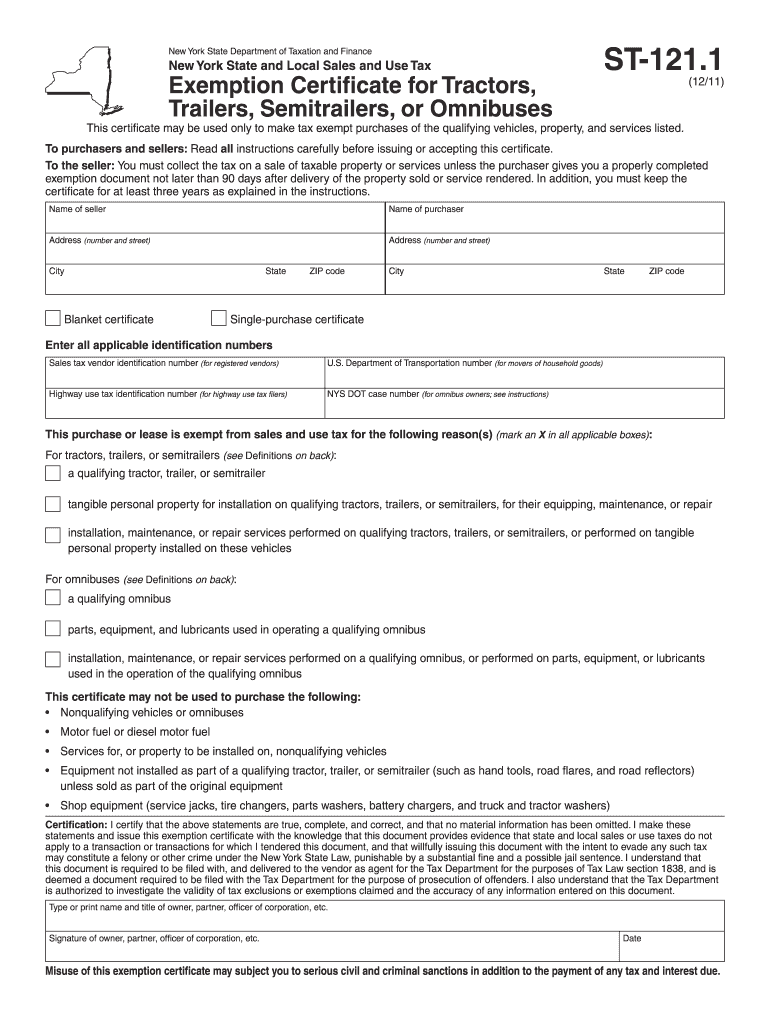
Begin by entering the seller's name and address in the designated fields. Ensure accuracy as this information is crucial for tax exemption.
Next, fill in the purchaser's name and address, including city, state, and ZIP code. This identifies who is making the tax-exempt purchase.
Select whether you are using a blanket certificate or a single-purchase certificate by marking an 'X' in the appropriate box.
Enter all applicable identification numbers such as sales tax vendor ID and U.S. Department of Transportation number. This step is essential for validation.
Indicate the reason for tax exemption by marking an 'X' in all applicable boxes related to tractors, trailers, semitrailers, or omnibuses.
Finally, certify your statements by typing or printing your name and title, signing the document, and adding the date before submitting it to the seller.
Start filling out your ST-1211 form online for free today!
Form ST-121.1:12/11: Exemption Certificate for Tractors
Certification: I DocHub that the above statements are true, complete, and correct, and that no material information has been omitted. I make these statementsRead more
Please email international@tacomacc.edu to request an application form. Apply to Tacoma Community College. Eligibility: Applicant must be at least 16 yearsRead more
Cookie consent notice
This site uses cookies to enhance site navigation and personalize your experience.
By using this site you agree to our use of cookies as described in our Privacy Notice.
You can modify your selections by visiting our Cookie and Advertising Notice.