Type text, add images, blackout confidential details, add comments, highlights and more.

02. Sign it in a few clicks
Draw your signature, type it, upload its image, or use your mobile device as a signature pad.

03. Share your form with others
Send tjc transcript via email, link, or fax. You can also download it, export it or print it out.

How to use or fill out request tjc with our platform
Ease of Setup
DocHub User Ratings on G2
Ease of Use
DocHub User Ratings on G2
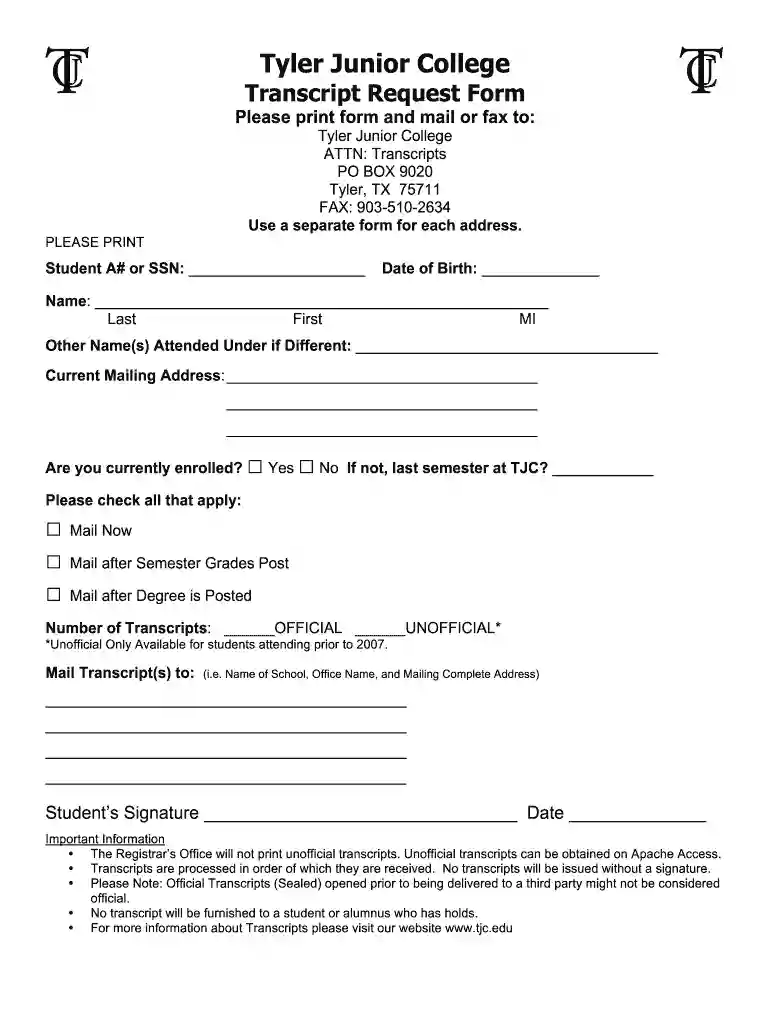
Click ‘Get Form’ to open the request tjc in the editor.
Begin by entering your Student A# or SSN in the designated field, followed by your Date of Birth.
Fill in your full name, including Last, First, and Middle Initial. If you attended under a different name, please provide that information as well.
Input your current mailing address clearly across the provided lines.
Indicate whether you are currently enrolled by selecting 'Yes' or 'No'. If you are not enrolled, specify your last semester at TJC.
Select all applicable options regarding when to mail your transcripts: 'Mail Now', 'Mail after Semester Grades Post', or 'Mail after Degree is Posted'.
Specify the number of transcripts you need and indicate if they should be official or unofficial.
Provide the complete mailing address for where the transcript(s) should be sent.
Finally, sign and date the form to validate your request before submitting it through our platform.
Start filling out your request tjc today for free using our platform!
microG installation (G - SailfishOS community wiki
Jan 31, 2025 Open microG Settings application and hit Location. Here you can enable different location services. Selecting Request from online serviceRead more
Cookie consent notice
This site uses cookies to enhance site navigation and personalize your experience.
By using this site you agree to our use of cookies as described in our Privacy Notice.
You can modify your selections by visiting our Cookie and Advertising Notice.