Bdvr 153 2025

Get Form
bdvr 153 Preview on Page 1

Here's how it works

01. Edit your form online
Type text, add images, blackout confidential details, add comments, highlights and more.
02. Sign it in a few clicks
Draw your signature, type it, upload its image, or use your mobile device as a signature pad.
03. Share your form with others
Send it via email, link, or fax. You can also download it, export it or print it out.

How to use or fill out bdvr 153 with our platform

Form edit decoration
9.5
Ease of Setup
DocHub User Ratings on G2
9.0
Ease of Use
DocHub User Ratings on G2
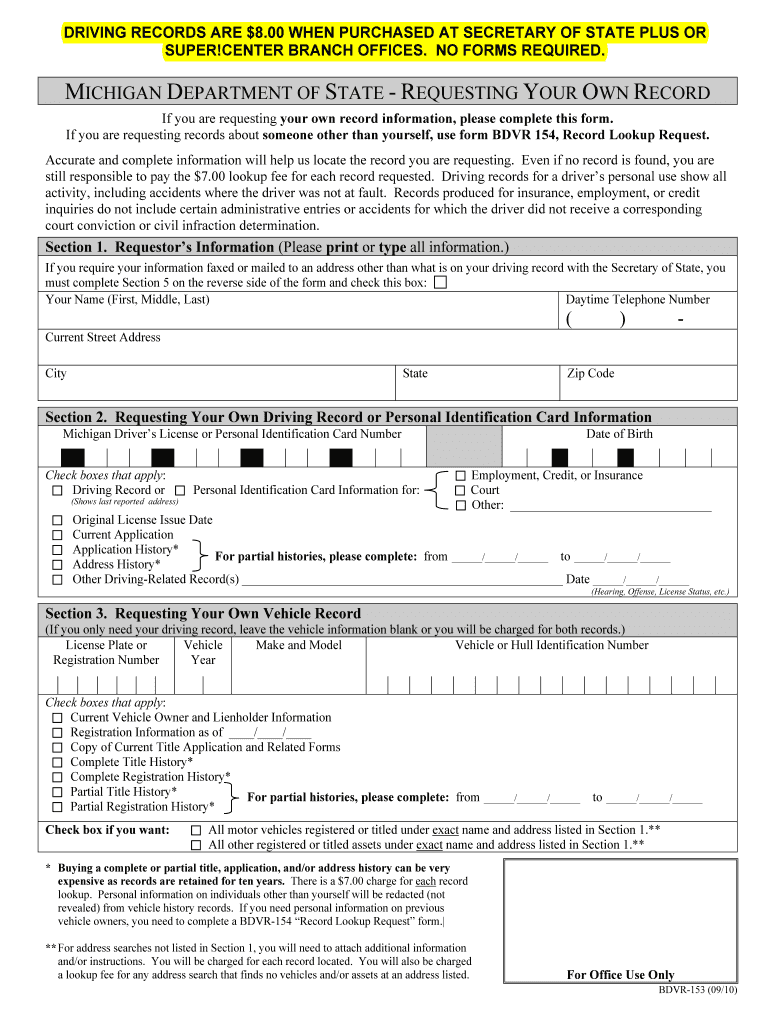
  1. Click ‘Get Form’ to open the bdvr 153 in the editor.
  2. Begin with Section 1, where you will enter your personal information. Ensure that you print or type your name, daytime telephone number, and current address clearly.
  3. In Section 2, specify whether you are requesting your own driving record or personal identification card information. Fill in your Michigan Driver’s License number and check the appropriate boxes for the type of information needed.
  4. If applicable, complete Section 3 for vehicle records. Provide details such as license plate number and vehicle identification number only if you need this information; otherwise, leave it blank.
  5. Proceed to Section 4 to select your payment method. Enter credit card details if paying by card, ensuring all fields are filled accurately.
  6. If necessary, complete Section 5 for special delivery instructions. This is important if you want records sent to a different address.
  7. Finally, sign and date Section 6 to certify your request before submitting the form.

Start using our platform today for free to streamline your bdvr 153 form completion!

be ready to get more

Complete this form in 5 minutes or less

Get form

Got questions?

We have answers to the most popular questions from our customers. If you can't find an answer to your question, please contact us.
Contact us

Most eSignature solutions require users to have a paid subscription. With DocHub, there are two ways for you to create an electronic signature to your bdvr 153 free of charge:

  • You can do it during a 7-day trial period;
  • You can subscribe to a free plan.

The second option, though, has restrictions on the number of signatures, sign requests, emails, and forms for adjusting available per month. You can check for full information here.

If you are searching for a state-specific bdvr 153 sample, you will find it in our DocHub Forms & Templates catalog. Use the search field, key in your form’s name, and search through the results for your state. You may also filter out irrelevant results while browsing our catalog by groups.

Records can be ordered online at Michigan.gov/SOSonline by going to the Additional Services section, selecting Record Sales Services, then Request Records. To request your own driving record, go to the Drivers License and ID section, select More Driver Services and login.
Note: StateElectronicWalk-In Michigan $15.00 Only available to person of record. $15.00, $16.00 certified Minnesota $5.00 $9.50 $10.50 certified Additional $1.00 per printed page Mississippi $14.31 $11.00 Missouri $2.82 per record $2.82 per record with $2.00 in office processing fee47 more rows