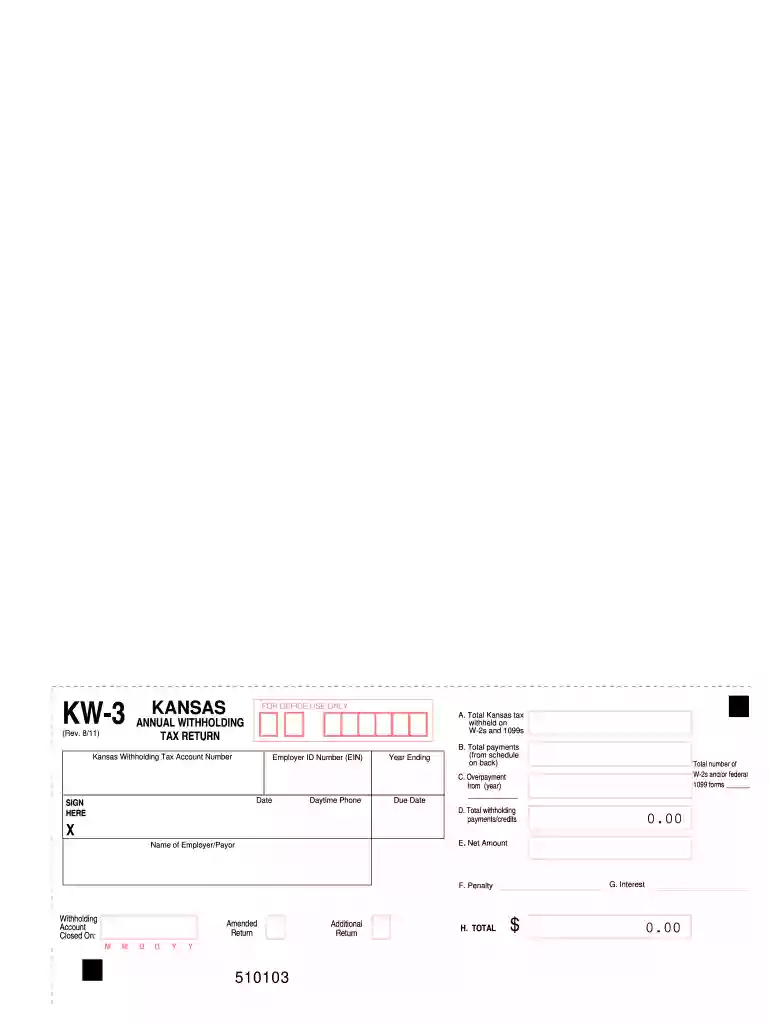
Form kw 3 2017-2019-2026

Get Form
form kw 3 2017-2019 Preview on Page 1

Here's how it works

01. Edit your form online
Type text, add images, blackout confidential details, add comments, highlights and more.

02. Sign it in a few clicks
Draw your signature, type it, upload its image, or use your mobile device as a signature pad.

03. Share your form with others
Send it via email, link, or fax. You can also download it, export it or print it out.

How to use or fill out form kw 3 2017-2019 with our platform

Form edit decoration
9.5
Ease of Setup
DocHub User Ratings on G2
9.0
Ease of Use
DocHub User Ratings on G2
  1. Click ‘Get Form’ to open the KW-3 form in the editor.
  2. Begin by entering your Kansas Withholding Tax Account Number and Employer ID Number (EIN) at the top of the form.
  3. Fill in the date and year ending, ensuring accuracy for timely processing.
  4. In Line A, input the total Kansas tax withheld from W-2s and 1099s. This is crucial for accurate reporting.
  5. Complete Line B by adding up all payments made during the year as indicated on the back schedule.
  6. If applicable, enter any overpayment from a previous year in Line C.
  7. Calculate total withholding payments/credits in Line D by adding Lines B and C.
  8. Determine if there’s an underpayment or overpayment by comparing Lines A and D, and enter this amount in Line E.
  9. Finally, sign and date your form before submitting it along with any required W-2 or 1099 forms to the Kansas Department of Revenue.

Start using our platform today to easily complete your KW-3 form online for free!

See more form kw 3 2017-2019 versions

We've got more versions of the form kw 3 2017-2019 form. Select the right form kw 3 2017-2019 version from the list and start editing it straight away!
Versions Form popularity Fillable & printable
2018 4.8 Satisfied (163 Votes)
2017 4.4 Satisfied (133 Votes)
2011 4.4 Satisfied (118 Votes)
2003 4 Satisfied (24 Votes)
1999 4.2 Satisfied (53 Votes)
be ready to get more

Complete this form in 5 minutes or less

Get form

Got questions?

We have answers to the most popular questions from our customers. If you can't find an answer to your question, please contact us.
Contact us
The state income tax withholding formula for Kansas has changed as follows: The annual allowance per exemption claimed has changed from $2,250 to $2,320. This applies to the number of additional dependents claimed. A new annual personal allowance has been added.
Your employer should withhold the earnings tax if you work in Kansas City, Missouri. Your W-2 (or your paystubs) will reflect tax paid through payroll deductions. You do not need to file a return if the amount in Box 19 of your W-2 equals 1% of Box 1.
A completed withholding allowance certificate will let your employer know how much Kansas income tax should be withheld from your pay on income you earn from Kansas sources. Kansas Form K-4 to their employer on or before the date of employment.
An employer must withhold Kansas tax if the employee is a resident of Kansas, performing services inside or outside of Kansas, or a nonresident of Kansas, performing services in Kansas.
You must send payment for taxes in Kansas for the tax year 2024 by April 15, 2025. The Extension Deadline is October 15, 2025, to file your Kansas corporate income tax return. Kansas automatically grants a 6-month extension on filing corporate income tax returns.

Security and compliance

At DocHub, your data security is our priority. We follow HIPAA, SOC2, GDPR, and other standards, so you can work on your documents with confidence.

Learn more
ccpa2
pci-dss
gdpr-compliance
hipaa
soc-compliance
be ready to get more

Complete this form in 5 minutes or less

Get form

People also ask

WITHHOLDING ALLOWANCE AMOUNT The personal exemption amount is $9,160 for those who are single, head of household, or married filing separate. For individuals who are married filing joint, the personal exemption amount is $18,320 (equivalent to two exemptions of $9,160).
Kansas has a state income tax on personal income. An employer must withhold Kansas tax if the employee is a resident of Kansas performing services inside or outside of Kansas, or a nonresident of Kansas performing services in Kansas.

Related links