EMPLOYEES PROVIDENT FUNDS ORGANISATION 2026

Get Form
pfmemberlogin Preview on Page 1

Here's how it works

01. Edit your pfmemberlogin online
Type text, add images, blackout confidential details, add comments, highlights and more.

02. Sign it in a few clicks
Draw your signature, type it, upload its image, or use your mobile device as a signature pad.

03. Share your form with others
Send employee provident fund organisation via email, link, or fax. You can also download it, export it or print it out.

How to use or fill out EMPLOYEES PROVIDENT FUNDS ORGANISATION with our platform

Form edit decoration
9.5
Ease of Setup
DocHub User Ratings on G2
9.0
Ease of Use
DocHub User Ratings on G2
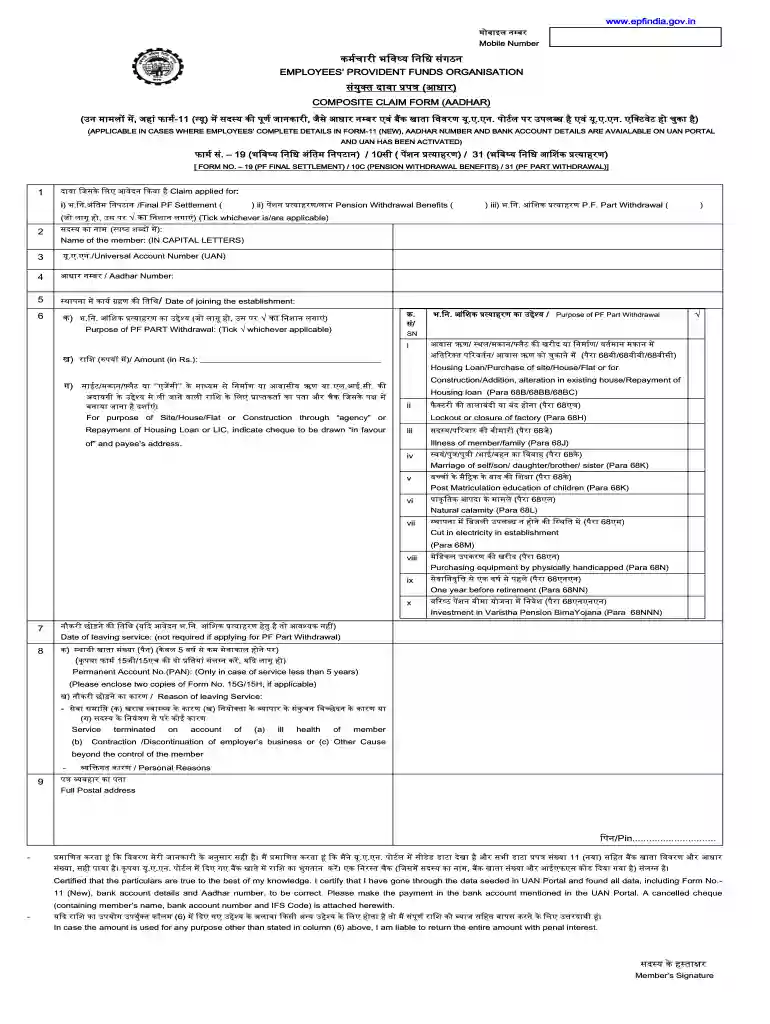
  1. Click ‘Get Form’ to open the EMPLOYEES PROVIDENT FUNDS ORGANISATION form in the editor.
  2. Begin by filling in your name in capital letters as required in the first section of the form.
  3. Enter your Universal Account Number (UAN), ensuring it is an 11-digit number for accurate processing.
  4. Provide your Aadhar Number, which should be a 12-digit number, and ensure it matches official records.
  5. Indicate the date of joining the establishment in DD/MM/YYYY format to confirm your employment duration.
  6. Select the purpose of your PF part withdrawal by ticking the appropriate box, such as housing loan or medical expenses.
  7. Complete any additional fields as necessary, including reasons for leaving service if applicable.
  8. Review all entered information for accuracy before submitting. Use our platform's features to save and share your completed form easily.

Start using our platform today to streamline your document editing and submission process for free!

be ready to get more

Complete this form in 5 minutes or less

Get form

Got questions?

We have answers to the most popular questions from our customers. If you can't find an answer to your question, please contact us.
Contact us
You can check your EPF balance by giving a missed call to this number - 9966044425 or sending the SMS - EPFOHO UAN ENG to 7738299899. You can also find out the EPF balance by logging into the EPF Passbook page or by visiting the UMANG App and selecting View Passbook under EPFO services.
What is a provident fund? A provident fund​ is an investment fund that is voluntarily established by Employer and employees to serve as long term savings to support an employees retirement. Sources of fund: Employees contribution: The amount deducted from the employees salary at a rate of 2% 15%.
Members registered on the UAN portal may get their details available with EPFO by giving a missed call to 9966044425 from their registered Mobile number. If the UAN of the member is seeded with any one of the Bank A/C number, AADHAAR and PAN the member will get details of last contribution and PF Balance.
Here are the steps you need to follow: Log in to the portal. Visit the EPFO e-SEWA portal, log in using your UAN and password, and enter the captcha code. Visit the online claims section. Enter bank account details. Confirm terms conditions. Select reason for withdrawal. Enter details and upload documents. Get Aadhaar OTP.
In case you have forgotten the password/login id, use Forgot Password link to get the same through SMS on your registered mobile number. In case your account is locked due to repeated use of wrong password, use Unlock account link.

Security and compliance

At DocHub, your data security is our priority. We follow HIPAA, SOC2, GDPR, and other standards, so you can work on your documents with confidence.

Learn more
ccpa2
pci-dss
gdpr-compliance
hipaa
soc-compliance
be ready to get more

Complete this form in 5 minutes or less

Get form

People also ask

Step 1: Visit the official EPFO portal. Step 2: Navigate to the Services section and click on the For Employees option. Step 3: A new dashboard will appear. Under the Services section, click on the Member UAN/Online Services section.

employees provident fund organisation login