Pain assessment form pdf 2026

Get Form
socrates pain Preview on Page 1

Here's how it works

01. Edit your socrates pain online
Type text, add images, blackout confidential details, add comments, highlights and more.
02. Sign it in a few clicks
Draw your signature, type it, upload its image, or use your mobile device as a signature pad.
03. Share your form with others
Send pain assessment questionnaire pdf via email, link, or fax. You can also download it, export it or print it out.

How to use or fill out pain assessment form pdf with our platform

Form edit decoration
9.5
Ease of Setup
DocHub User Ratings on G2
9.0
Ease of Use
DocHub User Ratings on G2
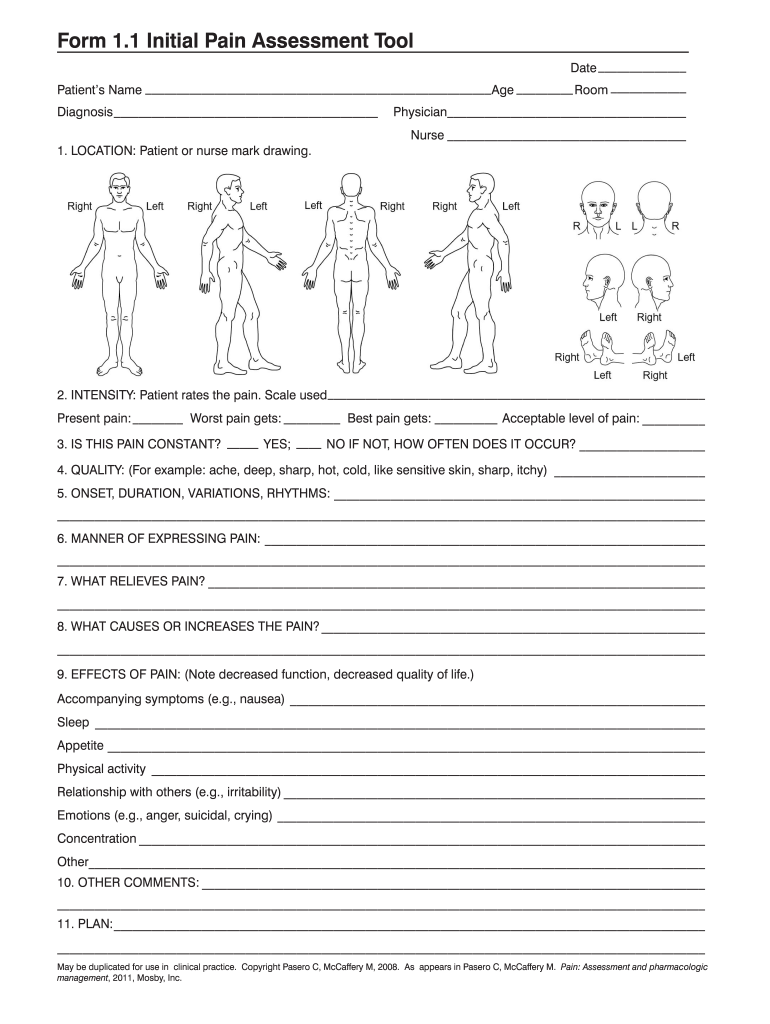
  1. Click ‘Get Form’ to open the pain assessment form in the editor.
  2. Begin by entering the date, patient’s name, age, and room number at the top of the form. This information is crucial for identifying the patient and their specific needs.
  3. In the LOCATION section, either you or the nurse can mark on the provided drawing to indicate where the pain is felt.
  4. For INTENSITY, have the patient rate their pain using a scale. Fill in present pain, worst pain experienced, best pain level, and an acceptable level of pain.
  5. Indicate whether the pain is constant by checking YES or NO. If it’s not constant, specify how often it occurs.
  6. Describe the QUALITY of pain using terms like ache or sharp in the designated field.
  7. Document ONSET, DURATION, VARIATIONS, and RHYTHMS of the pain in detail to provide a comprehensive overview.
  8. In MANNER OF EXPRESSING PAIN, note how the patient expresses their discomfort.
  9. List what RELIEVES PAIN and what CAUSES OR INCREASES IT in their respective sections.
  10. Assess EFFECTS OF PAIN on various aspects of life such as sleep and relationships. Provide detailed comments as needed.
  11. Finally, add any OTHER COMMENTS and outline a PLAN for management at the end of the form.

Start filling out your pain assessment form today for free using our platform!

be ready to get more

Complete this form in 5 minutes or less

Get form

Got questions?

We have answers to the most popular questions from our customers. If you can't find an answer to your question, please contact us.
Contact us

According to eSignature laws, forms approved digitally have the same validity as traditionally approved ones. You can electronically sign almost any business and personal paperwork. Four types of paperwork still demand handwritten signatures only - wills and testamentary trusts, court orders and other court forms, state statutes regulating divorce, adoption, or other family law, and notice of cancellation of utility services. If you adhere to the rules and use a reliable and compliant software solution, like DocHub, you can eSign your opqrst acronym without printing it.

If you use Chrome, there are two simple ways to edit your socrates pain assessment tool online. First, visit the DocHub website, add your file, and edit it utilizing our toolbar. You can also install our Chrome extension and edit any document by dragging and dropping it in your browser window.

Security and compliance

At DocHub, your data security is our priority. We follow HIPAA, SOC2, GDPR, and other standards, so you can work on your documents with confidence.

Learn more
ccpa2
pci-dss
gdpr-compliance
hipaa
soc-compliance